
The TL;DR
When compared to the Behringer X32, the Allen & Heath (A&H) SQ Series is a more modern system with more configrable I/O than the, now dated, X32/M32 line. It has much better build quality than the X32 (more akin to the Midas M32), and when paired with the newer DX168 or GX4816 stage racks, offer a level of performance that is comparable to using the Midas PRO D153 or D251 stage boxes. Finally, the whole A&H line, starting with the Qu Series offers a (mostly) smooth path upward allowing a more gradual increase in I/O, performance, and capability that the Music Tribe lineup does not, currently, offer.
Table of Contents
Background
As a bit of background, I'm a long time Allen & Heath user, starting with the iLive and GLD lines back in 2011. In fact, in 2021 I purchased an Avantis and two DX168 racks with the hopes of starting a side busines as a freelance audio engineer. I've recently added a SQ5 to the mix to use as a small gig or monitor board. Needless to say, when it came to purchasing equipment, I put my money where my mouth is.
To add additional context to this post, I should mention that I'm currently located in Romania, where I've done both volunteer and freelance work. Since being here, I've encountered more than my fair share of the Behringer X32 and Midas M32 consoles. I've also seen that, at least here, Romanians Are very much biased towards Midas. There is a belief that the Midas preamps have been created by the gods as the be-all and end-all of sonic quality. And of course, being an emerging / post-communist economy, there is an understandable and quite strong focus on value for money.
For the purposes of this post, I'll be using 2022/2023 prices in Euro with Romanian VAT included as quoted off Thomann or in USD as published from on Sweetwater as necessary. Please note that these are retail prices and that better deals may be had by communicating directly with your reseller, so this is not taken into account.
High Level
I often get into conversations with people about entry-level or value-conscious board decisions. These conversations always go about the same:
"I need a board for X purpose. It need to support up to 32 ins and 16 outs and I need to purchase a stage box. I looked at both the Behringer X32 with a Midas DL32 and an Allen & Heath SQ with two DX168s. I like the idea of the A&H, but I don't understand why it's nearly twice the cost."
For quite some time, that's been a hard question for me to answer. "On paper" they do look relatively similar and slot into roughtly the same place in the lineup as the most inexpensive board with enough inputs and outputs to cover a decent sized band or event.
Given this difference, let's start looking at what differentiates the two. Let's start with the specifications, specifically comparing the X32 and the SQ6 as the fader count and rough size are comparable:
| Specification | Behringer X32 | Allen & Heath SQ-6 |
|---|---|---|
| Channel Count | 40 | 48 |
| Fully configurable | ||
| Sample Rate | 48k | 96k |
| Bus Count | 16 busses | 12 busses |
| FX Slots | 8 (4 bus and 4 insert-only) | 8 (4 bus and 4 insert-only) |
| Console Inputs | 38 | 28 |
| Console Outputs | 23 | 17 |
| USB Interface | 32x32 @ 48kHz | 32x32 @ 48kHz or 16x16 @ 96kHz |
| USB Recorder | 2 channel direct to USB drive | 32 channel direct to USB drive |
| Price (Console + 32x16 racks) | ||
| Behringer X32 + Midas DL32 | SQ6 + DX168 (2x) | |
| €4,042 | €7,774 | |
| $4,598 | $7,098 | |
On paper, the primary differences between the stock X32 and the SQ-6 are the extra 16 channels and the sampe rate with the SQ and the rest go to the X32. Game over for the clearly overpriced A&H, right? At this point, most go for the Behringer and call it a day.
Deeper Dive
Not so fast, though. Let's go a bit deeper as there is more to this story, which should have been obvious since I've written this.
Architecture
In the initial comparison, I contend that the X32 has several features that, on paper at least, match or are close to the SQ line. These include inputs, FX, and busses. Let's look at each of these closer. For purposes of this discussion, I will use the Allen & Heath definition of mixes, where the mixer has a set number of busses that can be assigned to various purposes (groups, FX, auxes, etc).
Inputs
Yes, the X32 has 40 inputs, though many sites will more correctly list it as 38 inputs. Only 32 of these inputs are what could be considered instrument channels, meaning ones that can be internally pre-amp backed, have access to the full dynamics package (gate + compression), and used for instruments, microphones, etc. The remainder are actually line-level AUX inputs with less processing, specifically there is no dynamics processing (gate/expander or compression). The USB playback is just that, USB playback off a thumb drive, so it really doesn't count. The SQ line has a full 48 channels, each of which can be used as inputs with preamps, aux returns, etc. It is fully configurable in that way, something we will discuss later.
Outputs
The X32 has 16 busses, a stereo main, six matrixes, six aux outs, and a sub/mono channel output. However, the actual, assignable, outputs are limited to the 22 analog combined XLR and Aux outputs, and the one stereo AES/EBU output. That means there really are only 24 assignable mixes and most of those are hard coded. Even that gets a bit complicated as the routing in the X32 is, at best, described as complicated. This will be discussed below.
The SQ line has 12 stereo aux busses, a stereo main, three stereo matrixes, and four FX sends. That's 32 outputs mixes and with the dedicated FX sends, there is no need to remove busses from the 16 available if you need FX processing, at least up to four FX units that is. More importantly, all 36 busses can be used simultaneously (with the appropriate combination of expanders and local I/O), so you're not juggling how to share 16 XLR outputs between mains, matrixes, and busses as is necessary with the X32.
A side note on subgroups. Both mixers support some form of subgroups. On the X32, there are 16 busses, in a sense each of them can be either auxes or groups. The SQ also supports subgroups and the configuration UI allows you to determine which of the 12 stereo busses are auxes or groups. With the X32, there is really no difference between a subgroup and an aux bus, it's really in whether the bus is assigned to the Mains/Subs or not. Then each channel can be assigned on/off (subgroup) or pre/post fader. It's an interesting hybrid of a sort where the SQ is binary with a given bus being either a subgroup of an aux bus.
Routing
This brings us to the elephant in the room: routing. For anyone who's worked with the X32 line before, you will no doubt admit that routing on the X32 can be ... um ... challenging. The original design of the X32 was block-based, meaning that each bank of eight inputs was assignable to only to one source: local, AES-A, AES-B, expansion card, etc. Outputs are similar, though each block of four outputs can be assigned a specific set of 4 local busses (mains, busses, etc). With the 4.x line of firmware, Behringer was able to offer an almost one-to-one patching setup where any arbitrary input (card, AES, local) can be assigned to any specific channel. This happens under the oddly named User In and User Out section of the routing.
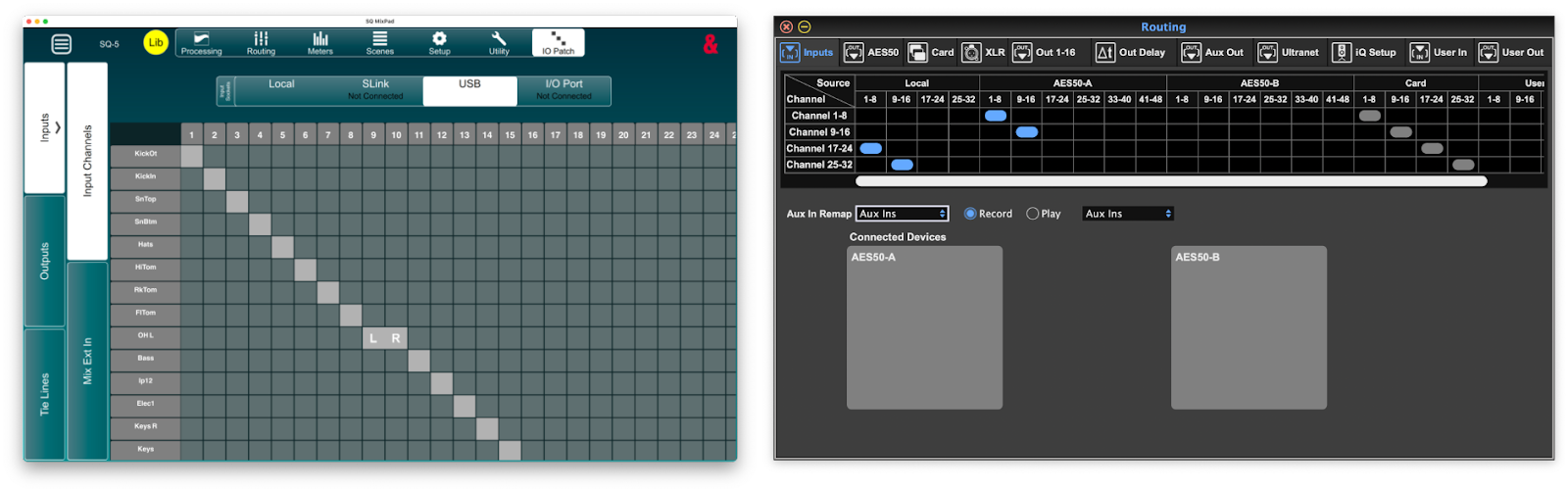
The SQ line, on the other hand, follows a much more direct grid-based mapping of channels. For each input and output target, you see the source on the left and target on the top. To connect them, you simply check the box where they intersect. This is the same UI used on countless other consoles, such as those by Avid, Yamaha, A&H, and others. It also gives complete control on what to route and where. In addition to the matrix-style assignments, each channel allows for selecting the individual input from the preamp screen. See below for the Avantis Director view as the SQ editor doesn't offer a similar view.

Equalization and Effects
Normally, the EQ and effects for a given console are treated as two separate entities. However, one major limitation of the X32 is that the mixes (busses, mains, etc) lack a dedicated graphical EQ. Instead, if you want to have a GEQ on one of your channels, you have to use one of the eight available FX slots. That means that, effectively, to have GEQ on both your mains and your sub send, you only have six FX slots.
The SQ line, on the other hand, has GEQ for each of the busses (aux/group/main). These can include four distinct GEQ models too, assuming you've purchased them.

The SQ with the GEQ enabled on the main. No insert required.
The SQ line also offers tube preamp and compressor modeling available for each channel. The compressors, available as an extra cost add-on, can emulate a line of compressors such as the dbx 160, UREI 1176 Peak Limiter, and others. The corresponding compressor models for the X3, while no extra cost, require dedicating yet another FX slot and inserting into the channel, continuing to stress the already limited number of FX slots.

The 16T compressor emulation on the SQ.
MIDI/DAW Control
Both mixers have the ability to control a remote digital audio workstation (DAW), using a Mackie HUI-like protocol, there is one key difference: with the X32, it's modal, meaning you're either in DAW or live mode. With the SQ, you get an additional 32 channel strips that can be used to remotely control the DAW simultaneously. In a live scenario this could be useful in lieu of a true multi-channel send from the tracks playback machine on stage.
Hardware
Build Quality
One key difference that is often cited between the X32 and M32 is that the M32 has better build quality. These include things like better rotary encoders and individually mounted, better quailty (Midas PRO) faders. These differences, to the best of my knowledge, also apply to the SQ line. The A&H line is build in a similar fashion, at least from the SQ up, with the faders being individually mounted to ease replacement.
Design and Layout
Most design elements are, in the end, subjective. Some may prefer physical controls vs. other inputs. For example, I much prefer a physical remote to a smart phone for controlling my TV or media players. Others may prefer the configurability of the big glass rectangle. Regardless, the one glaring difference between the X32 and the SQ line is the screen. The X32 is simplay a display, where the SQ has a touchscreen.
Everything else related to the layout is likely to be subjective. The X32 has more physical controls, but adjusting settings on the Combinator is an exercise in frustration as you're constantly having to find the right page and knob to change the setting you want, where the SQ is likely just a matter of selecting the control on screen and changing the value there or using the main control knob.
Preamps and ADC
This section needs a bit of a quick overview of the Music Tribe and Allen & Heath lines to make sense, so please bear with me. We will revisit this lineup later in the post as well.
Music Tribe
The Music Tribe line is basically divided into the Behringer/Midas entry- and mid-level line and the Midas PRO professional line of products. This division is even more stark now that the lineup consists of the X-Air/XR/MR, X32, M32, Wing, and Midas HD96. For the stage racks, it's similar in that they offer the Behringer S-range of racks, the Midas DL series, and then the Midas PRO D series.
Allen & Heath
A&H also offers a line of products, though there isn't quite the hard division between entry and pro levels. For them the line and its progression of digital boards starts with the Qu as an analog replacement board, followed by the SQ series, Avantis, and finally the dLive. For the I/O, there is a split between the 48kHz line and the 96kHz line. The 48kHz line represents the older and lower-end, which includes the AB168, and AR2412, AR284. The newer I/O units are the DX (DX168, DX012, etc) the GX4816, the new DX32 with the higher-quality Prime Input and Output cards, and of course the dLive has a mix rack, where the mixer is in the stage rack and the surface is really more akin to a remote control.
Comparison
When comparing the X32 and SQ lines, it is important to look hard at the stage racks as there are some non-obvious elements to consider. For the X32, the default racks are the S-line and the Midas DL-line. The primary difference between the two is the preamps and, to a lesser extent, the build quality. The Midas rack uses actual Midas made preamps rather than simply Midas-designed. The next step up is to a Midas PRO rack and that's a significant price bump.
The Allen & Heath line, especially the SQ and above, are typically paired with either the GX4816 or the DX168 stage racks. One could use the AB168, AR2412, or AR84 racks, but these are older and only marginally less expensive. For this discussion, let's assume that the DX168 racks are the entry level. Given this, a single, "entry level" A&H rack is more expensive than the comparable S16 and DL16, combined. See the table below for the comparison of 16x8, 32x18, and 48x16 options.
| Inputs | Outputs | Behringer | Midas | Allen & Heath | |||
|---|---|---|---|---|---|---|---|
| 16 | 8 | S16 | €648 | DL16 | €889 | DX168 | €1,762 |
| $709 | $949 | $1,899 | |||||
| 32 | 16 | S32 | €1,093 | DL32 | €1,553 | DX168 (2x) | €3,524 |
| $1,199 | $1,599 | $3,798 | |||||
| 48 | 16 | Not Available | GX4816 | €4,656 | |||
| $4,499 | |||||||
Again, this is where the issues start creeping in. Why would an entry-level A&H rack be so expensive, especially compared to the DL16, which, as Midas fans will remind you, has Midas premaps. Digging deeper reveals a key feature of the DX168: it uses the same preamps and analog to digital conversion circuitry as the top of the line dLive. In fact, the top of the range dLive S-series has a mix rack called the DM0, which has no local analog inputs. It relies exclusively on the DX168 or DX32 racks for I/O. This means that a more proper comparison between the DX168 would not be the S16/DL16, but rather the Midas DL152 PRO. They both have the top of the range preamps, build quality, and ADC circuitry. When the prices are compared between the two, the numbers look a lot better:
| Inputs | Outputs | Midas | Allen & Heath | ||
|---|---|---|---|---|---|
| 16 | 8 | DL153 PRO | €2,469 | DX168 | €1,762 |
| $2,499 | $1,899 | ||||
| 48 | 16 | DL251 PRO | €3,987.68 | GX4816 | €4,656.01 |
| $5,100 | $4,499 | ||||
Looking at the DX168 vs the Midas DL153 PRO it's a simple apples-to-apples comparison. Both have 16 ins and 8 outs and both have two digital snake (AES-50 or DX ports) for daisy chaining. Yet, the DX is about €/$700 cheaper.
The Midas DL251 PRO and A&H GX4816 comparison is a bit different, as the Midas does include redundant power supplies and other more professional elements, like remote network control. The A&H GX4816 lacks redundant power supplies, but offers built-in connection to the ME personal monitoring system as well as two additional DX ports that allow for hanging another 64x32 channels off the rack (via two sets of daisy-chained DX168s). This means it's not a perfect comparison, but it's close enough. This side comment not withstanding, the bottom line is that the DX racks are cheaper than the corresponding Midas PRO and offer comparable performance. However, the price is a bit different as in the EU, Thomann offers the PRO 251 for cheaper than the GX4816, but in the US it's more expensive.
Ecosystem
There is another element to keep in mind when you're considering a console, and that's the broader ecosystem. Unless you think you're never going to upgrade beyond what you buy today, understanding where your purchase fits into the range is important.
Compared to the Behringer/Midas ecosystem, I think A&H has the following advantages:
Product and User Interface Consistency
First, and perhaps most relevant to you with your dLive experience: the UI is generally shared across the line. From the Qu all the way up to the dLive, there is a commonality to the UIs that actually tracks back to the previous generation of iLive and GLD mixers.

The A&H iPad apps, clockwise from the top left, QuPad, SQ MixPad, Avantis MixPad, dLive MixPad
Yes, there are differences (especially with the Avantis being touch-screen focused vs the rest of the line) but, in general, the UIs feel familiar across the range with each step up adding more elements. For example, the SQ has only HPF and a single insert. The Avantis adds a LPF to the filter section and a second insert tab. Otherwise, the channel processing chain looks the very similar and generally feel like they are speaking with one voice from one company.

The current Allen and Heath website showing their mixers and how they look similar.
Compare that to the Behringer/Midas offerings where the XR/X32/M32 line is similar, but the WING and PRO/HD96 series are completely different.

Looks like mixers from completely different companies.
Even the user interfaces are completely different.

WING (left) and X32 (right) gate settings.
To be fair, a compentent engineer/A1 should have no issues moving between platforms, even if they look completely differently as the fundamentals are the same, but there is something to be said for consistency, at least within a given generation, like the WING and the HD96, or the dLive and Avantis. Fundamental differences between older and newer (X32 and the WING) are a bit more understandable.
Stage Rack Interopertability
The Allen & Heath stage boxes work up and down the range. This means I can take my DX racks and use them on my SQ5 and Avantis. They are interchangeable. In fact, the dLive can use them as primary I/O (DM0) or as expanders via the CDM/DM DX ports. Moving to the next level up in the range doesn't require replacing your racks (the two exceptions are the 48k racks don't work with dLive and the GX4816 requires a gigaACE card to connect to the dLive, so not as easy as AES50/SuperMAC for sure). For the Behringer ecosystem, it's possible to buy the PRO racks and use them on the X/M32 but that's a steep price point and the 48k racks don't really work with the pro gear (without gymnastics like external cards and headamp control issues).
Price Points
The A&H line has several steps and price points: Qu ($1-2K) -> SQ ($3-5K) -> Avantis ($13-15k) -> dLive C Class ($25k ish) -> dLive S Class ($40k+ish). You can jump in where you need (like your choice of the SQ6) and work your way up the line (next stop Avantis). Again, compare this to the Behringer / Midas offerings where it's X/M32 or WING ($2-3.5k) as an entry point and the next step is the Midas HD96 ($35k+ ish) with nothing in-between.

Approximate price range of the A&H and MusicTribe ecosystems
Of course, this can change over time as the Behringer/Midas team looks to replace the older PRO series and maybe they'll add other stops in between, but it still feels like there are two separate groups creating two completely separate lines of products and never the two shall meet.
What about the WING?
This article isn't meant to be a complete comparison, but to address a specific question: how do the X32 and the SQ series compare. I hope to create a similar comparison soon, but I would prefer spend a bit more time with the platform first.

