Thursday, October 19, 2017

Rocks Virtual Cluster on VMware Fusion for Mac

As part of my Master’s program, I’m attending a class called Operating Systems for Parallel and Distributed Architectures.  As a requirement of the class, we have been asked to set up a virtual Rocks Cluster on our laptop.  The class is using Virtual Box as the virtualization platform of choice, but since I’ve spent so much time working with VMware in my day job, and because I already had a VMware Fusion license, I chose to use this instead.  The process was fairly straightforward, but did require a bit of work configuring a virtual network adapter for the cluster to use as its private network.

For those of you not aware, a Rocks cluster relies on a private network for its inter-machine communications.  The head node also provides the DHCP and gateway services for the individual compute nodes.  This means the typical VMware “Private to My Mac” (or “Host Only” for VMware Workstation users) network isn’t the right answer.  By default that adapter has a DHCP server that provides addresses to all VMs on the network.

Instead, we need to create a new network that can be used to share connections.  The screenshot below shows the configuration that I ended up using.  (Note: I ended up repurposing a separate NAT network I had previously configured, hence the 192.168.116.x subnet IP listed).  The key items are to disable the DHCP server and uncheck the “Allow virtual machines on this network to connect to external networks (using NAT)”.  Now, to be fair, I did leave the NAT setting enabled and it worked as well, but isolating the network is still likely a good idea.

VMWare Fusion vmnet Configuration

Head Node

Once you have that configured, you can build the VMs.  For the head node, you’ll see two virtual network adapters: “Network Adapter” and “Network Adapter 2”.  These correspond to eth0 and eth1 and for a Rocks cluster, eth0 needs to be the private network.  The other network should be connected to the Internet in some form or fashion.  In the rest of this HOWTO, I will refer to the networks by their Linux name, either eth0 or eth1.  Just know that eth0 refers to “Network Adapter”.

Network Adapters for VM

First, let’s review the configuration for eth0. For it’s connection, I used the custom vmnet2 adapter/network.  (Again, note the subnet in the pictures is set, but since DHCP has been disabled, it’s irrelevant).
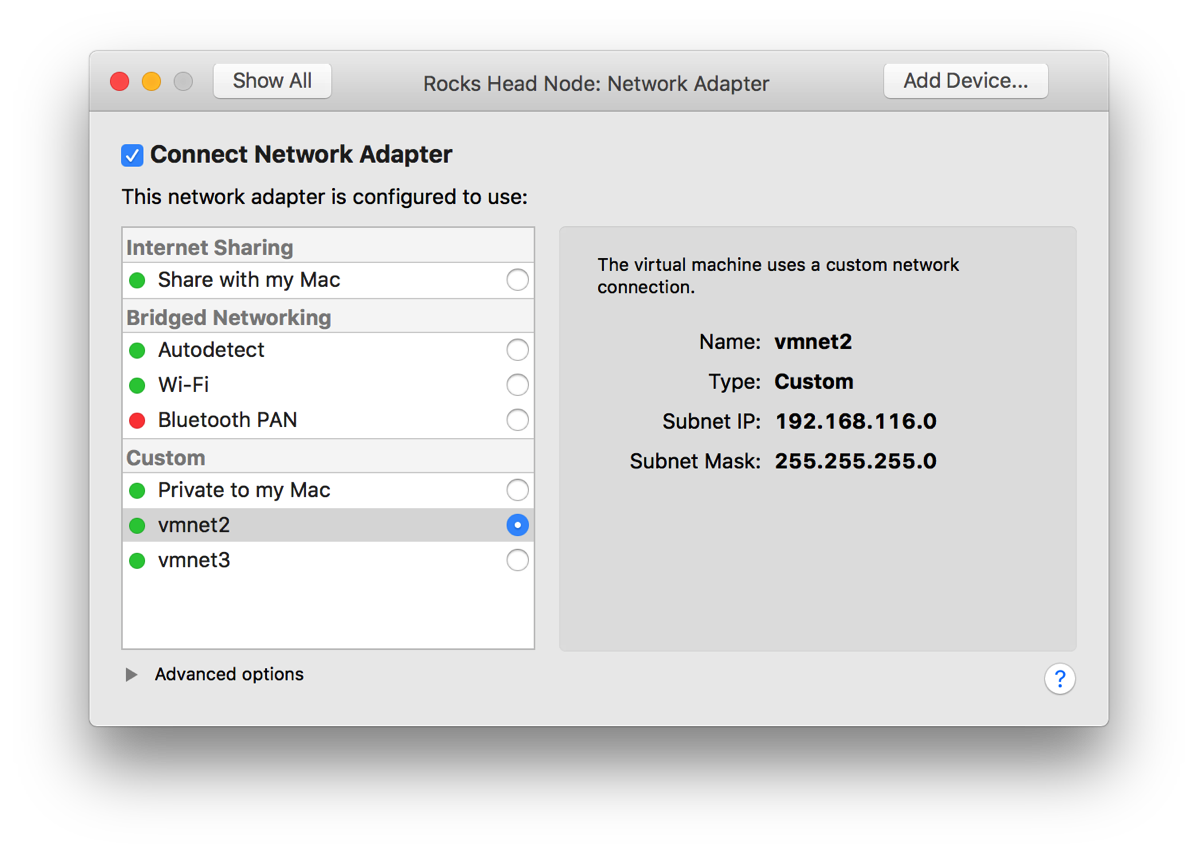
Screen Shot 2017 10 19 at 2 48 29 PM

Next, let’s look at the configuration of eth1.  For it’s connection, I used the “Share with my Mac” network.  This is a habit I got into when I worked at IBM and used a VM for development.  Initially I used Bridged Networking, but over time found that if I need to work in a disconnected state (say at a customer site or somewhere I don’t have an active network connection), I would lose the ability to communicate from the host PC/Mac to the VM as the state of connection.  That caused me a bit of frustration over the years, so I ended up relying on the NAT network.  It allowed me to continue to develop and communicate with the VM itself from my host machine and the VM Internet and local network access as needed.  The only real issue with this came when I wanted a separate system to communicate with the VM (remote debugger, mobile device, etc).  In Workstation, I would typically deal with that via port forwarding as long as the protocol supported it, otherwise I’d open up an additional interface set to bridged.  Which you use is up to you and how often you will be without network access.

One other thing I did was provide eth1 with a hard coded IP address that matched the vmnet8 (NAT) network.  This way the head node will always be at the same address (I’ve noted that VMware is aggressive about changing your IP address).
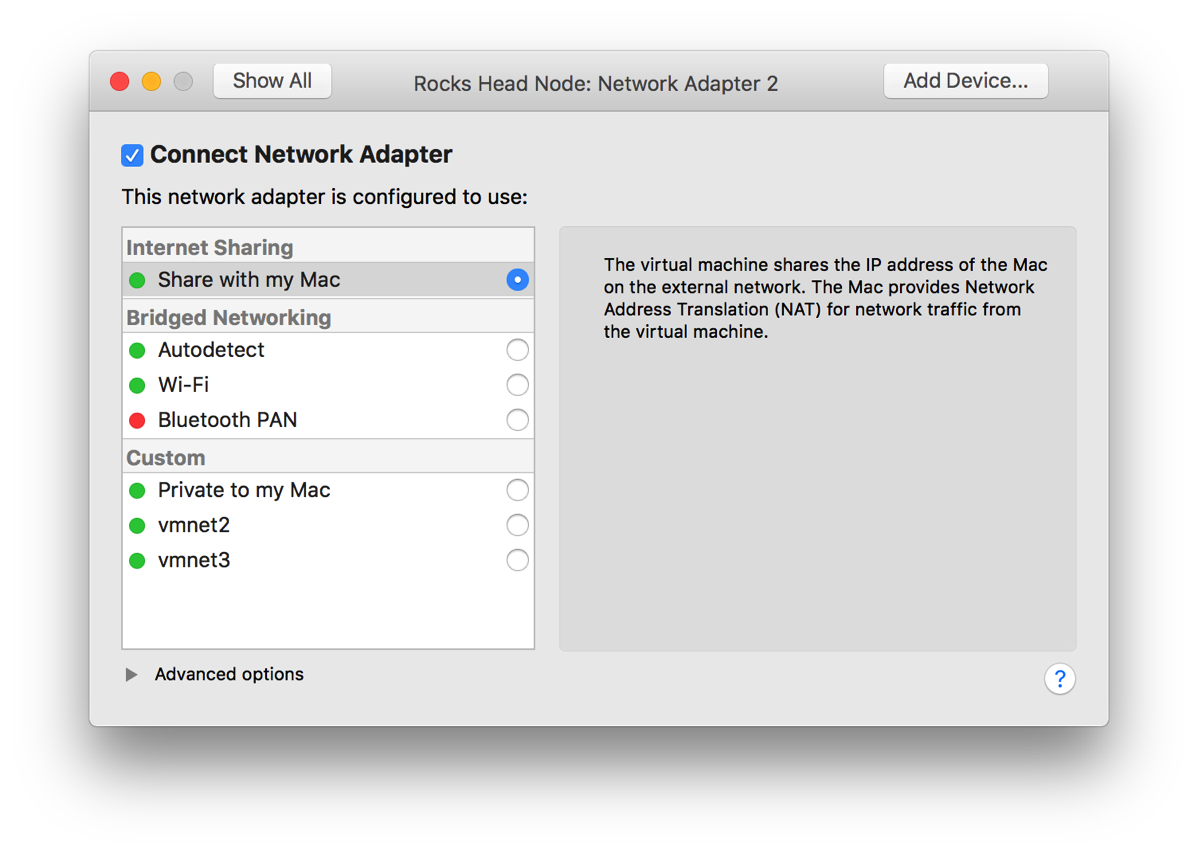
Screen Shot 2017 10 19 at 2 48 35 PM

Compute Node

With the head node installed and configured, let’s look at the compute node(s).  They are configured similarly with the exception that there is only one network adapter.  This one is connected to your newly created vmnet (vmnet2 in my case).  That adapter’s configuration should look the same as eth0 on the head node.  (See the picture above).
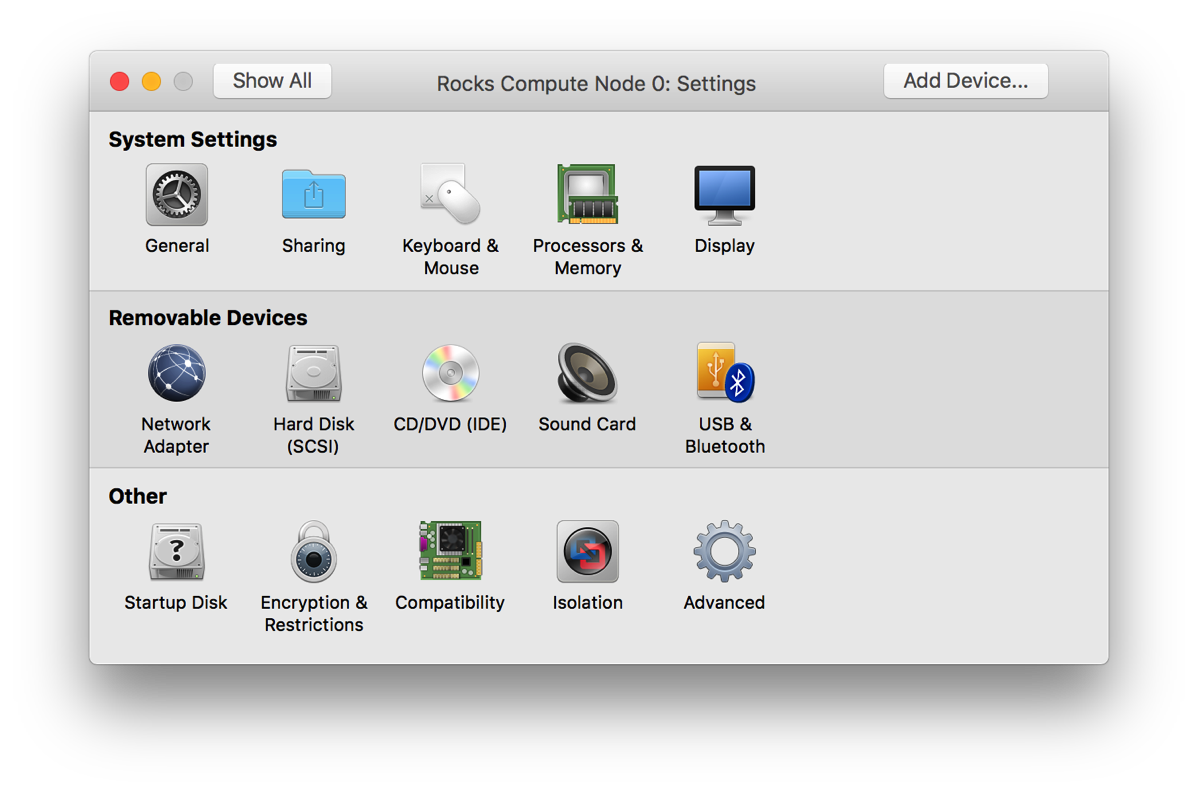
Screen Shot 2017 10 19 at 3 25 34 PM

Any other requirements should match the prerequisites for Rocks itself, including memory and disk space.

Other Notes

One other thing to note is that your compute nodes need to be able to boot using PXE.  By default, VMware provides a boot off removable media, the internal HDD and then if nothing else, fall back to PXE.  For Rocks, this needs to be reversed.  VMware offers a neat option in newer versions that allows you to boot straight to the firmware as opposed to hitting F8 or whatever the key is.  Under the Virtual Machine menu, you can select the item shown below:

Screen Shot 2017 10 19 at 3 29 31 PM

Once the VM boots, it’ll take you to the firmware screen where you can change the boot order to match below:

Screen Shot 2017 10 19 at 3 39 18 PM

One other thing I saw was that the initial boot for a new node seemed to take two tries.  First I’d boot the VM and let it time out and then just watch.  Eventually the insert-ethers command would show the new machine as available. I’d then reboot the new compute node and it would finish bootstrapping and be fine.  It could have been a WAN issue (at the time my Internet connectivity was hosed), but I can’t say for certain.

Saturday, October 07, 2017

Masters Week 1

This week ends my first week of classes at UBB.  Though, of all my classes, only one ended up being a full class.  The rest were mostly, "hi and here's a 10 minute overview of the class, now leave" type classes.  I guess that's what's to be expected, and I'm not really complaining.

For this semester, I have:
  • Programming Paradigms
  • Advanced Data Modeling
  • Parallel and Distributed Systems Architecture
  • Modeling Concurrent Processing
  • Scientific Methodology of Computer Science
I'm not certain yet whether they'll be difficult or not.  For me, I think the most difficult will be the data and concurrent process modeling classes.  I've done some semblance of each, but not necessarily in a formal manner.

I've seen the course overview for the methodology and programming courses and they should be a matter of just grunting out the work.

The wildcard could be the systems architecture class. They are focusing on distributed processing systems (think Hadoop or some such).  I've dabbled with them in the past, but I can't say that they are my strong suit.  I've already started work on the lab to install a Rocks cluster, so at least I'm not waiting to the last minute.

Looks like there are about 9 members of my group, so I'll have a small set of people to work with and see on a fairly regular basis.  I've only me three of them so far, but they all seemed nice.

As I continue to work through the classes, I'll try and post more here.  I've been waiting to see what I was working with and any insights I gain before really posting. 

Friday, September 22, 2017

I'm in!

I know I just posted on olands.international that I'm waiting to hear back about my Master's program. No more than three hours later I received confirmation that I've been accepted!

Friday, September 15, 2017

Quick Update

For those of you who have been following my application process to school, I wanted to provide a quick update.  Today is the day the results of the application should be posted at the university, so in theory I should know today whether I'm in for my master's or not.  I would say, though, that given that we are moving into our new place today, it may be Monday before we are able to come up for air and get the final result.

Either way, once I know what's going on, I'll update everyone with the details.

Thursday, September 07, 2017

Using Google Wifi

Before I left for Romania, I spent a bit over a week at my mom and dad’s house.  As with any trip back home, it’s always a good time to look at the current state of my parent’s tech and complete any tweaks, maintenance and upgrades.  Of course, much of this my mom can handle as she’s really quite handy with tech herself, but she’s always glad for the help.

During this trip, we replaced much of her existing tech, including a roll-your-own file server we’d created using an HP mini server and Ubuntu server.  It worked well, but at a certain point, using the console for maintenance became a bit too much for my mom to want to manage.  (Fair enough)  We ended up replacing it with the same server I have, the Synology DS416play.

We also took the time to upgrade her wifi and router.  About 4 years ago we moved her to a Cisco small business router and wireless access point.  It’s proved to be rock solid reliable and capable.  But it’s still 802.11g, so it limited her speed and reach a bit.

I’d been looking at the Google Wifi system for a while and thought that now was a good time to get her into a mesh system.  I believe it was even on sale at the time.  Given the size of her house, we thought that she needed more than one, so we picked up a three pack and set two of them up.  I then brought one of them with me here to Romania with the idea of using it as my access point.

Now that I have set up two of the Google Wifi systems, I have some thoughts.  There are a number of comprehensive reviews of the new Google Wifi system out there, so I’m not going to try and write a full on review, but instead I want to call out a few good and a few slightly annoying points that I would have liked to know before going in.

Note: these thoughts are based on v 9460.40.8 firmware on the access point and software version jetstream-BV10119_RC0003 for Android and 2.4.6 for iOS.  I bring this up as things could change over time.

Target Audience

One key thing to note about the system is that it’s definitely aimed at the more non-technical audience.  While it does have some more technical bits, some of the normal configuration options other routers offer are absent.  A few key ones are:

  • Changeable local network settings (you get 192.168.86.* whether you like it or not)
  • No VPN (inbound or outbound)
  • No content filtering options
  • No QOS tweaking (that I’ve seen)

Now, to be fair, much of this really isn’t necessary for your average consumer, but for the more nerdy of us, these could be deal breakers.

The Good

Here is a high level list of the things I liked about the system.

Speed

2017-09-06 02.01.40Like any mesh system, Google Wifi is not just an access point, but it’s also a mesh network system.  For my mom, that meant that her two access points would cover the whole house and key parts of her back yard. Technically, we could extend it further, but those are the places she uses them.  With just one, I don’t know (yet) if it’ll be enough to cover my needs, but it should be a good starting point.  And because it’s a system, I can always buy more later if I want.

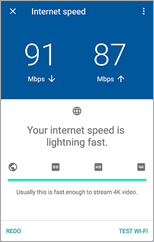
After we moved from the Cisco to the Google router, the throughput ramped up from 20mbps to maxing out her 60mbps cable modem.  Here in Romania via a double NAT setup, with who knows what else going on at the time.

The App

The app you use to configure the system is fairly easy to use.  On initial setup, it appears to connect via Bluetooth and complete the initial connection.  From there, it walks you through setting up your Internet connection and wifi password.

It also allows you to share the management of the system with other Google account holders.  Now, you do have to have a Google account to make this work and that could be a deal breaker for some.  In my case, I have the ability to manage my mom’s system remotely.  This can be useful if something pops up that is beyond her ability to fix or even if she just needs a second set of eyes.  It also means that you can extend the access to other family members to they can pause the network for certain devices.

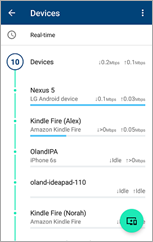
One of my favorite features of the app is the devices list.  From the middle tab you can see a quick overview of the network, your access points and a count of all the devices connected to your network currently.

2017-09-07 13.03.59If you select the devices node, you can see the list of all devices currently connected, including their current bandwidth usage.  It even tried to identify the device and what type of device it is (iPhone, Kindle Fire).

This can be quite useful for sure.  I had an issue a few years ago where my network ended up really slow and I couldn’t figure out why.  I tracked it back to my wifi network, but couldn’t determine what was happening beyond that.  I had two access points and I’d cut one off and the traffic moved to the other one and then back.  Ended up being my Nexus phone uploading pictures (Dropbox, OneDrive and Google Photos) simultaneously.  With this, I could have simply accessed the app and visually viewed what device was hogging my bandwidth.

A few other neat items include:

  • A built in speed test app.  It’s part of the network and system diagnostics and can test from your gateway to the internet directly.  It can also test the throughput from your device to the access point.
  • Simple guest network and device sharing.  You can set up a guest network (nothing special), but you can also expose private devices on the guest side.  This allows access to media streamers and other items that maybe a guest would want to use while keeping your other devices separate.
  • Family wifi configuration allows for you to group devices together and pause them manually or on a schedule.  No more collecting the devices or screaming to turn things off.  Instead, just use the app to pause their network access.
  • Google continually keeps these devices up to date.  I worry about devices you need to manually update, where these can be updated much more easily.  (Just for giggles, I checked and there have already been 5 version updates since it was released late last year).
  • This guy is powered off USB-C.  I think that means that finding replacement power supplies should be fairly straightforward.  I’ve even considered simply plugging it into my Monoprice multi-port USB charger with USB-C.  Of course, if I do that, I’m certain I’d end up accidentally unplugging the whole shebang, but that’s a different story.

The Bad

There are a few things that drive me a bit nuts, though.  Here are the highlights:

  • You cannot configure your local network range.  You are stuck with 192.168.86.*.  One of the first things I tried to do was change it to match the original .1.* we were using.  It was then I ran smack into this issue.  Not really sure why the did this.
  • No non-app access to configuration.  While the app is nice, being able to grab a PC to configure your network is a must for power users.  I think I can live with it, but others may not be.
  • You cannot reserve DHCP addresses for devices that have not yet connected to the network.  Once a device is connected, you can reserve its address (or one of your choosing), but if you have a bunch of devices you want to configure out of the gate, I couldn’t see that it was possible.
  • Very little in the way of tweaking, including static routes and other common router features.  I don’t typically use them, but other tech savvy users may need these settings.

I’m not certain any of these are deal breakers for me.  I may end up changing my mind later, but right now it appears solid.

Bottom Line

At the end of the day, I trend to judge technology based on results.  If it solves a problem and works reliably then it gets my approval.

The Google Wifi system seems to do just that.  It was definitely an upgrade for my mom, allowing her much better access to the Internet and her local file server.  For me, it’s worked great as a secondary router here in Romania. My father-in-law’s router seems decent but there’s a problem with the wifi stack.  Every time we’ve been here, we end up taking it down every 24 hours or so.  I don’t know if it has a memory leak or what, but every day or so the network just drops.

Plugging in the Google system via the wired port and connecting all my devices to it seems to have solved the issue.  Almost a week in and we’ve had no failures since.

Otherwise, it’s a nice looking and reliable router.  I think I could recommend it to most people, but for true techies, I might be inclined to look elsewhere.

Tuesday, September 05, 2017

Early September Update

I know I’ve been chatting with a few of you, but I thought I’d go ahead and update everyone on what’s going on with me.  Last I wrote, I was still waiting to hear back from UBB about my PhD application.  Since then, the response has come back and I was rejected because I don’t yet have a masters.  That’s a bit annoying because I did bring this up early in the process and tried to get an answer, but oh well.  With that specific response in hand, we have now applied for a masters and are waiting to hear back about that.

In the meantime, we are now here in Romania and trying to get settled into our new life.  I think it’ll be a bit before we can completely relax as I still have some paperwork to get through, but at least we are here and can start moving forward again.

Saturday, August 12, 2017

Archiving Photos

In 2005, Hurricane Katrina hit the Gulf Coast and destroyed a large swath of New Orleans and other cities in its path.  I remember listening to people talk about the destruction and what they lost.  One common item people lamented that was lost was often not things, but pictures and memories.  Unfortunately, time (and water) are not kind to pictures.

It was this experience that compelled me to purchase a good quality slide scanner.  After a bit of research, I ended up with a Nikon CoolScan ED.  While it was the cheapest Nikon slide scanner available, it still can make incredible scans of slides and negatives.

Oh, and as a bonus, my mom and dad had kept the negatives from all our pictures from when we were kids.  That ended up being number of rolls of film.  I spent about a year, working a bit at a time, scanning all the negatives.  (Yet another reason to love working from home …)  As a result, I now have almost 250 Gb of pictures in TIFF format.  That ended up being about 60 DVDs of images.

With our impending move (and the reduction in cost of both cloud storage and HDDs), it’s time to move them on to spinning media and into the cloud.  I’ve now spent the past three or four days here in Richmond copying all the files off onto an external HDD, unzipping, sorting and fixing.

I’ve been rather surprised that in all my DVDs, I’ve only hit three that have had issues.  One was my fault as it was sticking up out of the sleeve and ended up bleached in the sun.  Whoops.  The other failures were do to scratches and the like.  None appear to have failed due to a failure of the actual DVD (yet).

As a reminder, in addition to having the files you need to make sure you have good backups.  When in doubt, remember 3-2-1:

  • 3 copies of your pictures (files)
  • 2 different kinds of media
  • 1 offsite

Monday, July 10, 2017

Synology NAS Update

I now have the Synology back up and running, at least up to a point.  It appears I was able to fully back up my data, replace the disks and rebuild the volume.  I’m now in the process of trying to restore the data and reconnect it to OneDrive, Dropbox and other online services.

One nice side effect of this is I’m able to perform the basic reorganization I should have done a while back.  At least now I can move the folders and make really, truly take one copy of everything with me instead of multiples.

That being said, I do have one more rebuild to go.  I had four disks in there and one was new.  I thought I’d left that as disk #1, but apparently I was wrong.  I think it was actually disk #4 which ended up failing and causing the whole meltdown to begin with.  So, I now need to perform the replacement one last time.  I’m just waiting for the full disk scan and parity check to complete, then I shutdown, replace the drive and rebuild.

Saturday, July 08, 2017

Hard Drive Crash

Here’s one for you.  I bought (and still really like) the Synology NAS earlier this year.  It’s proven to be faster and more flexible than the server it replaced.  Granted the Hyper-V server could run any workload I wanted, however I ended up using it only for file and iTunes/music sharing so that was going to waste.

I had four Western Digital Red 3TB drives in it.  The WD Reds are quite likely my current favorite drives for this purpose.  They are 5400 RPM, quiet, cool and fast enough.  I do recommend them.  My only real gripe is they have a three year warranty instead of a five, but that’s what it is.  More expensive WD drives have longer MTBF/warranty times, so you have options.

That being said, three of my drives are at the end of their lifespan.  In fact, one was giving me bad sectors so I decided it was time to replace it, followed by the rest over the next few weeks.  With that in mind, I ordered two new drives, used one to back up the data I cared about and set about replacing the failing drive two.

Within 5 minutes of replacing that drive and starting the rebuild process, I received a number of emails about failures and ultimately a crashed array because drive FOUR had started generating bad sectors.

Ugh.

Next time I have the NAS perform RAID maintenance to catch this. I’m fairly confident that had I done that it would have fixed the issues and moved on, but now I have a permanently degraded array and a fairly big issue.  I’m not in the process of copying EVERYTHING off the NAS and onto a collection of spare drives (three 2tb Reds and a couple other 1tb SSD/HDDs).

At least the array stayed live, albeit read-only, so I could get this done.  It’s more annoying than fatal at this point, but I must admit I’m a bit annoyed the ongoing self-checks didn’t catch the issue.  I also suspect that somewhere there was a note to perform basic maintenance on the array before pulling a drive ….

Ce’st la vie …

Sunday, June 25, 2017

PhD Application Update

For those of you who don’t know, I’m in the process of applying for a PhD.  I narrowed it down (or more specifically, chose to apply for the PhD because of talking with them) to BabeÅŸ-Bolyai University in Cluj-Napoca.

I picked the university based on their location and its size.  At 41,000+ students (according to Wikipedia), it’s the biggest university in Romania and has a highly ranked math program, of which their computer science program is a part.  The location is in Cluj-Napoca, which is both a beautiful city and close to where my wife grew up.  We are looking forward to exposing the kids (and myself) to Romanian culture, language and customs.  Oh, and being 75 minutes or so from bunu and buna is a nice thing too.

As for my research topic, I’m hoping to find better and more complete ways to include unstructured data as part of a broader data analytics strategy, leveraging my experience in Enterprise Content Management at IBM and the work I’ve been involved in for the last year or two with Ali Arsanjani, Distinguished Engineer.

My goal is to start using this blog as a place to chronicle my experience, thoughts and insights over the next few years (assuming I’m ultimately accepted).

Tuesday, March 28, 2017

Another Bucket List Item

I’ve put together a list of items I hope to accomplish before we leave for Romania.  As a music guy, of course that includes a list of bands and concerts I’d love to see before I go.  I just received a notification that one of the bands, OK Go, is coming to Baltimore in June!

In case you who don’t know, OK Go is an incredible band that rose to fame through their now infamous dancing treadmill video for Here We Go Again.  I found them through other means when they chose to go their own way and publish music as an independent artist instead of through a major label.  I’ve since grown to love their music and appreciate their artistry.  Below is their most recent video.  It’s worth checking out and I’d also recommend watching the making of videos.

For reference, here’s the list of shows I’m hoping to see before I leave:

For those interested, I have a history with Darlingside and Jamie Kent (albeit a bit loose … cue Weird Al Yankovic’s Lame Claim to Fame) in that they toured together back in 2012.  One stop they made was Ebenezers Coffeehouse here in DC.  I was front of house for that show, so now I can be “that guy” who hollers “I knew them when …”.

On another subject, we do get to go see Empire of the Sun at Echostage as well and that should be a fun show too.  I also got to see Save Ferris a month or so ago at the Black Cat.

Thursday, January 05, 2017

NAS Update

I’m about two weeks into having the NAS and so far so good.  I’ve spent much of the last two weeks sorting out all my pictures (see my other blog posts about that process) in preparation for the big move.  I’d spent so much time at one point or another making duplicates or moving files around that I had at least two copies of almost every picture I’d ever taken.  Needless to say, that wasn’t really sustainable long term.  It also meant that my file server had more than its fair share of extra files on it.  Now I’m at the point where I have, basically, one good copy of all my pictures.  Oh, and I’ve held onto the iPhoto libraries from all the way back too, just in case.

This means that I was able to move some of my three terabyte Western Digital Red drives into the NAS.  Of course, in true moving-a-bit-too-fast-for-my-own-good style, I grabbed the wrong drives out of the server only to have it boot up and tell me that it had no working arrays … whoops.  Fortunately for me, the Synology’s Diskstation Manager (DSM) didn’t immediately grab the drives and try to reformat them.  As such, I just stuck the correct drives back into the old server, grabbed the right drives, booted the system and all was well.

With the additional drives in the new NAS, it was time to add them to the array.  Right now (24 hours later), it’s at 25% expansion of the array.  It’s definitely taking longer than I would have expected to complete the expansion, but I’m hoping that’s a one-time deal.  It is something to be aware of, though, if you plan on expanding an array in a hurry.

A few other notes:

  • I currently use my old server as an iTunes server.  No worries, DSM offers both Plex and a native iTunes server.  The issue I’m seeing right now is the built-in server doesn’t support playlists, other than smart playlists.  Given that I have a playlist I’ve played for the kids almost every night since my son was born, not having access to that capability is a bit of a pain.  To top it off, I can’t seem to get Plex audio playlists to show up on my Roku. Update: Turns out I was wrong, I just needed to install the Synology Audio Station to create static play lists. With that, and the Video Station, I’ve uninstalled Plex for now.
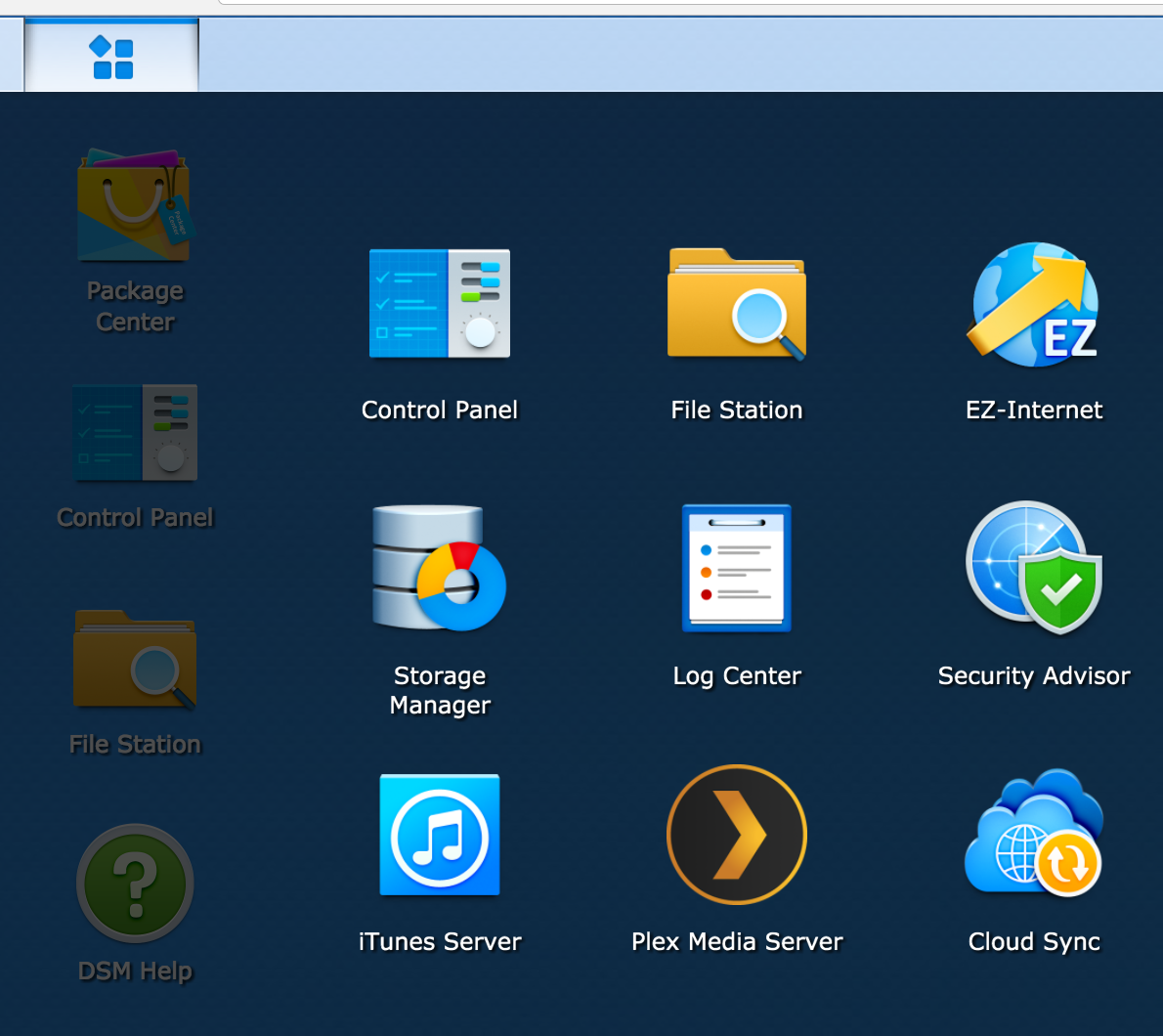
  • The web based UI is decent.  It’s still a web-based UI, but overall it seems competent.  There are places where I can’t always seem to find what I’m looking for, but that’s how it goes.  The biggest issue for me is the split between items you control in the control panel, items you need to go to the package manager to manage and “applications” that appear in the app start menu thingy (see the UI below with the menu expanded).  The big one was the Storage Manager application.  I had to go there to change how the storage was managed.  An OK thing once you know about it, but, to me, that belongs in the control panel.  I guess that’s a minor gripe, because now that I know where it is …
  • Synology also offers Android and iOS applications for certain key features, such as photo, video and music browsing.  I haven’t spent too much time with those yet, but they look interesting and may provide a decent alternative to Plex.  And they have Google Cast capabilities built in!

NewImage

Thursday, December 29, 2016

A new NAS

After 10 years (or so) of using a PC as a file server, I finally decided enough is enough.  The size, noise and upkeep of my old PC was just a bit too much for me to want to deal with any longer.  Not that there’s an issue with using a PC as a file server, but it just seems, now, a bit overkill.

My original goal when I build the PC server was to use virtualization in order to run various servers and experiment with various technologies.  While that worked for a time, the amount of memory I needed ended up growing beyond what I have and the price to upgrade became too much for what is basically an eight-year-old machine.

The size also became a bit too much to handle.  When I built the machine originally, I bought a huge full tower case.  I assumed that I would ultimately need multiple HDDs and a big power supply.  Had I stuck with the virtualization, then this may have made more sense.  Now, it’s just a noisy boat anchor that serves (pun intended) as a file and iTunes server.

One other reason to move away starts with the advent of streaming music services (Google Play, which I use).  I now rely much less on the iTunes sharing than ever before.  My kids have a bedtime play list they use every night to go to sleep, but other than that (and the occasional Sonos use), I don’t rely on it as heavily as before.

With this in mind, I started looking at stand alone Network Attached Storage devices.  I like the idea of a bespoke device to manage this setup.  I also like the size of the device as opposed to beastie I have now.  The new devices also appear to offer more functionality and can, basically, replace a lot of the things I needed a stand alone PC for before.

If you’re curious, I ended up with a Synolog DS416play.  It was slightly more expensive than I was planning on, but it does offer better media capabilities, including hardware-based media transcoding.  This was something I’d tried on the old system and it just couldn’t keep up.  I’m hoping to dump much of my media on there and share them out to my Chromecast and Roku devices.

As I spend more time with it, I’ll post more.

Smart House

Earlier this year, I finally broke down and purchased a Samsung SmartThings home automation hub.  I had wanted to get one for about two years after hearing about them advertised on the TWiT network. I did wait a bit until I had a bit of spare cash and for the SmartThings 2.0 hub to come out.  The big draw for the 2.0 was some limited local network-only remote control.

Anyway, it started with just a Z-wave front door lock and has begun to spread.  I now have several receptacle and smart appliance switches, garage door opener, door sensor and a number of Aeotec water sensors.

In fact, those just saved me today when we had a small water problem in the basement.  Somehow the hot water was left on and that caused a poorly installed trap to slip just enough to let water start leaking onto the floor.

When I bought the sensors originally, that was the very first place I intended to put one because this has happened to me before.  The sink is a pedestal sink which makes it hard to get access to the trap in case of a leak.  Well, when it happened before it took me a while to catch it and I’ve been a bit paranoid about it happening again since.

Well, this time the sensor saved me.  The app first indicated a water problem in the basement at 1:34pm.  By 1:45ish, I’d fixed the problem and cleaned up the mess.

Oh and thanks for the assist goes to Pushbullet.  I’ve been using it for a number of years to handle notification mirroring from my Android phones to Chrome on my PCs.  In this case, the notification popped up on my laptop while I was doing something else, so I was able to immediately react.  For lack of that, I may not have caught it until a bit later.  Come to think of it, I may want to update the action on the water problems to include an email …

Tuesday, December 27, 2016

More Details on Photo Sorting

After about three weeks of work, I believe I’ve identified almost 167,000 unique pictures (give or take a thousand or so) and over 250k duplicates.  Right now, OneDrive is struggling to determine what of the myriad of changes I’ve made are valid and trying to sync that up to the cloud.  I sort of expect that to take quite some time.

I still haven’t resorted them based on the Year/Month/Day/Model mode I mentioned earlier, but I do plan on doing that eventually.  First I need to let this sync happen and then I plan on identifying which cameras belong to us, family and friends so I can separate ours/theirs/etc.  Once that’s done, then I’m going to slowly perform the final reorgs of Mobile/Regular and apply the new sort.

I’m also considering whether I should separate out all the videos or not.  Part of me says yes, part of me says no.  Having the videos separate might make it easier to prepare videos and other multimedia things in the future, but there’s also something nice about having the pictures/videos intermingled and can lead to some neat discoveries.

I’ll post more as I go.

Sunday, December 18, 2016

Sorting out Photos Revisited

Since my last post, I’ve continued running the script to process my images and am getting close to being done.  Given that, there are a few things I would like to have done differently:

  • Right now the script organizes pictures as: <model>/<year>/<month>/<day>/<picture/video>  While that works ok, it does mean that to find a specific picture I need to know which camera model took it. I’m starting to think I should have turned that around: <year>/<month>/<day>/<model>.  At least then I would only need to know the approximate day they were taken.  However, I do like the idea of grabbing all mobile phone pics/video and being able to move them en masse.
  • Videos don’t, by default, include the camera model.  Not really sure why this is, but that does make it kind of annoying to sort out.   I have to build some strange rules/heuristics/guesses to determine which camera took what picture.  Maybe not an issue for deduping, but definitely a pain if I want to keep them separated into Mobile/Non-Mobile.
  • MacOS’s mdls command does a great job at dragging the capture date from videos, but only if the file is mounted locally on the Mac itself.  This includes FAT32 and other Windows-based file systems.  If you mount the same file system via NTFS, it gets confused.  As such, I’ve had to leave behind AVI files so I can pull them local later.  (Though, as I think of it, maybe mediainfo would work for AVI files … not sure why I didn’t try that)
  • My previous script only looks at the first conflict, meaning that once I have a single non-duplicated file, any more duplicates may be copied repeatedly.  That’s my next correction.

Overall, the process has been a bit of a pain in the back side and definitely slow, but I’m almost to the point where I have one canonical copy of all my pictures.  (Well, actually two because I’m working off my local OneDrive mirror).

Sunday, December 11, 2016

Sorting Out Photos

My wife and I are (or at least were) shutter bugs of a sort.  At this moment, I have just a bit shy of 1.5 terabytes of photos that she and I have take over the years.  I’ve also managed to make a hash of them with copies, duplicates and the occasional “I think I have this somewhere, but I can’t say for certain” directory.

I’ve been looking for the past year or two for a solution and still haven’t really found one I liked, so like a good nerd, I’ve rolled my own.  It’s cobbled together using BASH, ImageMagick, dcraw and MediaInfo.

My primary goal was to make sure that I had one copy of every file, not necessarily one high quality version of each picture or video.  Meaning, that if I end up with duplicated of a picture in RAW, high res JPEG and a JPEG thumb, I’m ok with that.  Once I have the initial culling of the photos, then I make take another swipe at further deduping it.

Anyway, my script starts by recursively looping through the current path and all subdirectories.  If it encounters a file, it will retrieve the extension and then conditionally call some combination of the above utilities to retrieve the creation/capture/modified timestamp and the camera make/model.  It does this fairly well, but there are some major caveats which I’ll discuss in a bit.

Once it has retrieved the above, it starts creating the following folder structure:

/<camera>/<year>/<month>/<day>

It then takes the file and tries to copy it into the following:

/<<camera>/<year>/<month>/<day>/<year><month><day><hour><minute><second>.<#>.<ext>

This should, in theory, allow me to identify a specific picture taken by a specific type of camera at a specific moment in time.  The initial issue I ran into with this is around time resolution.  The timestamps given to me by the various tools only resolve to the second (not millisecond like I’d prefer).  This means that if you have a camera that can take multiple pictures per second, then you can easily end up with duplicates, hence the <#> at the end.

If I encounter a file that is the same timestamp, I then do a MD5 sum on both files to confirm they are actually the same time.  If they are, then off to a duplicates tree the file goes.  If they aren’t the same, then I start an auto increment pass until I can write the file out uniquely in the target folder.

One issue, though, is that if the 0 file doesn’t match, I don’t check for subsequent matches, so the script could easily end up with files 1 2 3 and 4 all being duplicates.  Maybe I’ll try and fix that in a future edit.

As for the tooling, I use the following:

  • BASH
  • ImageMagick’s “identify --verbose”  command to get information a JPEGs
  • MediaInfo for details on MP4/M4V/AVI/MOV files
  • dcraw for details on RAW files (such as Nikon’s NEF/NRW)

Probably one of the biggest issues I have is that while your typical JPG/NRW/NEF file includes the camera details, a video typically does not. That means that I’m a bit hard pressed to determine what camera took a specific video.  I also found that the camera metadata for when the file was captured isn’t always that useful, so there are limits.

One other thing to note: ImageMagick isn’t always that fast, so there’s room for improvement on this, specifically around JPEG processing.  I was hoping to use MacOSs mdls for getting the camera data, but that only works if the filesystem is local (not mounted like mine was).

If you’re a BASH expert, please be kind.  I’m good at programming, not always good at scripting.  Otherwise, help yourself.

#!/bin/bash
BASE="/Volumes/e/Pictures/Processed"

moveFile()
{
#    local SOURCE="$1"
#    local BASE="$2"
#    local EXT="$3"
#    local SUFFIX="$4"
   
    if [ -f "$2.$4.$3" ] ; then
        moveFile "$1" "$2" "$3" $(($4 + 1 ))
    else
        mv -n "$1" "$2.$4.$3"
    fi
}

moveNonDuplicateFile()
{
    mkdir -p "$BASE/Sorted/$2/$3/$4/$5"

    local T="$BASE/Sorted/$2/$3/$4/$5/$3$4$5$6$7$8"

    moveFile "$1" "$T" "$9" "0"
}

#        moveDuplicateFile "$1" "$BASE" "$CAMERA" "$YEAR" "$MONTH" "$DAY" "$HOUR" "$MINUTE" "$SECOND" "$EXT"
moveDuplicateFile()
{
    mkdir -p "$BASE/Duplicates/$2/$3/$4/$5"

    local T="$BASE/Duplicates/$2/$3/$4/$5/$3$4$5$6$7$8"

    moveFile "$1" "$T" "$EXT" 0
}

processMOV()
{
    TIMESTAMP=`mediainfo "$1" | grep "Encoded date" | head -n 1 | sed 's/Encoded date//' | awk '{$1=$1;print}' | sed 's/: //'`
   
    YEAR=`date -ujf "%Z %Y-%m-%d %H:%M:%S" "$TIMESTAMP" +%Y`
    MONTH=`date -ujf "%Z %Y-%m-%d %H:%M:%S" "$TIMESTAMP" +%m`
    DAY=`date -ujf "%Z %Y-%m-%d %H:%M:%S" "$TIMESTAMP" +%d`

    HOUR=`date -ujf "%Z %Y-%m-%d %H:%M:%S" "$TIMESTAMP" +%H`
    MINUTE=`date -ujf "%Z %Y-%m-%d %H:%M:%S" "$TIMESTAMP" +%M`
    SECOND=`date -ujf "%Z %Y-%m-%d %H:%M:%S" "$TIMESTAMP" +%S`
   
    if [ -z "$CAMERA" ] ; then
        CAMERA="MOV"
    fi
}

processRAW()
{
    TIMESTAMP=`dcraw -i -v "$1" | grep Timestamp | sed s/Timestamp\:\ //`
   
    YEAR=`date -jf "%a %b %d %H:%M:%S %Y" "$TIMESTAMP" +%Y`
    MONTH=`date -jf "%a %b %d %H:%M:%S %Y" "$TIMESTAMP" +%m`
    DAY=`date -jf "%a %b %d %H:%M:%S %Y" "$TIMESTAMP" +%d`
   
    HOUR=`date -jf "%a %b %d %H:%M:%S %Y" "$TIMESTAMP" +%H`
    MINUTE=`date -jf "%a %b %d %H:%M:%S %Y" "$TIMESTAMP" +%M`
    SECOND=`date -jf "%a %b %d %H:%M:%S %Y" "$TIMESTAMP" +%S`
   
    CAMERA=`dcraw -i -v "$1" | grep 'Camera:' | awk -F\: '{ print $2 }' | tr '[:lower:]' '[:upper:]' | awk '{$1=$1;print}'`
}

processAVI()
{
    TIMESTAMP=`mdls "$1" | grep kMDItemContentCreationDate | sed 's/kMDItemContentCreationDate     = //'`
   
    if [ "$TIMESTAMP" == "" ] ; then
        YEAR="0000"
        MONTH="00"
        DAY="00"
        HOUR="00"
        MINUTE="00"
        SECOND="00"
    else
        YEAR=`date -jf "%Y:%m:%d %H:%M:%S %z" "$TIMESTAMP" +%Y`
        MONTH=`date -jf "%Y-%m-%d %H:%M:%S %z" "$TIMESTAMP" +%m`
        DAY=`date -jf "%Y-%m-%d %H:%M:%S %z" "$TIMESTAMP" +%d`

        HOUR=`date -jf "%Y-%m-%d %H:%M:%S %z" "$TIMESTAMP" +%H`
        MINUTE=`date -jf "%Y-%m-%d %H:%M:%S %z" "$TIMESTAMP" +%M`
        SECOND=`date -jf "%Y-%m-%d %H:%M:%S %z" "$TIMESTAMP" +%S`
    fi
   
    if [ -z "$CAMERA" ] ; then
        CAMERA="AVI"
    fi
}

processJPG()
{
#    TIMESTAMP=`mdls "$1" | grep kMDItemContentCreationDate | sed 's/kMDItemContentCreationDate     = //'`
#    CAMERA=`mdls "$1" | grep kMDItemAcquisitionModel | sed 's/kMDItemAcquisitionModel        = \"//' | sed s/\"//`

    TIMESTAMP=`identify -verbose "$1" | grep DateTimeDigitized | sed 's/    exif:DateTimeDigitized: //'`
    TIMESTAMP="$TIMESTAMP -0000"
    CAMERA=`identify -verbose "$1" | grep "exif:Model" | sed 's/    exif:Model: //'`

    if [ "$TIMESTAMP" == " -0000" ] ; then
        TIMESTAMP=`identify -verbose "$1" | grep "date:modify" | sed 's/    date:modify: //' | sed 's/\(.*\)-\(.*\)-\(.*\)T\(.*\)\([+-]\)\(.*\):\(.*\)/\1:\2:\3 \4 \5\6\7/'`
        #TIMESTAMP=`mdls "$1" | grep kMDItemFSContentChangeDate | sed 's/kMDItemFSContentChangeDate = //'`
    fi
   
    # | awk '{$1=$1;print}'`
       
    #echo $TIMESTAMP / $IMAGE
   
    # 2014-07-05T11:12:16-04:00
   
    if [ "$TIMESTAMP" == "" ] ; then
        YEAR="0000"
        MONTH="00"
        DAY="00"
        HOUR="00"
        MINUTE="00"
        SECOND="00"
    else
#         YEAR=`date -jf "%Y-%m-%d %H:%M:%S %z" "$TIMESTAMP" +%Y`
#         MONTH=`date -jf "%Y-%m-%d %H:%M:%S %z" "$TIMESTAMP" +%m`
#         DAY=`date -jf "%Y-%m-%d %H:%M:%S %z" "$TIMESTAMP" +%d`
#    
#         HOUR=`date -jf "%Y-%m-%d %H:%M:%S %z" "$TIMESTAMP" +%H`
#         MINUTE=`date -jf "%Y-%m-%d %H:%M:%S %z" "$TIMESTAMP" +%M`
#         SECOND=`date -jf "%Y-%m-%d %H:%M:%S %z" "$TIMESTAMP" +%S`
        YEAR=`date -jf "%Y:%m:%d %H:%M:%S %z" "$TIMESTAMP" +%Y`
        MONTH=`date -jf "%Y:%m:%d %H:%M:%S %z" "$TIMESTAMP" +%m`
        DAY=`date -jf "%Y:%m:%d %H:%M:%S %z" "$TIMESTAMP" +%d`

        HOUR=`date -jf "%Y:%m:%d %H:%M:%S %z" "$TIMESTAMP" +%H`
        MINUTE=`date -jf "%Y:%m:%d %H:%M:%S %z" "$TIMESTAMP" +%M`
        SECOND=`date -jf "%Y:%m:%d %H:%M:%S %z" "$TIMESTAMP" +%S`
    fi
   
   
    if [ -z "$CAMERA" ] ; then
        CAMERA="Unidentified"
    fi
}

processMPEG4()
{
    TIMESTAMP=`mediainfo "$1" | grep "Encoded date" | head -n 1 | sed 's/Encoded date//' | awk '{$1=$1;print}' | sed 's/: //'`
   
    YEAR=`date -ujf "%Z %Y-%m-%d %H:%M:%S" "$TIMESTAMP" +%Y`
    MONTH=`date -ujf "%Z %Y-%m-%d %H:%M:%S" "$TIMESTAMP" +%m`
    DAY=`date -ujf "%Z %Y-%m-%d %H:%M:%S" "$TIMESTAMP" +%d`

    HOUR=`date -ujf "%Z %Y-%m-%d %H:%M:%S" "$TIMESTAMP" +%H`
    MINUTE=`date -ujf "%Z %Y-%m-%d %H:%M:%S" "$TIMESTAMP" +%M`
    SECOND=`date -ujf "%Z %Y-%m-%d %H:%M:%S" "$TIMESTAMP" +%S`

    if [ -z "$CAMERA" ] ; then
        CAMERA="MP4"
    fi
}

processFile()
{
    echo "Processing file $1"
   
    local EXT=`echo "$1" | sed 's/.*\.\([A-Za-z0-9]*\)/\1/' | tr '[:lower:]' '[:upper:]'`

    case $EXT in

        # Picture Formats Here

        NEF)
            processRAW "$1"
            ;;

        NRW)
            processRAW "$1"
            ;;

        JPG)
            processJPG "$1"
            ;;

        # Media Formats Here

        AVI)
            processAVI "$1" "$EXT"
            ;;

        MOV)
            processMOV "$1" "$EXT"
            ;;

        MP4)
            processMPEG4 "$1" "$EXT"
            ;;

        M4V)
            processMPEG4 "$1" "$EXT"
            continue
            ;;
           
        DB)
            rm "$1"
            return 0
            ;;
           
        PNG)
            rm "$1"
            moveFile "$BASE/Other/PNG" "$2" 0 "PNG"
            continue
            ;;
           
        PANO)
            rm "$1"
            moveFile "$BASE/Other/PANO" "$2" 0 "PANO"
            continue
            ;;
           
        \*)
            continue
            ;;

        DS_STORE)
            rm "$1"
            ;;

        *)
            echo Unmaped extension $EXT
            continue
            ;;

    esac

    if [ -z "$YEAR" ] ; then
        echo "Image with no YEAR"
        continue
    fi

    if [ -z "$MONTH" ] ; then
        echo "Image with no MONTH"
        continue
    fi

    if [ -z "$DAY" ] ; then
        echo "Image with no DAY"
        continue
    fi

    if [ -z "$HOUR" ] ; then
        echo "Image with no HOUR"
        continue
    fi

    if [ -z "$MINUTE" ] ; then
        echo "Image with no MINUTE"
        continue
    fi

    if [ -z "$SECOND" ] ; then
        echo "Image with no SECOND"
        continue
    fi

    TARGET="$BASE/Sorted/$CAMERA/$YEAR/$MONTH/$DAY/$YEAR$MONTH$DAY$HOUR$MINUTE$SECOND.0.$EXT"
   
    if [ -f "$TARGET" ] ; then
   
        SOURCEHASH=`md5 -r "$1" | awk '{ print $1; }'`
        TARGETHASH=`md5 -r "$BASE/Sorted/$CAMERA/$YEAR/$MONTH/$DAY/$YEAR$MONTH$DAY$HOUR$MINUTE$SECOND.0.$EXT" | awk '{ print $1; }'`

        if [ "$SOURCEHASH" == "$TARGETHASH" ] ; then
            moveDuplicateFile "$1" "$CAMERA" "$YEAR" "$MONTH" "$DAY" "$HOUR" "$MINUTE" "$SECOND" "$EXT"
        else
            moveNonDuplicateFile "$1" "$CAMERA" "$YEAR" "$MONTH" "$DAY" "$HOUR" "$MINUTE" "$SECOND" "$EXT"
        fi
    else
        moveNonDuplicateFile "$1" "$CAMERA" "$YEAR" "$MONTH" "$DAY" "$HOUR" "$MINUTE" "$SECOND" "$EXT"
    fi

#    mv -n "$1" "$TARGET"
}

processDirectory()
{
    echo "Processing dir  $1"
   
    cd "$1"

    YEAR=""
    MONTH=""
    DAY=""
    HOUR=""
    MINUTE=""
    SECOND=""
    CAMERA=""

    for FILE in * ; do
   
        if [ -d "$1/$FILE" ] ; then
            processDirectory "$1/$FILE"
#            rmdir "$1/$FILE"
        else
            processFile "$1/$FILE" "$FILE"
        fi
   
    done

    if [ -f ".DS_Store" ] ; then
        rm .DS_Store
    fi   

    cd ..
    rmdir "$1"
}

CURRENT=`pwd`

processDirectory "$CURRENT”

Trying to be a bit more social

So, I know this blog hasn’t been active in a while.  Anyone that knows me will know that I’m not necessarily that big into social media.  I like the concept, but I tend to get a bit too busy to bother posting.  Oh, and don’t even bother looking for me on Facebook.  I’m not there, at least not really.

However, given that I do have this blog and this little spot in the world, I thought I’d give it another go.  No promises for sure.

Monday, June 18, 2012

It's Been Quiet Around Here

Today marks day day 60 that Felicia and Alex were over in Romania.  When they first took off, I wasn't really sure what to expect.  And from what I can remember, neither was Feli.  I remember at the time thinking that 10 weeks was such a long time for them to be away.  Don't let anyone kid you, it is quite a long time for them to be away.  But I think it's also been a good time.

I do know that Alex has had a grand time in Romania with his grandparents.  And I also know that they have had a good time having him around.  What's funny is watching him via Skype and videos that Feli takes of him.  I think he's learned quite a bit of Romanian while he was there.  Not speaking it, but definitely understanding it when spoken to him.  It'd be rather interesting to determine who knows more, me or him.  I think I'd win that one, but only by a small bit.

If you've been reading the blog or following the trip on Friendface, then I'm sure you've seen just how much he's grown over the past two months.  I know that when I was there, he'd grown a bit, but over the last 4 weeks he really seems to have grown.  And not just grown, but matured.  He no longer looks like a baby, but looks like a little boy.

I will say that this time apart would definitely have been more painful if it weren't for the trip I took over there for 8 days.  In retrospect, I should have taken a bit more time there (especially since it wouldn't have cost much more and could have happened in and around Memorial Day here in the States), but at least I as able to see them.  I think that 10 full weeks would have been almost unbearable.

At least while they were away I was able to get some work done on the house.  RIght now, I'm sitting in Alex's room in the glider rocker typing this blog entry.  As I type this, I'm surrounded by not only his stuff, but a decent percentage of the furniture and stuff from the living and dining rooms.  Why? Well, that's because while they were gone I had both the upstairs and the main level's wood floors done.  The upstairs was a complete sand down and refinish (and man do they look different  … you can see pictures on my Google+ account if you're interested).  

The main level wasn't quite as invasive, though they were in much better shape too.  Instead of a complete sand down, these were just screened and poly's.  In fact, it was meant to be a single coat, but due to a technical glitch, our floor guy (if anyone needs a their floors done in DC, let us know, we can definitely recommend him) had to come back and redo the work.  So now the main level has two coats of fresh polyurethane on it and do they look shiny.

So, now as the last 10 days speed past I can look forward to having squirbles and @felioland back from abroad.  It's been a good time apart and now I'm ready to have them back home.  But if you happen to think of them on Wednesday night and/or Thursday morning, could you say a little prayer for them?  I'm not going to be able to help them as they travel back to the US and I'm sure the flight won't be the most fun thing they've ever done.  I'm sure Feli will have something to say about it here in a little over a week.

Cross posted from Alex's blog

My mobile phones

So, I saw an article today on The Verge asking what people's mobile phone timeline was.  Looking at some of the older phones people mentioned in the comments got me thinking about my phone history.  So, just for fun, here's mine:

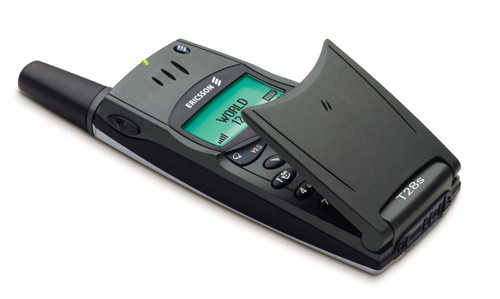
Ericsson T28 (2000)

T28

So, my first phone, that I bought myself, was an Ericsson T28 world phone.  I still remember buying this at the Best Buy in Rockville just off I-270.  I went with it because it was a GSM-based world phone that I suspected would work in Europe.  I would have been right, but I didn't realize they SIM-locked phones.  So, instead I used it when I was home and used something different over in the UK.  In fact, my first real phone was also an Ericsson T10, I think.  However, since this was a pre-paid phone that was loaded me by eGrail, I'm not absolutely certain it counts.

Nokia 8890 (2001)

Nokia88901

I still think this phone was one of the coolest phones I ever owned.  I bought this little guy in the UK so I would have a phone of my own and to have when I came home.  It came unlocked and worked on the 1900 MHz frequencies that T-Mobile (then VoiceStream) used in the US.  I carried that little guy all over Europe with me.  Unfortunately, it developed a crack along the speaker (just above the Nokia logo).  This caused the screen to basically stop working unless I squeezed on the top really hard.  It was too bad too as I really did like that little phone.  In fact, I still have it today, though I doubt it would even turn on if I had to.

Sony Ericsson T610 (2003)

1535c15d c63e 4b7b aa15 9e69eacc7785

My next phone was also a candy bar style phone.  At the time, flip phones were all the rage, like my older T28.  However, I wasn't a real fan of the flip phones.  For some reason, they never felt right to me.  The smaller, more svelte phones like the T610 always suited me better.  This one was no exception.  I really did like that phone and kept on using it until I decided I had to have a smart phone.  In fact, I really do believe I have this one still too.  It may even be unlocked.  I don't remember.

T-Mobile MDA (2005)

Tmobile mda views1


After a spate of "feature" and candy bar phones, I upgraded to a true nerd phone, the T-Mobile MDA.  This was a Windows Mobile 5.0-based phone.  Sometimes I do miss this particular phone.  Granted, my new phones are much more full featured and definitely have a better collection of applications available for it, but this phone had one thing my newer phones don't: a keyboard.  And it was a decent keyboard too.  By the time I'd had it for a bit over 2.5 years, I'd become quite adept at typing on it.  Too bad the browser stunk and towards the end it would lock up for no real good reason.

iPhone 3G (2008)

Appleiphone3g

So the story goes like this.  I've been a T-Mobile user since 2000 and really didn't want to switch.  I needed a new phone, quite badly as my phone (the aforementioned MDA) was really flaking out.  In fact, our last night in Rome saw the phone basically throw an electronic hissy-fit.  It decided that the alarm needed to go off and keep going off no matter how many times I rebooted.  That was basically the final straw on this one.

I assumed that I'd end up with the T-Mobile G1, the first Android-based phone on the market.  My plan was to head to the closest T-Mobile store and pick one up once I got back the States.  However, a trip to duty free at the airport sort of derailed me.  They had iPhone 3Gs on sale and unlocked.  Granted the price was €699, so quite steep, but at least I could use it on my current contract and service.  With a little prodding from @felioland, I grabbed it and used it for a bit over 2 years.

It worked pretty good, though getting it to play nice with the T-Mobile network was a bit of work and it did take a bit of time to track down the right settings.  And, of course, it never would with on 3G as it was never compatible with the T-Mobile US frequencies.  But I did like the phone.

Samsung Nexus S

Nexuss phone google

And now to my current phone, the Samsung Nexus S.  Now, this phone I truly love.  The form factor is great and the OS, Android 4.0 Ice Cream Sandwich (not pictured above), makes for a great phone experience.  Also, since it's a true T-Mobile phone, it offers decently fast speeds.  Fast enough to watch Netflix via WiFi sharing.  This almost consistently beats out hotel Wifi for performance.  It also came unlocked, something I didn't realize until I was trying to get T-Mobie to unlock my phone.  It took the rep chatting with her manager to realize that it was never locked to begin with.