Saturday, February 25, 2023

Allen & Heath SQ vs Behringer/Midas X32/M32

The TL;DR

When compared to the Behringer X32, the Allen & Heath (A&H) SQ Series is a more modern system with more configrable I/O than the, now dated, X32/M32 line. It has much better build quality than the X32 (more akin to the Midas M32), and when paired with the newer DX168 or GX4816 stage racks, offer a level of performance that is comparable to using the Midas PRO D153 or D251 stage boxes. Finally, the whole A&H line, starting with the Qu Series offers a (mostly) smooth path upward allowing a more gradual increase in I/O, performance, and capability that the Music Tribe lineup does not, currently, offer.

Table of Contents

  1. Background
  2. High Level
  3. Deeper Dive
    1. Architecture
    2. Hardware
    3. Preamps and ADC
  4. Ecosystem
    1. Product and User Interface Consistency
    2. Stage Rack Interoperability
    3. Price Points

Background

As a bit of background, I'm a long time Allen & Heath user, starting with the iLive and GLD lines back in 2011. In fact, in 2021 I purchased an Avantis and two DX168 racks with the hopes of starting a side busines as a freelance audio engineer. I've recently added a SQ5 to the mix to use as a small gig or monitor board. Needless to say, when it came to purchasing equipment, I put my money where my mouth is.

To add additional context to this post, I should mention that I'm currently located in Romania, where I've done both volunteer and freelance work. Since being here, I've encountered more than my fair share of the Behringer X32 and Midas M32 consoles. I've also seen that, at least here, Romanians Are very much biased towards Midas. There is a belief that the Midas preamps have been created by the gods as the be-all and end-all of sonic quality. And of course, being an emerging / post-communist economy, there is an understandable and quite strong focus on value for money.

For the purposes of this post, I'll be using 2022/2023 prices in Euro with Romanian VAT included as quoted off Thomann or in USD as published from on Sweetwater as necessary. Please note that these are retail prices and that better deals may be had by communicating directly with your reseller, so this is not taken into account.

High Level

I often get into conversations with people about entry-level or value-conscious board decisions. These conversations always go about the same:

"I need a board for X purpose. It need to support up to 32 ins and 16 outs and I need to purchase a stage box. I looked at both the Behringer X32 with a Midas DL32 and an Allen & Heath SQ with two DX168s. I like the idea of the A&H, but I don't understand why it's nearly twice the cost."

For quite some time, that's been a hard question for me to answer. "On paper" they do look relatively similar and slot into roughtly the same place in the lineup as the most inexpensive board with enough inputs and outputs to cover a decent sized band or event.

Given this difference, let's start looking at what differentiates the two. Let's start with the specifications, specifically comparing the X32 and the SQ6 as the fader count and rough size are comparable:

Specification Behringer X32 Allen & Heath SQ-6
Channel Count 40 48

  • 32 channels
  • 6 aux returns
  • channel USB media player
  • Fully configurable
    Sample Rate 48k 96k
    Bus Count 16 busses 12 busses
    FX Slots 8 (4 bus and 4 insert-only) 8 (4 bus and 4 insert-only)
    Console Inputs 38 28

  • 32 preamps
  • 6 line-level)
  • 24 preamps
  • 4 line-level
  • Console Outputs 23 17

  • 16 XLR
  • 4 TRS
  • 2 TRS+RCA
  • 1 AES/EBU
  • 14 XLR
  • 2 TRS
  • 1 AES/EBU
  • USB Interface 32x32 @ 48kHz 32x32 @ 48kHz or 16x16 @ 96kHz
    USB Recorder 2 channel direct to USB drive 32 channel direct to USB drive
    Price (Console + 32x16 racks)

    Behringer X32 + Midas DL32 SQ6 + DX168 (2x)

    €4,042 €7,774

    $4,598 $7,098

    On paper, the primary differences between the stock X32 and the SQ-6 are the extra 16 channels and the sampe rate with the SQ and the rest go to the X32. Game over for the clearly overpriced A&H, right? At this point, most go for the Behringer and call it a day.

    Deeper Dive

    Not so fast, though. Let's go a bit deeper as there is more to this story, which should have been obvious since I've written this.

    Architecture

    In the initial comparison, I contend that the X32 has several features that, on paper at least, match or are close to the SQ line. These include inputs, FX, and busses. Let's look at each of these closer. For purposes of this discussion, I will use the Allen & Heath definition of mixes, where the mixer has a set number of busses that can be assigned to various purposes (groups, FX, auxes, etc).

    Inputs

    Yes, the X32 has 40 inputs, though many sites will more correctly list it as 38 inputs. Only 32 of these inputs are what could be considered instrument channels, meaning ones that can be internally pre-amp backed, have access to the full dynamics package (gate + compression), and used for instruments, microphones, etc. The remainder are actually line-level AUX inputs with less processing, specifically there is no dynamics processing (gate/expander or compression). The USB playback is just that, USB playback off a thumb drive, so it really doesn't count. The SQ line has a full 48 channels, each of which can be used as inputs with preamps, aux returns, etc. It is fully configurable in that way, something we will discuss later.

    Outputs

    The X32 has 16 busses, a stereo main, six matrixes, six aux outs, and a sub/mono channel output. However, the actual, assignable, outputs are limited to the 22 analog combined XLR and Aux outputs, and the one stereo AES/EBU output. That means there really are only 24 assignable mixes and most of those are hard coded. Even that gets a bit complicated as the routing in the X32 is, at best, described as complicated. This will be discussed below.

    The SQ line has 12 stereo aux busses, a stereo main, three stereo matrixes, and four FX sends. That's 32 outputs mixes and with the dedicated FX sends, there is no need to remove busses from the 16 available if you need FX processing, at least up to four FX units that is. More importantly, all 36 busses can be used simultaneously (with the appropriate combination of expanders and local I/O), so you're not juggling how to share 16 XLR outputs between mains, matrixes, and busses as is necessary with the X32.

    A side note on subgroups. Both mixers support some form of subgroups. On the X32, there are 16 busses, in a sense each of them can be either auxes or groups. The SQ also supports subgroups and the configuration UI allows you to determine which of the 12 stereo busses are auxes or groups. With the X32, there is really no difference between a subgroup and an aux bus, it's really in whether the bus is assigned to the Mains/Subs or not. Then each channel can be assigned on/off (subgroup) or pre/post fader. It's an interesting hybrid of a sort where the SQ is binary with a given bus being either a subgroup of an aux bus.

    Routing

    This brings us to the elephant in the room: routing. For anyone who's worked with the X32 line before, you will no doubt admit that routing on the X32 can be ... um ... challenging. The original design of the X32 was block-based, meaning that each bank of eight inputs was assignable to only to one source: local, AES-A, AES-B, expansion card, etc. Outputs are similar, though each block of four outputs can be assigned a specific set of 4 local busses (mains, busses, etc). With the 4.x line of firmware, Behringer was able to offer an almost one-to-one patching setup where any arbitrary input (card, AES, local) can be assigned to any specific channel. This happens under the oddly named User In and User Out section of the routing.
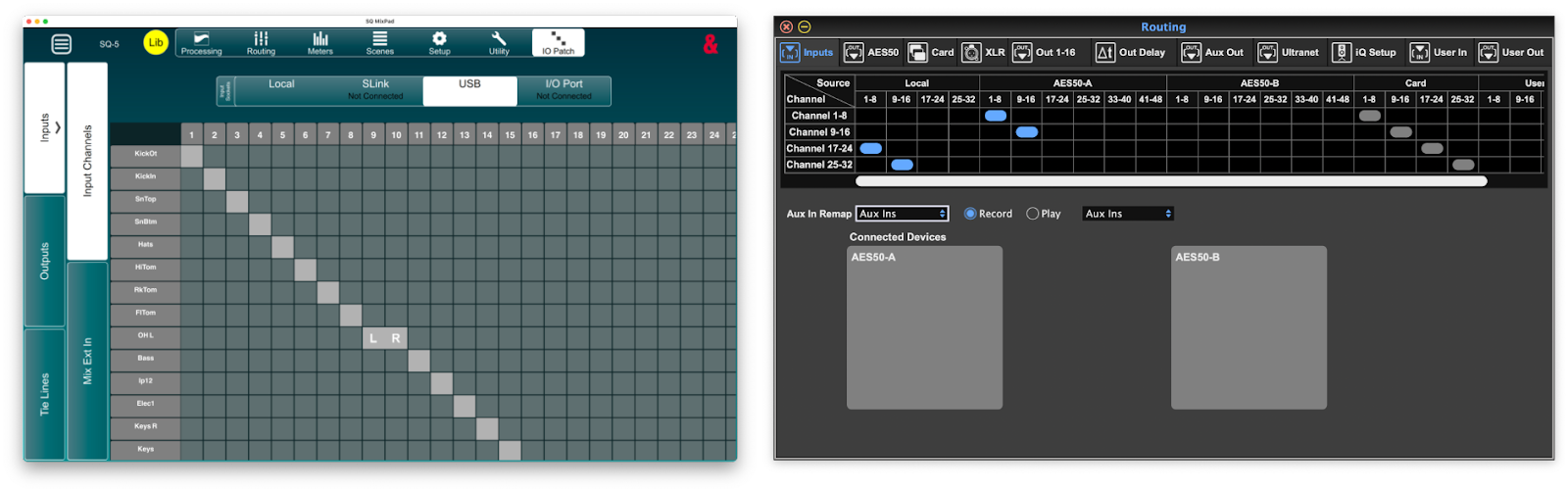
    X32 vs SQ routing

    The SQ line, on the other hand, follows a much more direct grid-based mapping of channels. For each input and output target, you see the source on the left and target on the top. To connect them, you simply check the box where they intersect. This is the same UI used on countless other consoles, such as those by Avid, Yamaha, A&H, and others. It also gives complete control on what to route and where. In addition to the matrix-style assignments, each channel allows for selecting the individual input from the preamp screen. See below for the Avantis Director view as the SQ editor doesn't offer a similar view.

    Avantis Source Selection

    Equalization and Effects

    Normally, the EQ and effects for a given console are treated as two separate entities. However, one major limitation of the X32 is that the mixes (busses, mains, etc) lack a dedicated graphical EQ. Instead, if you want to have a GEQ on one of your channels, you have to use one of the eight available FX slots. That means that, effectively, to have GEQ on both your mains and your sub send, you only have six FX slots.

    The SQ line, on the other hand, has GEQ for each of the busses (aux/group/main). These can include four distinct GEQ models too, assuming you've purchased them.


    The SQ with the GEQ enabled on the main. No insert required.

    The SQ line also offers tube preamp and compressor modeling available for each channel. The compressors, available as an extra cost add-on, can emulate a line of compressors such as the dbx 160, UREI 1176 Peak Limiter, and others. The corresponding compressor models for the X3, while no extra cost, require dedicating yet another FX slot and inserting into the channel, continuing to stress the already limited number of FX slots.


    The 16T compressor emulation on the SQ.

    MIDI/DAW Control

    Both mixers have the ability to control a remote digital audio workstation (DAW), using a Mackie HUI-like protocol, there is one key difference: with the X32, it's modal, meaning you're either in DAW or live mode. With the SQ, you get an additional 32 channel strips that can be used to remotely control the DAW simultaneously. In a live scenario this could be useful in lieu of a true multi-channel send from the tracks playback machine on stage.

    Hardware

    Build Quality

    One key difference that is often cited between the X32 and M32 is that the M32 has better build quality. These include things like better rotary encoders and individually mounted, better quailty (Midas PRO) faders. These differences, to the best of my knowledge, also apply to the SQ line. The A&H line is build in a similar fashion, at least from the SQ up, with the faders being individually mounted to ease replacement.

    Design and Layout

    Most design elements are, in the end, subjective. Some may prefer physical controls vs. other inputs. For example, I much prefer a physical remote to a smart phone for controlling my TV or media players. Others may prefer the configurability of the big glass rectangle. Regardless, the one glaring difference between the X32 and the SQ line is the screen. The X32 is simplay a display, where the SQ has a touchscreen.

    Everything else related to the layout is likely to be subjective. The X32 has more physical controls, but adjusting settings on the Combinator is an exercise in frustration as you're constantly having to find the right page and knob to change the setting you want, where the SQ is likely just a matter of selecting the control on screen and changing the value there or using the main control knob.

    Preamps and ADC

    This section needs a bit of a quick overview of the Music Tribe and Allen & Heath lines to make sense, so please bear with me. We will revisit this lineup later in the post as well.

    Music Tribe

    The Music Tribe line is basically divided into the Behringer/Midas entry- and mid-level line and the Midas PRO professional line of products. This division is even more stark now that the lineup consists of the X-Air/XR/MR, X32, M32, Wing, and Midas HD96. For the stage racks, it's similar in that they offer the Behringer S-range of racks, the Midas DL series, and then the Midas PRO D series.

    Allen & Heath

    A&H also offers a line of products, though there isn't quite the hard division between entry and pro levels. For them the line and its progression of digital boards starts with the Qu as an analog replacement board, followed by the SQ series, Avantis, and finally the dLive. For the I/O, there is a split between the 48kHz line and the 96kHz line. The 48kHz line represents the older and lower-end, which includes the AB168, and AR2412, AR284. The newer I/O units are the DX (DX168, DX012, etc) the GX4816, the new DX32 with the higher-quality Prime Input and Output cards, and of course the dLive has a mix rack, where the mixer is in the stage rack and the surface is really more akin to a remote control.

    Comparison

    When comparing the X32 and SQ lines, it is important to look hard at the stage racks as there are some non-obvious elements to consider. For the X32, the default racks are the S-line and the Midas DL-line. The primary difference between the two is the preamps and, to a lesser extent, the build quality. The Midas rack uses actual Midas made preamps rather than simply Midas-designed. The next step up is to a Midas PRO rack and that's a significant price bump.

    The Allen & Heath line, especially the SQ and above, are typically paired with either the GX4816 or the DX168 stage racks. One could use the AB168, AR2412, or AR84 racks, but these are older and only marginally less expensive. For this discussion, let's assume that the DX168 racks are the entry level. Given this, a single, "entry level" A&H rack is more expensive than the comparable S16 and DL16, combined. See the table below for the comparison of 16x8, 32x18, and 48x16 options.

    Inputs Outputs Behringer Midas Allen & Heath
    16 8 S16 €648 DL16 €889 DX168 €1,762

    $709
    $949
    $1,899
    32 16 S32 €1,093 DL32 €1,553 DX168 (2x) €3,524

    $1,199
    $1,599
    $3,798
    48 16 Not Available GX4816 €4,656


    $4,499

    Again, this is where the issues start creeping in. Why would an entry-level A&H rack be so expensive, especially compared to the DL16, which, as Midas fans will remind you, has Midas premaps. Digging deeper reveals a key feature of the DX168: it uses the same preamps and analog to digital conversion circuitry as the top of the line dLive. In fact, the top of the range dLive S-series has a mix rack called the DM0, which has no local analog inputs. It relies exclusively on the DX168 or DX32 racks for I/O. This means that a more proper comparison between the DX168 would not be the S16/DL16, but rather the Midas DL152 PRO. They both have the top of the range preamps, build quality, and ADC circuitry. When the prices are compared between the two, the numbers look a lot better:

    Inputs Outputs Midas Allen & Heath
    16 8 DL153 PRO €2,469 DX168 €1,762

    $2,499
    $1,899
    48 16 DL251 PRO €3,987.68 GX4816 €4,656.01

    $5,100
    $4,499

    Looking at the DX168 vs the Midas DL153 PRO it's a simple apples-to-apples comparison. Both have 16 ins and 8 outs and both have two digital snake (AES-50 or DX ports) for daisy chaining. Yet, the DX is about €/$700 cheaper.

    The Midas DL251 PRO and A&H GX4816 comparison is a bit different, as the Midas does include redundant power supplies and other more professional elements, like remote network control. The A&H GX4816 lacks redundant power supplies, but offers built-in connection to the ME personal monitoring system as well as two additional DX ports that allow for hanging another 64x32 channels off the rack (via two sets of daisy-chained DX168s). This means it's not a perfect comparison, but it's close enough. This side comment not withstanding, the bottom line is that the DX racks are cheaper than the corresponding Midas PRO and offer comparable performance. However, the price is a bit different as in the EU, Thomann offers the PRO 251 for cheaper than the GX4816, but in the US it's more expensive.

    Ecosystem

    There is another element to keep in mind when you're considering a console, and that's the broader ecosystem. Unless you think you're never going to upgrade beyond what you buy today, understanding where your purchase fits into the range is important.

    Compared to the Behringer/Midas ecosystem, I think A&H has the following advantages:

    Product and User Interface Consistency

    First, and perhaps most relevant to you with your dLive experience: the UI is generally shared across the line. From the Qu all the way up to the dLive, there is a commonality to the UIs that actually tracks back to the previous generation of iLive and GLD mixers.


    The A&H iPad apps, clockwise from the top left, QuPad, SQ MixPad, Avantis MixPad, dLive MixPad

    Yes, there are differences (especially with the Avantis being touch-screen focused vs the rest of the line) but, in general, the UIs feel familiar across the range with each step up adding more elements. For example, the SQ has only HPF and a single insert. The Avantis adds a LPF to the filter section and a second insert tab. Otherwise, the channel processing chain looks the very similar and generally feel like they are speaking with one voice from one company.


    The current Allen and Heath website showing their mixers and how they look similar.

    Compare that to the Behringer/Midas offerings where the XR/X32/M32 line is similar, but the WING and PRO/HD96 series are completely different.


    Looks like mixers from completely different companies.

    Even the user interfaces are completely different.


    WING (left) and X32 (right) gate settings.

    To be fair, a compentent engineer/A1 should have no issues moving between platforms, even if they look completely differently as the fundamentals are the same, but there is something to be said for consistency, at least within a given generation, like the WING and the HD96, or the dLive and Avantis. Fundamental differences between older and newer (X32 and the WING) are a bit more understandable.

    Stage Rack Interopertability

    The Allen & Heath stage boxes work up and down the range. This means I can take my DX racks and use them on my SQ5 and Avantis. They are interchangeable. In fact, the dLive can use them as primary I/O (DM0) or as expanders via the CDM/DM DX ports. Moving to the next level up in the range doesn't require replacing your racks (the two exceptions are the 48k racks don't work with dLive and the GX4816 requires a gigaACE card to connect to the dLive, so not as easy as AES50/SuperMAC for sure). For the Behringer ecosystem, it's possible to buy the PRO racks and use them on the X/M32 but that's a steep price point and the 48k racks don't really work with the pro gear (without gymnastics like external cards and headamp control issues).

    Price Points

    The A&H line has several steps and price points: Qu ($1-2K) -> SQ ($3-5K) -> Avantis ($13-15k) -> dLive C Class ($25k ish) -> dLive S Class ($40k+ish). You can jump in where you need (like your choice of the SQ6) and work your way up the line (next stop Avantis). Again, compare this to the Behringer / Midas offerings where it's X/M32 or WING ($2-3.5k) as an entry point and the next step is the Midas HD96 ($35k+ ish) with nothing in-between.


    Approximate price range of the A&H and MusicTribe ecosystems

    Of course, this can change over time as the Behringer/Midas team looks to replace the older PRO series and maybe they'll add other stops in between, but it still feels like there are two separate groups creating two completely separate lines of products and never the two shall meet.

    What about the WING?

    This article isn't meant to be a complete comparison, but to address a specific question: how do the X32 and the SQ series compare. I hope to create a similar comparison soon, but I would prefer spend a bit more time with the platform first.

    Tuesday, July 19, 2022

    Synology DSM Login and Connection Issue

    TL;DR: if you cannot access DSM via the web or the apps, the date on your Synology might be wrong causing the services to either not start or not respond correctly.

     I had a strange error with my Synology DS416play the other day.  I had to power the system down to connect it to a new UPS.  Upon powering it back up, I could not access the DSM console via the web, nor would any of the Synology / DS apps connect.  No amount of restarts or kicking the box would fix the issue.

    What was strange is SMB and SSH were working fine, meaning that the underlying OS and system were working fine.  I could copy files to and from using SMB/CIFS and I could ssh into the box itself.

    I opened a support case with Synology and we started collecting logs and other information.  One of the things they asked for was to confirm that the drives in the system were on the compatibility list.  To do that, I had to shut the system down.  When I powered it back up, I noticed that the drive lights had shut off.  I confirmed that the system was running and that made me realize that the date could be wrong.  I have the lights set to go dark at night.

    I logged into the server and checked the date and sure enough, it had reset to Jan 1, 2015 00:00:00.  I sudo'd to root and reset the date using the date command and suddenly DSM access was restored.  I assume that means the CMOS battery needs to be replaced, but that's something for tomorrow ...

    Wednesday, January 19, 2022

    First Publication

    Wanted to let everyone know that I'm now a published academic author.  Last year, I presented a paper at the IEEE EDOC conference, or more specifically the VOTRE workshop.  Later last year, the paper was officially published and is now available through the IEEE.

    The information in the paper will be the basis of my PhD thesis.  I'm now working on follow up papers that will attempt to add to and answer the questions from this paper.

    Allen & Heath SQ vs Behringer Wing

    For those of you who know me, you know that in addition to being a propeller head of the highest order, I am also a professional audio engineer.  It's not my day job, but something I tend to do on the side.  Given that, I've started haunting the r/livesound subreddit.  A few months ago, someone asked about the Wing vs other options.  I've been thinking about it for a while and decided that was a good time to put my thoughts on "paper".  As people found the answer useful, I thought I'd publish it here lightly edited.
     
    Here's my take: those who love the Wing, really love it. I know some local engineers who have it and sing its praises. But I know others who don't. The split tends to be along the lines of X/M32 users love it and those who have used higher end consoles (DiGiCO, Yamaha, Studer, etc) don't like it as much.  Given that, as you're looking at a low/mid-level console, you need to ask the questions below.  And do note, this comparison focuses on the Allen & Heath SQ vs the Behringer Wing.
     
    Like any question of this type: it depends on factors such as your budget, needs, and your choice of alternative.
     
    Here's what I've started saying / recommending:
     
    Are you an existing Behringer/Midas user (specifically into AES50)?
    If so, then the Wing will likely be an upgrade, especially if you're hitting the top end of I/O in the X/M32 range. Below is my take on the pros/cons. Someone with more Wing experience might be able to add to the list.
    • Pros
      • More channels that can all be stereo (aside: is this a major upgrade as most vocal mics, instruments and other inputs are likely mono and won't benefit)
      • More effects (autotune clone anyone?)
      • Big touchscreen
      • It is newer so should be supported longer than a new X/M32 today
      • Fully remappable surface (you can make any fader on any layer be what you want it to be like the A&H SQ line and GLD before it as well as higher end consoles)
      • Generally more of everything
      • More flexible input/output mapping vs the X/M32 (yes firmware 4.x makes 1:1 patching possible but it's still more complicated than is necessary)
    • Cons
      • Bigger than a M32 Live / X32 Compact / X32 Producer (that might matter if you're having to move it constantly like a touring band where a smaller/rack mountable console might be better)
      • New patching system that is still different than the industry standard grid patching layout used by A&H, Yamaha, DiGiCo, etc.
      • (personal opinion here) Potentially a more cramped layout as they added DAW controls that are not necessary for live sound and (potentially) unnecessarily split the fade banks. The X/M32 (full) has 16 mix faders and 8 DCA/bus faders plus the mains fader. The Wing is 20 mix/DCA faders and 4 mains(ish faders). Yes, then can be remapped, but in my usage I found it to feel a bit cramped. Probably with time it might become more comfortable.
      • No real path upwards (Next step up is Midas Pro or Heritage series that may need new stage boxes to support 96kHz vs 48kHz for the Wing/X32 and the price difference is immense vs the path up in the A&H line)
      • You MUST have a stage rack as the Wing only has 8 inputs on the surface vs 16-32 on the X32/M32 mixers (the SQ series is similar)
      • No offline editor (as of Jan 2022) and iOS/Android apps still developing to meet feature parity.
    Are you looking to start new with a Wing-level budget?
    • Consider the Wing of course as it's a fine console and will be broadly supported and see above for pros/cons vs X32/M32.
    • Consider the Allen & Heath SQ line as it has similar feature set:
      • Pros
        • 96kHz (there is discussion as to which is better, but it is a thing)
        • More options to upgrade (same stage racks work with the Avantis @ $10K and the dLive C/S-series $18k+)
        • Uses industry standard patching options (grid-based UI, same as DiGiCo, Yamaha, Avid, and A&H)
        • Three surface options giving same processing but flexibility for selecting the form factor / fader count needed (SQ5 16+Main, SQ6 24+Main, SQ7 32+Main)
        • Generally considered better sounding than the Behringer / Midas consoles, though of course opinions vary
        • True offline editor and feature complete iOS/Android apps
      • Cons
        • Stereo inputs consume multiple channels vs the Wing
        • Fewer FX and what they have are descendants of the 2004 iLive FX which are not always the best
        • Proprietary Slink port for audio connections vs AES50 which is a standards, though it has limited adoption outside the Behringer/Midas world.
        • More expensive components (surface, stage rack, add-in cards) than the Behringer side
    For myself, I ended up skipping the Wing and SQ altogether and bought a Allen & Heath Avantis and love it. It has almost everything I could have wanted (short of a dLive, DiGiCo SD or Yamaha CL/QL) at a price that is probably better than anything else on the market at that range.

    Friday, February 14, 2020

    First Conference Session

    Just a quick update, but I've had a conference presentation accepted for early March.  I submitted a proposal to the Workflow Workshop and Hackathon (WoWoHa) 2020 in Livermore, California and was accepted.

    The conference looks to be great with a number of interesting presentations.  Maybe I'll see some of you there. 

    Saturday, September 14, 2019

    PhD v2.0

    It was about two and a half years ago that I started publishing information about my presumed pending doctoral program.  Well, that ended up being sidelined because of the Romanian Ministry of Education.  In reviewing my application, they determined I was not eligible because I had not attended or completed a master's degree.

    Whoops!

    Nothing like selling everything you have and preparing to move to a new country only to discover that the primary reason (or excuse) you planned the move was not going to happen.  At least the educational system in Romania tends towards a "things get done at the last minute" method, so I was able to apply for a Master's Program at UBB instead.  And, while the process was annoying, it did end up with me having a better understanding of the process and a stronger line on what I will be attempting to research.

    My original plan was to continue my loose work around text analytics, but the more time I spent learning the math involved, the more I started to understand that my passions lie elsewhere.  Now, that's not to say I won't end up picking this back up, but for now I plan on working towards a different topic.

    Which brings us to the main thrust of this post: I have now been accepted into the PhD program at Universitatea Babes-Bolyai.  This time, I'm going to start looking into the intersection of workflow management and parallel programming.  Associate Professor Virginia Niculescu posed the following question during my last semester: what overlap is there between the workflow patterns (as documented by van der Aalst and Russell) and the defined parallel programming patterns.

    With that thought in my head, I started my Master's thesis based on that, with a healthy dose of advanced case management thrown in.  Apparently, it was enough to complete my degree.  Now, I plan on working to complete the thought, as I believe there is plenty of room left to research the topic.  In fact, my thesis was about 80 pages (including project documentation) and I firmly believe that I could have easily added another 20-40 pages.

    Follow this space (and my ResearchGate profile) as I move forward.  I'm already starting to write what I hope to be my first academic article and as it progresses I will try and update here.

    Friday, July 05, 2019

    Masters is (Basically) Complete

    This may be slightly premature as I'm still waiting on the final grades from the University, but Wednesday 3 July, I delivered my thesis/dissertation defense and final presentation.  I believe it went well and hope to publish my final paper on ResearchGate as soon as the final grades are out.  In the meantime, here's the abstract:
    Computers and information technology are commonly used to perform complex tasks more efficiently. Within information technology, two disciplines that are often used to assist businesses and other domains complete processes in a more efficient manner are workflow management and advanced case management. Workflow management is a discipline that is used to document, enforce, and streamline repetitive processes. Advanced Case Management is an emerging field that is an alternative to traditional workflow management and that offers more flexibility in completing processes. Both disciplines can provide additional efficiency gains through enabling business to distribute tasks to multiple users simultaneously.
    Another discipline in computer science is parallel and high-performance computing. It offers users a similar ability to increase performance and throughput of complex processes through parallel task execution and work distribution across multiple systems. 
    To explore the commonality between the three disciplines, this paper will review both the disciplines of workflow management and advanced case management from a parallel programming perspective. In addition, this paper will present a prototype of a new framework based on the guard-stage- milestone methodology of advanced case management, that has been built on the Akka actor model framework, uses a common big data NoSQL database for data storage, and can be used to demonstrate how an advanced case management system can be used to as a parallel task execution environment.

    Saturday, March 09, 2019

    URL Shorteners + Icecast/VLC

    One additional thing I've been trying that seems to work well is using something like bit.ly.  We've been using it for linking to our online instructions, but last weekend I started using it as the URL for listening to the stream.  Now, instead of having to type in http://192.168.0.4:8000/live.mp3, the listeners can simply use bit.ly/CTEnglish.

    So far, it seems to be working, though I haven't tried it on both iOS and Android.

    Friday, March 08, 2019

    Thoughts on Interpretation

    I have a friend, Scott Garber, in the US who has been an interpreter for his church for a number of years.  When we started planning the new ministry, I reached out to him for some pointers.  With his permission, below are his thoughts:

    1. It’s difficult to do the translation in the same space (or even off in a corner) as the main service. It just creates too much distracting noise. So, you have to figure out how the hearers are going to get the sound. At our church we give the listeners earpieces that fit over one ear and receive a radio signal (I suppose, as i don’t deal with the transmission of the sound). That allows them to follow the original audio as well. If you’re not going to translate everything (for instance, if you translate only the sermon) or if the listeners are also trying to learn Romanian, the live audio comes in handy. Plus, a full headset would make it hard to follow the live music.
    2. The translator needs to be in a space where he or she can concentrate without distractions. I’m in a studio, where I have a monitor and a headset with a mic. It doesn’t have to be such a dedicated space, but stuff is going on around you that diverts your attention you’ll get behind and then have to start summarizing and paraphrasing to catch up. Or just lose track of what’s being said while you’re talking. You could do it without video, I suppose, but the video makes it a lot easier to follow. If the speaker writes anything or uses graphics, you’d get kind of lost without video. It also allows you to see the song lyrics if they are projected.
    3. Translation works better if you have multiple services, even if you’re translating only one. That way the translator can attend a service before translating and think through/look up any tricky bits rather than being caught flat-footed. Plus, it allows the translator to have a worship experience, as translating is work. And to have any Scripture passages bookmarked before translating, so that those can just be read rather than having to translate them. If you have just one service there are things you can do to help the translator. All of these will also enhance the translation, even if the translator has a chance to experience the service beforehand. Having sermon notes ahead will allow them to make sure they have the best possible terminology for key words and main points. Plus, it will give them the Scripture passage ahead of time. If you want to translate the music, having the lyrics ahead of time is very helpful. If you’re translating into English, in many cases the translator could find the English lyrics. If not, it’s still helpful to see the Romanian lyrics, as poetic language can be trickier than normal speech, and it can throw translators for a loop. If you do dramas, it’s also really helpful to have that script ahead of time.
    4. You have to determine which portions of the service you will translate. At the U.N. they switch out translators every 20 min. or so (I’ve been told). I do an hour and a half (minus some announcements and instrumental music), and it’s a lot. We don’t get the lyrics ahead of time, so not all of our translators even attempt to do music. Even though it would be handy to be able to switch out translators and keep them fresh, if you’re working with volunteers on a rotational basis it can get logistically hairy to find enough people if you have to use more than one per week, especially if that requires them to attend two services. 
    5. I would suggest that you have at least a couple or three people that you can count on. One person might start with great enthusiasm but could easily get burnt out. Plus, if that person is away or ill, the people who have come to depend on translation are left high and dry.
    6. If you are streaming the services you’ll have to decide whether or not translation will be part of that package and how to pull it off technically. You might want to work out the kinks and make sure that you’re really going to continue with translation long-term before you cross this bridge..
    7. I think it’s important to have somebody who understands both languages monitor the translation, at least initially and from time to time, to make sure that you don’t have wildly divergent quality levels and that it’s actually working. Not everybody who is an expert in both languages can do simultaneous translation, so having some quality control can help determine if the translator(s) is capable. Feedback can also help improve performance over time. We don’t do this at our church, but I think we should. I know that some people, like me, are really translating, whereas I have the sense that some are just giving periodic summaries or very loose paraphrases. Your pastor(s) might not be happy to have people “flavoring” their messages too much.

    Tuesday, March 05, 2019

    Configuring Icecast and BUTT

    In my last post, I described some of the recent changes we've made to our live interpretation tech and described some lessons learned.  Now I want to try and walk someone through the process of setting up a similar system to ours.  I'm going to focus on Windows, Icecast and Broadcast Using This Tool (BUTT).  I may add a second post to show how this can be configured using Linux as well, but for now Windows will do.

    For starters, you'll need a Windows machine (probably Windows 7 based on my recent experience, though YMMV).  After that you will:

    • Configure your Windows machine with either a static IP address or a DHCP reservation with your firewall.  (I'm a big fan of the DHCP reservation so you can take your machine elsewhere and it'll still work fine).
    • Download the two packages mentioned above: Icecast and BUTT.

    Install the Tools

    • Install Icecast using the downloaded installer.  You can accept the defaults, but you might want to install it somewhere other than Program Files as you'll need to edit the configuration file and, given that it's a server, you might want to run as a non-system/non-privileged user.
    • Install BUTT using the downloaded installer.

    Configure Icecast

    Icecast uses an XML configuration file.  Edit that file in your favorite text editor.  You will need to make the following changes (at minimum ... there may be more things you can do to harden the server).
    1. Change the value of the <location>Earth</location> tag.  The value doesn't matter much, but Icecast will gripe at you if you don't.
    2. Change the <admin>icemaster@localhost</admin> tag to your contact address
    3. Change the <hostname>localhost</hostname> tag to your system's hostname
    4. In the <limits> section:
      1. set <queue-size>16384</queue-size>
      2. set <burst-size>16384</burst-size>
    5. In <authentication>, set the source, relay and admin passwords. 
    Save the configuration and start the server with the icecast.bat file.  If you've done everything right, you should see a console window like this:

    Configure BUTT

    BUTT offers a nice UI for configuring the tool.  So, once you've started it, you can configure it using the UI.

    Configure the server

    1. Click the settings button to the right of the VU meter
    2. Click the ADD button under the server drop down to configure your server.  Enter the following:
      1. Name: I used localhost just because, but you can call it what you want
      2. Type: Icecast
      3. Address: localhost
      4. Port: 8000
      5. Password: <source password from icecast config file>
      6. IceCast mountpoint: live.mp3 (or whatever you want it to be.  This is will be part of the URL for the Icecast server)

    Configure Audio Settings

    On the Audio tab you will configure the audio encoding settings.  The default assumes full CD quality 44100/stereo.  As this is voice only, you can greatly reduce your overhead and network usage by reducing this.  To do this, you will: 
    1. Select your audio input device
    2. Set channel to Mono
    3. Set Samplerate to 22050Hz
    4. Set the streaming bitrate to 64k

    Save the settings and start streaming.


    After you start, you might want to update the title of the stream using the Stream tab and update song name manually option.


    Note: there is also an option on this tab to start streaming automatically.  Once you know you have the settings correct, enabling this option might be a good idea.  It simplifies the process.

    Test

    Now that you have your system up and running, you can test the sound by starting VLC (or any streaming client) and opening the stream.  You should adjust your audio to suit.

    Documentation

    I'm a big fan of creating documentation for volunteers to use.  As such, I created a HOWTO document for our team.  I've uploaded a sanitized version of this document here for you to use as a starting point.

    Live Interpretation (Updated)

    I had someone come to me today asking about the solution we are using for live interpretation.  Apparently news of this is starting to get around and this made me realize it's time to update the technical details and start posting some of my lessons learned.

    Let's start with our current technology stack.  It's fairly similar to what we were using before, but we have managed to simplify it a bit.  Here's a list of tech:
    The configuration is fairly straightforward:
    • Connect mic to mixer
    • Connect mixer to interface
    • Connect the interface to the laptop
    • Connect the laptop to router
    • Connect router to internet
    • Power everything on
    • Start Icecast
    • Start BUTT
    • Start streaming


    I will create blog posts to describe how to configure the software and a description of Windows vs Linux as a server OS for this purpose.  However, this is meant to be an overview of what we're using and how.

    I also wanted to provide a list of issues we've run into so far and things to keep in mind:
    • Internet connectivity is very important.  Our initial tests were on a local network with no internet connectivity and, while it worked, it did cause some issues.  Specifically, we started using TuneIn the streaming radio player and its initial setup required internet connectivity to move forward.  VLC doesn't, but you cannot assume the users will have enough data on their plan to download the software.  We now have a dedicated wireless network that does have internet connectivity
    • Wireless channel selection.  Right now we are having some issues with cross-talk between the various routers in the house.  (sound tech, ours and others).  I'm hoping we can get around to assigning dedicated channels for these, but we're not there yet
    • User friendliness: VLC, while a great app, isn't always the friendliest.  The iOS app will keep track of URLs you've listened to and that helps, but Android does not.  I'm hoping to eventually replace this with a dedicate app for CT, but that's a future enhancement.
    • Audio Processing: Our current mixer has limited audio processing, specifically no compression.  BUTT doesn't offer any dynamics either, so we are looking at other options to allow us to compress and boost the audio a bit.  Also, don't skimp on the choice of microphone.  You could use an inexpensive computer mic, but I would think it would result in poor sounding audio and not be pleasant to the listener.  We're using a Sennheiser mic (which is probably overkill), but at least a Shure SM58.  Ideally you'd have a good plosive filter too.
    • Dedicated space: one of the issues we have now is our interpreters are set up in the back of the theater.  This is for expediency sake at this point as they can see what's going on and hear the message.  There are two key downsides to this:
      • The interpreters can occasionally be heard by the congregation.  To avoid this, they often have to speak more quietly than they would and that causes the volume to fluctuate for the listener.
      • The listeners tend to hear the sound from the service flow into the feed we are sending.  This can be a bit distracting, especially given the lag.
    • Latency: while the technology appears to work well, it does suffer from a bit of latency.  Each step of the chain adds a small time buffer to smooth out any network loss.  The configurations I use tend to reduce this, but it still adds up.  At best, we tend to see 3 second latency between when words are spoken to when they are delivered.  At worst, I've seen 10 seconds or more.  With VLC, you can simply stop and restart the stream to reduce that back down, but it's still something to keep in mind.
    • Avoid Windows 10 (for now): I personally use Windows 10 and have since about the time it came out. (In fact, I'm writing this post on a Windows 10 Pro machine).  However, when I tried to use Icecast on Windows 10, something went wrong.  It worked in testing, but in production use, somehow the networking stack in Windows (be it the firewall or something) ended up killing all active connections.  It was so bad that I had to quickly restart into Linux just to continue the service.  We're currently using Windows 7 and it works just fine, so until I can figure out what happened, I'd avoid 10.
    • GDPR: One thing Icecast will do is create log files.  Under GDPR you will need to make sure you handle those with care and follow your organization's privacy guidelines.  And if you don't have guidelines for compliance ... bring it up as it does matter.
    At the end of the day, it's not the most perfect setup, but the price of starting up is fairly inexpensive.  Assuming you have a PC or laptop available, simply add the dedicated wireless router, mixer and microphone and you're up and running.

    As we continue on, I will publish more thoughts and details.

    Saturday, October 27, 2018

    CT Interpretation Live Links

    This post provides links to the live stream only.  For more details on the whole process, see the previous post.

    To listen to the live stream, tap on one of the following links:

    Apple iOS or Android Link

    Live Interpretation 2.1

    Welcome to the Casa Taplarului live service interpretation service.  Getting connected and listening is fairly straightforward, though it does include a few steps.  This guide will try and cover both Android and iOS.  For those technically inclined, here's the brief overview:

    1. Connect to the CT-Live24 or CT-Live50 access point (password: CTInterpretation)
    2. Connect to the following streaming URL using a media player (like VLC or TuneIn): http://bit.ly/CTEnglish (or if that fails, you can try http://192.168.0.4:8000/live.mp3)
    For those who need more step-by-step instructions, here are the steps for Android and iOS:
    1. Connect to the CT-Live24 or CT-Live50 WiFi access point.  The password is CTInterpretation.  Note: you will need to do this in the cinema itself as the WiFi does not extend out into the lobby. 
    2. Download VLC (or any audio streaming application you want to use).  We're recommending VLC as it is free and has proven to work well.

      , Get it on Google Play


    3. Start VLC.  On first run, there will be some introductory steps you will need to skip through.


      For iOS, you can take the tour or just tap on "Done"

        
      For Android, note that on the second step you can disable the "Let VLC scan my device for media content" option.
    4. Open the live stream for the first time:

       
      For iOS, tap on the traffic cone / VLC icon in the top left and then select "Network Stream".  In the URL box at the top, enter: http://bit.ly/CTEnglish  (or if that fails, you can try http://192.168.0.4:8000/live.mp3)

        
      For Android, tap on the hamburger menu (three lines) in the upper left, tap on "Stream" and enter http://bit.ly/CTEnglish and tap on the arrow to the right.   (If that fails, you can try http://192.168.0.4:8000/live.mp3)

      Note: if the stream ends up lagging behind the service by more than about 5 seconds, you can stop and restart the stream.
    5. For subsequent, future visits, you may be able to select the stream from a list of recent streams:


      For iOS, on the Network Stream page, you can simply select the CTEnglish stream from the list.

      For Android, you may be able to select it from the History page.
    If you have any issues, you can reach out to one of the volunteers and they can direct you to someone who can help.

    Google Play and the Google Play logo are trademarks of Google LLC.

    Sunday, May 13, 2018

    Smooth Move of the Week

    On Wednesday, I pulled a good one.  Alex and I were biking across town for his guitar lesson when I managed to crash my bike.  I'm sure you've heard other people's stories where they hit a car, crashed into a curb or got their tire stuck in a streetcar track.  My story's even better.  I managed to crash over the air.  I literally hit nothing.

    A bit more details are in order, for sure.  While I can't be 100% certain, I think what happened was this:  while riding, I saw my neighbor's kid and wanted to say hi.  That meant I slammed on my brakes to slow down and I think I just shifted my weight forward causing the bike to stop and me to keep going.

    Next thing I know I'm heading over the handlebars and thinking "this is going to be painful".  I then crashed into the ground (shoulder first), hit my head (in my helmet) on the ground and then crashed into my side.  The result was bruised ribs, road rash on my shoulder/arms/knee/foot and a serious bruise to my ego.

    Fortunately I was wearing a helmet so I'm only living with painful ribs and not a concussion.  I will heal and live to bike again.  The bike also survived the encounter more or less unscathed.  The handlebars do have a bit of road rash too and I need to adjust a few things.

    My only real hope now is that I heal sooner than later .. and that someone happened to get that on video.  I'd love to watch me bounce off the air like a moron.  Bonus points if they have it in slow motion.

    Wednesday, March 14, 2018

    Listening to the Live Stream

    In my last post, I described how I’m trying to use streaming audio to deliver simultaneous translation of the messages at my church.  This post is meant to be a HOWTO for anyone attending and tho want to listen to the stream.

    Note for this to work, you will need to be connected to the appropriate wireless network. This will be given out on Sunday morning

    AndroidiOS

    Download TuneIn

     TuneIn Android TuneIn iOS 

    Copy URL (or use QR code)

    Stream URL
    http://192.168.86.230:8000/live.mp3.m3u

    Create Custom URL in TuneIn

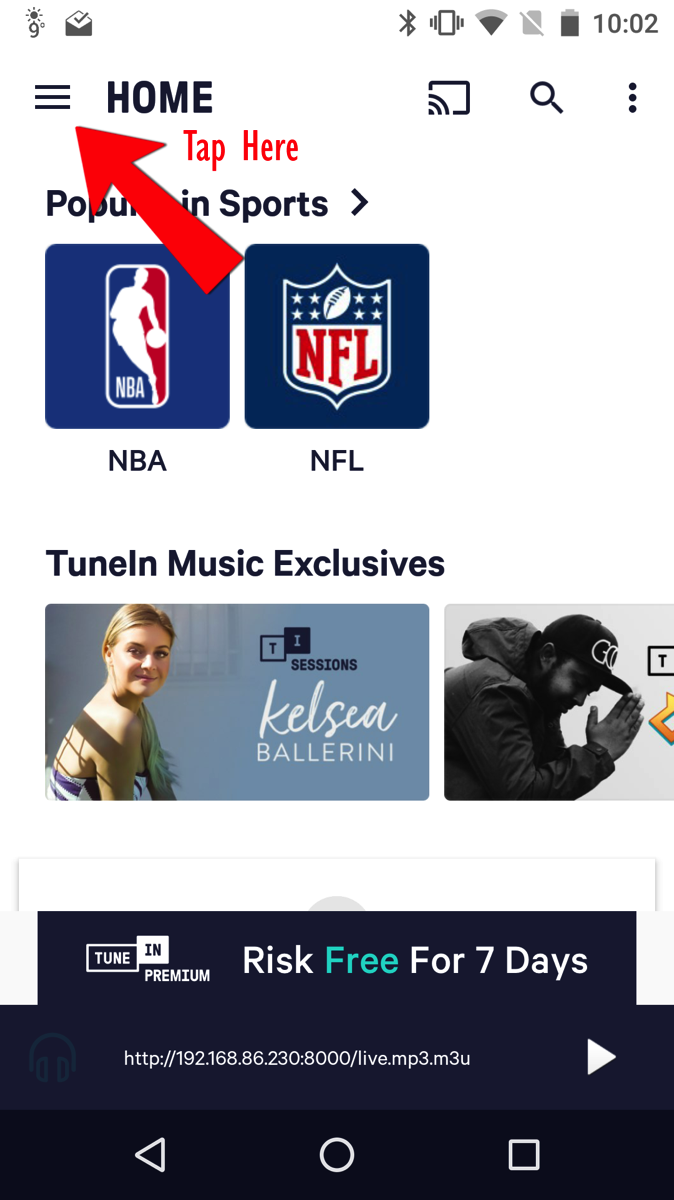
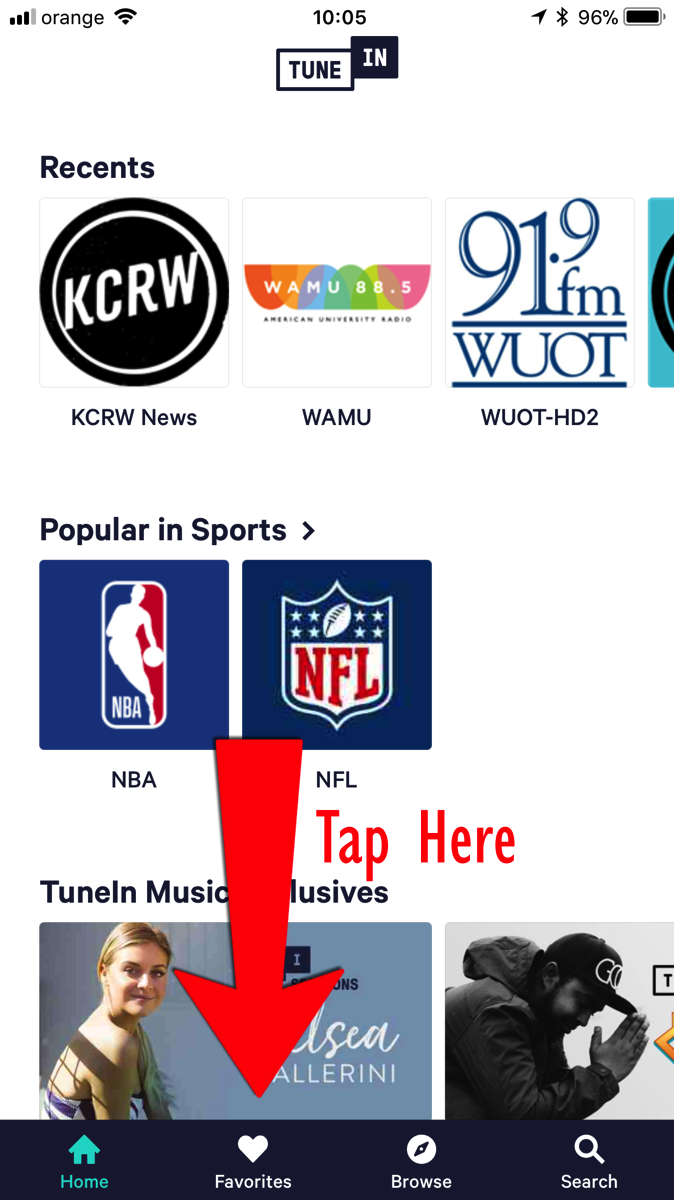
    Step 1: Select favorites from the hamburger menu (Android) or from the bottom set of links (iOS)
    Screenshot 20180314 100225 2018 03 14 10 05 47
    Screenshot 20180314 100229
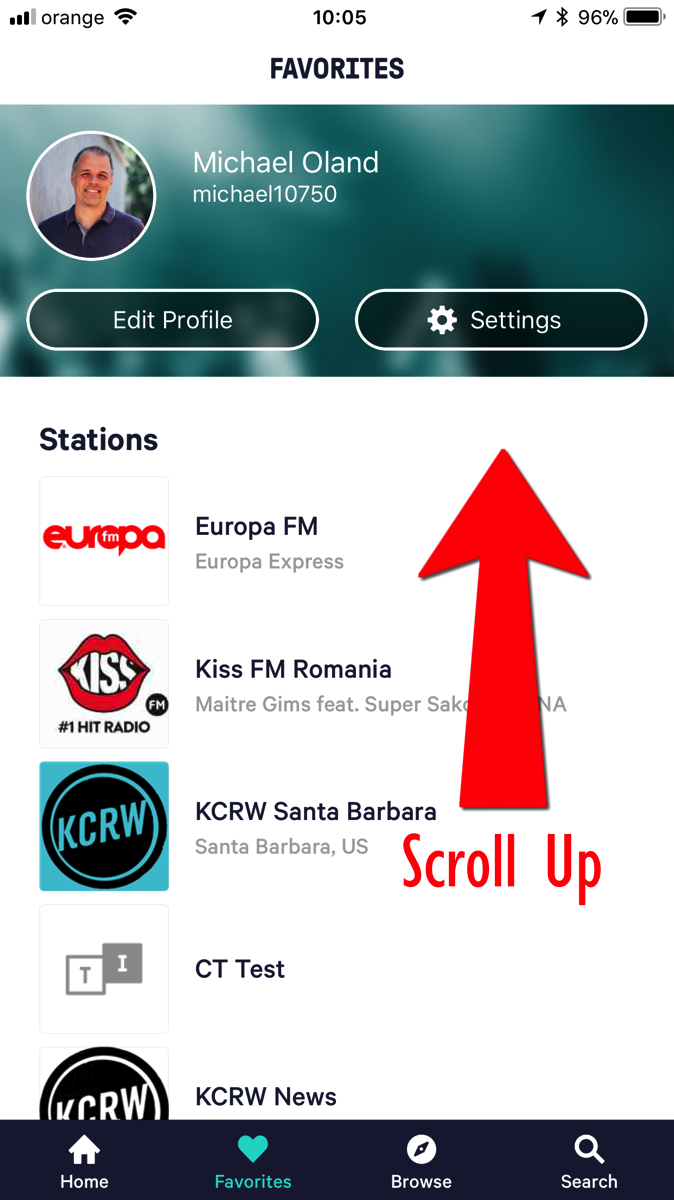
    Step 2: Click "Add Custom URL"
    Screenshot 20180314 100239 2018 03 14 10 05 59
    Screenshot 20180314 100242 2018 03 14 10 06 02
    Step 3: Enter the Custom URL into the box and touch Save on Android or touch the URL below the search box on iOS
    Screenshot 20180314 100247 2018 03 14 10 06 06
    Screenshot 20180314 100312 2018 03 14 10 06 34

    Once you have created and saved the custom URL, each time you want to listen you can just select that Custom URL from the favorites list and it will begin streaming the audio.