Saturday, July 09, 2011

Google Nexus S

So back in May I ordered a new mobile phone.  As much as I liked my old iPhone 3G, it was getting to be a little long in the tooth.  It worked, but was a bit on the goofy side when I tried to do certain things.  Plus, there was a bit of screw you AT&T for trying to buy T-Mobile in my choice.  I ended up with the Nexus S.  While I personally am new to the Android world, my other half has been in the Android world for almost 2 years.  She has the G1.  Now that I’ve had the phone for a couple of months, I wanted to document some of my experiences.

First and foremost, one of the best features of the phone is the built in Wi-Fi hotspot.  Now, to be fair, the newer iPhones do have it built in as well, but since I’m on T-Mobile, the additional feature costs me nothing extra.  And it’s legit.  No jail breaking, no side loading, nothing.  Just a built in feature of the phone.  In fact, I’m at a coffee shop here in DC right now watching over my child process (also known as Alex) and I didn’t even bother getting a code for the Wi-Fi here.  Instead, I’ve conducted some basic business over the portable hotspot on my Nexus S.

And while it’s handy, one thing I’ve found rather astonishing was the fact that during a recent trip to Philadelphia, my Nexus S was better for internet connectivity than the major name hotel I was staying at.  I was even able to watch Netflix streaming on my iPad over the personal hotspot while I couldn’t over the hotel provided Wi-Fi.  Now, there was also a wired connection and I wonder if that would have worked better, but since my iPad lacks an ethernet jack …

Other surprising things for me included:

  • Speed: even though the Nexus S is only on 3G and not T-Mobile’s HSDPA+/4G, using the phone itself is quite snappy.  And compared to the EDGE connectivity I was getting on my old iPhone, this guy’s a downright speed demon
  • Usability: if you listen to the Apple faithful, the Android phones are a pale comparison of the iPhone.  I guess in some ways they are correct.  The iOS devices are definitely slick and I do still enjoy my iPad (though it’s become a bit flaky lately).  Now, that being said, I do like my Nexus S.  It works and generally works well.  Once over the hump, I do think it works as well for me as the iPhone did.  There are more rough edges, but it’s not the night and day difference some think.
  • Auto Updating: it may be a simple thing, but knowing that my phone will just be constantly up to date is a great thing.  There’s no hooking it up to the computer to run updates, it just does it.  And even better is if you allow it, all your applications will automatically update themselves too.  Maybe that’s less of an issue for me, but for others (like my other half), having it keep itself up to date is a great thing.
  • Music: the music stack is not as nice as the iOS versions for sure.  However, I like the choices I have.  If I don’t like the Google-provided apps, I can always install something else.  In fact, one of the best things I have is access to both the Amazon MP3 music store and Cloud Music Service, but also the Google Music service.  They are a single source for storing my music and then syncing to my phone.  It saves me from having to decide exactly which music I want to download and have.
  • Apps: now, any Android phone can share the same apps as my phone, however there are a few exceptions.  One big surprise for me was that any restricted applications, such as Netflix, always target the Google phones first.  That means that when Netflix shipped their streaming app for Android, it supported two phones: the Nexus One and the Nexus S.  I sort of assumed that since the phone wasn’t that popular, I would get those last.  I guess that targeting the pure Google phones is a better idea than I thought.

There are definitely some things I miss and some of the applications aren’t as good on the Android as on iOS, but overall, I’m quite happy with my choice.

Wednesday, May 04, 2011

Next Redbook is out

Last fall I spent 3 weeks in Costa Mesa helping write the updated IBM FileNet P8 Platform and Architecture Redbook.  It’s finally done and posted (or more specifically it was posted about 3 weeks ago and I missed it.  Here’s a link:

http://www.redbooks.ibm.com/Redbooks.nsf/RedbookAbstracts/sg247667.html?Open

Sunday, May 01, 2011

Switching mobile phones

I finally broke down and switched mobile phones this week. I had been using an iPhone 3G (bought new and unlocked at duty free in the Rome airport) on T-Mobile. While not perfect it was a quite serviceable little phone, even though I could only use EDGE speeds for mobile broadband, not the 3G my wife's Android-based G1 used.

For two years, the iPhone was exactly what I had wanted and was a joy to use. Two things happened to make me choose to switch. (well three if geek wanderlust is factored in).

First off, iOS 4.0 came out and many apps started to require it. Because of this, I ended up having to upgrade. Now, for 3Gs and iPhone 4 users, that wasn't t a big issue, but for us 3G users, it wasn't the best upgrade. While it did work, there were a few limitations, most importantly, the speed dropped. iOS just needed a beefed CPU than what my older and aging 3G offered. Now, while annoying, Apple did say at the start, a 3Gs was the minimum for good performance.

While the speed thing was annoying, the second issue that started plaguing me was what appears to be an increasing reliance of mobile data. It seems that more and more applications I used frequently seemed to put a greater and greater strain in the data pipe. What this looked like is more and more apps just seemed to stall for no good reason. On wifi, the problem was less noticeable, so I'm inclined to think they were assuming there was a good 3G connection.

The other reason I chose now to upgrade was the AT&T buyout of T-Mobile. I've been a customer of T-Mobile since 2000, or when they were VoiceStream. I've loved their service and their pricing. And since I live in a big city, coverage was never an issue for me. Well, there was no coverage in my parent's hometown in southern Illinois, but I'm nit there too often, so it wasn't a real issue. Now, with AT&T buying them, I can only assume that means my bill will go up, and up, and up. (hooray for no competition). Upgrading phones now means I signed up for a two year contract extension which means that when our clueless government approves the deal (which it will, even though it's bad for everyone but AT&T), I will still be under contract and they have said they will honor all existing contracts.

Oh, and my current plan is unlimited everything (phone, data and SMS) for both Felicia and myself, for about the same price as everyone else's non unlimited plan. Take that death star...um...AT&T.

I've really only started playing with my new phone, a Samsung Nexus S. So far I really like it. Switching is a strange experience, one I will document more as time goes on.

- Posted using BlogPress from my iPad

Friday, April 15, 2011

New michaelandfelicia.com

For those of you who missed my last post, I decided to take the old michaelandfelicia.com and convert it from a long disused home for our pictures and make it more of a life stream or aggregation of all our other social networking sites and blogs. What made this an interesting project was that I was able to pull out of mothballs my old FileNet WCM / eGrail virtual machine. It ended up being a decent vehicle for doing this kind of project. After a few weeks of messing around, the new site is now officially launched. It's still a work in progress in that it only tracks Twitter (and anything we cross post there) and our blogs. I hope to add more sites as I have a chance to get my RSS parser built for other sites. But in the meantime, this should track us relatively well. - Posted using BlogPress from my iPad

Monday, March 28, 2011

An old friend

In an ongoing effort to keep both friends and people who don't really care up to date with what I and the family have been up to lately, I decided to take my wife and my website, michaelandfelicia.com, and turn it from a place were four year old content went to die and make it a one stop shop for following us and our life. Frankly, I would have liked to have used FriendFeed with a custom URL for this, but since it's been bought by Facebook and seems to have been left out to pasture, I decided that a roll your own solution may be just the ticket. Though to be fair, roll your own is a bit of an overstatement.

So, to that end, I dug out and brushed off an old friend, FileNET WCM 5.1, or more specifically eGrail. It may have needed a bit of dusting and removal of a small amount of bit rot, but once it got it back up and running, it felt and still feels like home. I do have to admit, that it has taken me a bit of time to remember all the old tricks, but even after almost 10 years, the software seems as good as ever.

I often wonder what would have happened if FileNET would have kept working on it ....

Anyway, I decided to take the old syndication module out for a spin and so far it seems to be working just great. I already have it pulling in feeds from Twitter and Blogger. Not sure the other feeds I'll pull in, but if it has RSS, then it's fair game as far as I'm concerned.

So far the only real issue I've seen is that WCM seems to expect a single article per XML file. That meant I have to preprocess the feeds using Java, but I had to do something to download the data anyway, so it does seem l be working out. As soon as it's ready, I'll post a link.

- Posted using BlogPress from my iPad

Saturday, March 12, 2011

Infrastructure

I hate it. I really hate it, but after seven years with Speakeasy as my primary Internet provided, I ended up having to switch to Comcast. There was just something increasingly wrong with my old POTS-based DSL line. When I first moved into the new house, I was getting a solid and very reliable 5.1 or 5.2 Mbps. While not the best, it was sufficient for my home office and enough to reliably do Netflix streaming in HD.

But it was definitely expensive. I was spending about $105 per month for the service, which was a bit high. However, it was business class and was running on a dedicated loop, meaning it wasn't sharing the line with my current telephone service.

However, after. Year and a half of service, something went wrong and the speed and reliability began to drop. Toward the end, about the best I could reliably achieve was about 4.0-4.2. I'd lost about 20% of my performance. And that drop was just enough that I could no longer stream Netflix at HD. In addition, with Felicia quitting her job to take care of Alex, we had additional demands on the service.

So, in the recommendation of my brother in law, I looked into Comcast Business service. I ended up with the cheapest package for both Internet (10x2) and basic cable television as well as a telephone line. The true triple play as it were. Now, I did end up opting for the static IP address at $14/month, I think.

All of this together, even with the static IP, ended up being $50 per month less than what I was paying for my DSL line and telephone before. And just as important, it's been reliable so far. I've been with them for going on three weeks now and I can't really complain so far.

As time goes on, I'll try to report back if I see any throttling or bad traffic shaping.

Sunday, September 19, 2010

Mindy 3.0 – Open the Windows!

So, in what appears to be an annual event, I’ve had to rebuild Mindy yet again.  This time it wasn’t a complete hardware failure that caused the refresh, though there was a minor hardware problem involved.  Turns out when I rebuilt her last year, I had picked up three Western Digital WD1001FAYS 1Tb hard drives to uses as part of the RAID configuration.  Unfortunately, those are desktop drives and appear to be basically incompatible with any kind of RAID for redundancy (RAID-1, RAID-5, etc).  I kept seeing disk timeout errors from my RAID controller which were causing system stalls (up to 60 seconds) and repeated verification runs on the array.  Besides being annoying (nothing like having the music you’re listening to just stop mid stream followed by a very annoying repeating click – love the SoundBridge, but it doesn’t handle that gracefully), I also would see file corruption on my primary file server.  Fortunately it was confined to the logs, but it was no good none the less.

The other issue I was seeing was an almost complete failure of the VMware web UI (MUI).  When I first rebuilt her, I installed Ubuntu Linux server 8.04.2 LTS.  My hope was to avoid doing a rebuild for a while and plus I’d worked with Ubuntu for a while and really liked it.  Unfortunately, it appears that Ubuntu + VMware Server 2.x (at least for me) are not really a good combination.  For the first couple of months, all was well, but then the MUI started failing to connect to the back end server.  At this point, I can’t tell if it was a simple degradation of the system or if it was a result of an update (I think the latter).  Regardless, by about 2 months ago, I would restart the UI, connect once or twice and that was it.  I could never reconnect, so no starting VMs, stopping VMs, etc.  It became basically unmanageable.

At that point, I decided it was time to fix the drive problems by replacing the desktop drives with three Western Digital WD2002FYPS RE4 2 tb drives.  These are the RAID Enabled drives, which basically means they have TLER (time limited error recovery) enabled.

Time Limited Error Recovery (TLER) - instructs the drive that in the event of write failure that it should limit the amount of time it takes to attempt to correct the issue.  Typically this is 7 seconds.  That way the RAID controller can catch the issue and help fix it rather than assuming the drive has timed out.

No only do they have the TLER, they also have a 5 year warranty and 64mb cache, so they are blazingly fast.  More on that in a moment.

So, about $800US later and I have three new hard disks and the battery backup (BBU) for my LSI / 3ware 9650SE RAID card.  (I’m thinking this is worse than a child, but I digress).  I proceed to backup all the data (no small feat with 3tb online and only 1.5 tb of space around), and start the rebuild.  First thing I do is take out the six hard disks I had in the system before (3x1Tb and 3x500Gb), attach the BBU and install the three new RE4 drives.  Then I had to determine which OS to use for the new system.

My original plan was to move to VMware ESXi 4.1.0 so I could continue to leverage my investment in VMware (both as a desktop system and from the server).  So that was my first move.  I build the array and then tried installing ESXi.  No dice.  It would load the bootstrap and then just before starting the configuration UI, it would freeze (at the “Booting: MBI=0x01100db, entry=0x00100212” step).  I couldn’t seem to figure out what was happening.  Nothing online seemed to explain the error and I had a hard time determining if my motherboard (ASUS P6T Deluxe V2) was supported or not.  VMware does have a small number of supported motherboards and the ASUS was definitely not on there.  I had found a site that said the P6T (no additional markings) has been made to work, so I didn’t assume it was a complete hardware incompatibility.

I was stumped, so I turned to Windows Server 2008 R2.  I have an MSDN account, so I pulled down the server installer, just to see if it worked.  Funny enough, it failed too.  The installer would start and then almost immediately give me a black screen and an error code (—insert code here—when I find it).  I dug around and was finally able to determine that Windows (and ESXi for that matter) both failed to start because I had disabled ACPI in the BIOS (remnants of me trying to solve the drive timeout problem mentioned earlier).  Enabling that allowed both to boot.

Now I had a decision to make.  Do I go with ESXi or Hyper-V.  My preference was definitely VMware’s solution as I’ve used Server and Workstation for quite some time and generally have good luck with it.  In fact, I use Workstation on my work laptop on a regular basis.  So it was back to trying to get VMware to boot.  First thing I discovered is that VMware ESXi (not ESX) cannot be installed to a RAID card like mine.  It needs some sort of storage (non-RAID).  So I ordered a compact flash card to SATA adapter.  Once that came in, I tried it again.  Still no dice.  Now I got an error saying the vmfs3 module wouldn’t load.  Back to Google.

After a bit of searching, I think I’ve determined that it isn’t compatible with my network card, and apparently this is a requirement for it to install.  I thought about ordering a new network card, but at this point, I was tired of spending money.  And while the CF to SATA card was being delivered, I tried Windows 2008 and seemed to finally get it to a point where it looked usable.  So, I ended up installing Windows Server 2008 R2 and Hyper-V.  (Though, I probably should have gone with the Hyper-V stand alone, free product in retrospect … and if I had known about it, I would have).

All wasn’t completely rosy, but I’d made my decision.  There were, however, a couple of key tweaks I had to perform before the system worked as it should.  I ended up having to disable the IPv4 large packet offload on all the systems before I managed to get proper network performance.  Actually, on my Server 2008 client OS install, I just disabled all offload.  Now, I can get around 40-60Mb/sec transfer rates to and from the VM.  That’s what I like to see and wasn’t ever quite seeing with the older VMware/Linux setup (though, I didn’t have the BBU for my card and I think the new drives have twice the cache, so that’s not necessarily an apples-to-apples comparison)

No matter, I now have Mindy 3.0 up and running and she’s doing quite well.  I’ve even used the Vmdk2Vhd converter to move from VMware to Hyper-V.  Though, one piece of advice for the transition: before moving any Windows VMs to Hyper-V, install an IDE hard disk, boot the VM and uninstall the VMware tools.  That’ll make sure you can (a) boot the Windows VM on Hyper-V (as it only offers IDE disks for conversions like this) and (b) you actually get the VMware tools uninstalled.  They don’t like being uninstalled off a non-VMware hosed system.

Monday, March 15, 2010

HD HomeRun

Was checking my newsfeeds on Sunday and happened to see that Newegg was selling a Silicon Dust HD HomeRun networked digital TV tuner for $75 (or $25 off the regular price).  I’ve been thinking of getting one of these for quite some time, so … what the heck, right?

For those of you not familiar, the HD HomeRun is just a simple TV tuner that connects to your home network.  Then, with the right software or hardware, it’ll let you watch live TV on your computer (or your TV …. wait …)  In addition, you can get software that’ll work like a DVR (or TiVo).  I’m hoping to use this to record live TV and then have it automatically converted to AppleTV format so I can watch if whenever I want to.

Ok, I could have gotten a TiVo and done the same thing, but with this solution, I get to keep the files and copy them to whatever device I want, like my AppleTV or an iPod.  Plus, I’m a nerd, so getting something like this to function and do what I really want it to do is a challenge and fun to boot.@

Sunday, January 03, 2010

Apple’s Rumored Tablet … My Take

For at least the past 5 years (and maybe more, I’ve kinda lost track), there’s been speculation that Apple will release a tablet-based computing device.  Each year, the pundits and everyone else take their time to pontificate and or pass on the latest inside information saying that the tablet is nigh.

This last year was no exception.  Everywhere I looked, people were thinking it was coming soon or going to be at least announced at the next major Apple event.  Personally, I’ve not taken much stock in the rumors because they didn’t seem credible, and from my way of thinking (based mostly on what other people were saying), there was no real reason for Apple to release one.  And up to this point, I’ve been right.  Apple has yet to release a tablet (other than the iPod Touch which, while very nice, isn’t a “tablet”)

However, the Wall Street Journal has started talking about a tablet computer, so for this reason, the tablet appears to be a bit more real than it did six-to-eight months ago.  For that reason, and a friend who also got me thinking about what a tablet could be, I’ve started thinking about what it could be.  Before I say anything else, this is just pure conjecture and a fair amount of “wag”-ging (wild-ass guessing) and I don’t have any kind of inside information or sources.  In fact, I’m pretty sure the world doesn’t really care what I say, but on the off-hand chance what I say is correct, I at least wanted it on public record.

I tend to think that every Apple device they release has to have two things going for it:

  • A simple, elevator pitch to explain the device
  • A place in Apple’s overall story

Before I go forward, I do have to point out that I didn’t come up with these requirements.  Rather, I borrowed them from Chicago Sun-Times columnist and regular on TWiT’s MacBreak Weekly, Andy Ihnatko.

So, what do I mean by the above items?

Every Apple device they currently sell (especially on the consumer side) can be summed up in one sentence.  For example, the original iPod was “1000 songs in your pocket”.  The MacBook Air was the “lightest Macintosh ever”.  This is the elevator pitch.

Secondly, the device must fit into the Apple story.  Apple wants to be the center of your digital life.  The iPod offered a way to handle your music.  The iPhone offers the whole internet in your pocket as well.  Even the Macintosh fits in with iLife (iTunes, iMovie and iPhoto), handling your music, home movies and photos.

What would an Apple tablet bring to the table?

I tend to think it’ll be something of an extension of your digital life.  And I think it’ll do it through touch-ready versions of the iLife suite.

What I envision is a netbook sized device that can carry all your pictures, movies and music with you wherever you go.  And it will work either as a stand alone device or as an addition to your current Macintosh.  Going on a trip, take your music, movies and TV shows to watch.  Oh, and if you take pictures or video on the trip, download them directly via the built-in SDHC card reader (or via USB).  You can even do photo manipulation via iPhoto touch and quick video editing with iMovie touch.

Then when you get back home, you’ll be able to sync back up with your home Macintosh’s iPhoto and iMovie libraries to continue editing, or even move the videos and pictures into the professional apps, Aperture and Final Cut Pro.

I also suspect that in addition to WiFi-based wireless, it will also integrate well with your iPhone.  Need to check e-mail on the run, you can do it on your iPhone or use the integration to check it on your tablet.  I don’t expect it to have or offer built-in wireless.

The one thing I have heard recently that makes me question this a bit, is the talk of electronic magazine publishing via the tablet.  It does make some sense, but I’m still inclined away from this being primarily a static media-based device (like a magazine / newspaper reader).  Maybe it’s an addition, but I can’t imagine someone shelling out $600 or more for something like this.

I could be wrong, though.

Friday, June 26, 2009

Security Snake Oil: The Bogus Email Address

This is the first post in what I think may be a series of security snake oil e-mails and ideas that are forwarded my way. However, before reading this, know that the best way to handle your computer security is outlined here;

Just received this forward on how to "protect" your e-mail address book from worms:

How to protect your e-mail address book:

A computer repairman says this is like having gold. This is a good thing. I learned a computer trick today that's really ingenious in its simplicity.

First dead giveaway that this isn't real is that the fix is "simple". There's no panacea for computer security.

As you may know, when/if a worm virus gets into your computer it heads straight for your email address book, and sends itself to everyone in there, thus infecting all your friends and associates.

This trick won't keep the virus from getting into your computer, but it will stop it from using your address book to spread further, and it will alert you to the fact that the worm has gotten into your system.

Here's what you do:

First, open your address book and click on 'new contact,' just as you would do if you were adding a new friend to your list of email addresses. In the window where you would type your friend's first name, type in ' A'.

For the screen name or email address, type AAAAAAA@AAA.AAA

Now, here's what you've done and why it works:

The 'name 'A' will be placed at the top of your address book as entry #1..

First problem is that may not be the case. Just because you see it first does not mean that it'll be the first e-mail stored on the drive. Data is stored in the way that the computer can access it the quickest or perhaps as you've added it. Then when the computer goes to show you the details, it will sort that data into a human readable format. However for the worm, it'll get it in the quickest order the computer can hand it back.

This will be where the worm will start in an effort to send itself to all your friends.

When it tries to send itself to AAAAAAA@AAA.AAA, it will be undeliverable because of the phony email address you entered. If the first attempt fails (which it will because of the phony address), the worm goes no further and none of your friends will be infected.

Second place this breaks down is assuming the worm will stop on error. It won't for 2 reasons:

  1. Internet mail delivery doesn't work this way. It takes the e-mail and then tells the app it's received it. The app then moves on while the mail delivery system tries to deliver the message.
  2. No worm writer would stop on a bad e-mail address. Even if it did get immediate failure, it would just skip to the next address and keep going.

Here's the second great advantage of this method: If an email cannot be delivered, you will be notified of this in your In Box almost immediately. Hence, if you ever get an email telling you that an email addressed to AAAAAAA@AAA..AAA could not be delivered, you know right away that you have the worm virus in your system. You can then take steps to get rid of it!

This is the only valid point in this article. Having a bad e-mail address in your address book would guarantee a failure you may catch. However, it doesn't matter much as your computer already has a problem. And this problem could be stealing your identity, invading your privacy and generally causing problems. The best bet is not to try and catch the problem to fix it, but to keep it from happening in the first place.

True Security Options

I've seen a number of e-mails from friends and family talking about different ways to handle computer security and to ward off bad things. Almost every time what's recommended in these e-mails or articles won't help or are of at best dubious benefit. Instead of this snake oil, there are a number of things that you can do to keep your system safe. In fact, for the longest time, I didn't even use an anti-virus application and as of yet, I have not gotten a virus or malware on my system. (I've since started using one, just as a precaution ....)

The top 4 most important things your an do:

  • Always patch your computer and keep your applications up-to-date. (Use Windows Update, Apple's SoftwareUpdate, or the appropriate updater for your system)
  • Don't open attachments from someone you don't know
  • Don't click on random links in e-mail, Facebook, Twitter, etc, especially if you don't know who it's from
  • Use a hardware firewall (like a router, any router). This means you can reach out onto the Internet, but stuff outside the internet cannot reach back to you. (I generally like Linksys, but just about any company's router will do)

In addition to the above, here are a few more things you can do:

  • Avoid pirated software and most music sharing sites as many of the files contain malware, viruses, worms, etc.
  • Be aware that Windows by default hides the extension of a file, so the file you see as image.jpg may very well be image.jpg.exe (where .EXE is an executable file that could contain a worm, virus or some other bad thing)

This is not an exhaustive list by any stretch of the imagination, but these are the basics, like locking the doors on your house and car, keeping valuables out of sight, etc. They won't deter a determined intruder, but will save you from the drive-by and opportunistic attacks.

Keep this page bookmarked as I'll continue to add links and details as I have more.

Monday, June 15, 2009

Mindy 2.0 Part 1

So, about a two weeks ago now my server computer, named Mindy (named for the Animaniacs character), decided that it was too hot to work and died. Well, at least sort of died. When I got back from a trip, she was no longer responding to pings and when I tried to reboot her, she would power down after about 20-30 seconds. Best as I can tell, I have a temperature management failure on either the power supply or the motherboard, not sure which.

In thinking about how to approach fixing the problems, I was stuck with two basic paths: try and find the failing component or replace the core components and build a version 2.0 Mindy. If I had a good computer store handy, I would have tried replacing the individual components, but the closest real store I have access to is MicroCenter out in Fairfax or Rockville. (And no, BestBuy does not qualify as I need real parts, not the desktop/consumer parts they have). In addition, my hope was to get this back and running ASAP, so ordering a new power supply and then a new motherboard, etc, just seemed to be a slow process.

In the end, I decided to just replace her guts and upgrade the mainboard, power supply, CPU and memory. This was a good excuse for me to upgrade from the 18-month old Core2 CPU and desktop motherboard and move to a server-type board with a dedicated PCI-E slot for the RAID card I have and to target the new Intel Core i7 chip. So on the recommendation of a friend via Facebook/Twitter, I went with a SuperMicro C7x58 motherboard. In addition, I purchased 12Gb of RAM, a Corsair 630 watt modular power supply and 3 1TB hard disks.

The parts arrived from Newegg on Wednesday, but we had friends over for dinner that night, so I wasn't able to start working on the transplant until Thursday evening while watching Burn Notice and Royal Pains on USA (good shows, btw). I took my time and slowly moved the parts and completed the upgrade about 10:30, too late for me to want to try starting the system. But at least everything fit and looked like it was going to work well.

Friday morning came and I woke up a bit earlier than normal, so I thought I'd give it a quick run. When I went to hook the monitor up to try it, it was at that point I discovered that the motherboard I picked did not include on-board video.

Crap. I didn't even think to look at that. I assumed that it would include Intel integrated video, but alas I was wrong.

Friday came and went and I hadn't been able to get out to get a video card. I did take a few minutes to try and ID the right one both by online shopping and asking friends via Twitter/Facebook what they recommend. Saturday came and went and I had ID'd the card I wanted to buy from BestBuy, a PCI-E 16x passively-cooled video card. Seemed like a good choice as it didn't draw much power and didn't need a cooling fan to work.

Only, it didn't fit. Turns out the card had a HUGE heatsink that spanned both sides of the card. Crap again. The two PCI-E 16x slots I have available surround the PCI-E 8x slot that holds my AMCC/3ware RAID card. I had planned on using the one furthest away from the CPU as it was clear on the non-RAID card side. Unfortunately, the heretofor unknown back-side heatsink wanted to take the same space as the RAID card's jumper pins. And if I tried the CPU-adjacent slot, it hit the humongo CPU fan that came with the i7 processor I purchased.

Sigh, so that meant my first attempt at a video card failed, so back online I went. This time, I decided to purchase a PCI-based inexpensive video card, since the area round my PCI slot is completely clear. As I type, it's being delivered from NJ, so hopefully it'll arrive tomorrow so I can give this whole thing another shot. In the meantime, thank goodness for the Lenovo S10 and Google Apps for domains as they can temporarily replace some of what I relied on Mindy 1.0 (or maybe 1.5) to do.

Thursday, May 14, 2009

Google Chrome

I've started playing with Google's Chrome bwser. At first, I thought it was mostly a toy and not a good replacement for my trusty Firefox. However, the funniest thing has happened. I've started to grow to like it.

Screenshot:

google-chrome.png

Why do I like it? Well, there's no one compelling reason that I can point to that makes me choose it. Instead, it's a small number of little things. I think the biggest reason may be that it's new and something for me to play with. As a nerd, that's definitely one of the things I like is to play with new things.

But in addition to that, I do find it oddly compelling. The UI is simple and on my Lenovo S10's small screen it tends to stay out of the way. And that's never a bad thing. In addition, it feels rather fast (faster than Firefox), but that could just be my perseption and not reality. Will it completely replace Firefox for me? No. But is it a great 2nd browser? Yah, you betcha. (sorry, I'm writing this while sitting in a bar in St. Paul, Minnesota).

There are a couple of things that will drive you nuts at first. For starters, the tabs are not under the menu and control bars, but are instead part of the title bar. Supposedly Safari 4.0 does it the same way, but I haven't really tried it yet to be able to say for sure. In addition, the location bar and the search bar are the same thing. Now, this isn't as big a deal as it seems because now you can just type in what you're looking for and Chrome will just try and sort it out. Finally, there's no menu bar, and in its place, the menu items are all pushed into two submenus on the right hand side (the wrench and gear icons in the screenshot above).

None of these things are major, but just something to be aware of before trying it.

Feedback loop

So, something really interesting happened to me the other day. My wife and I were pondering which fridge to get to replace our then dead Frigidare. A couple of trips to Home Depot and Best Buy, plus plenty of web surfing later, I had settled on two: a Kenmore (Whirlpool/Frigidare/whatever) and an LG side-by-side. Both were about the same price and both were comparable in size. However, on sears.com (where I was looking to buy because they could get it to us before my family arrive in DC), the LG was lower rated than the Kenmore.

My problem was the LG looked better and (for some reason) was more appealing to me than the Kenmore. Maybe part of the problem was the Kenmore was a direct replacement for the one that just died on me. And by direct replacement, I mean everything was identical, so it felt like the same fridge. Plus the LG just plain looked better.

As the decision time drew near, I ended up tweeting about my dilema. Now, I've heard the digerati talking about how they ask questions of their Twitter minions and getting good answers, but I've never found that to work for me. Maybe I have too few followers (46 at last count) or maybe they just ignore me (and based on my occasional inane tweets, I can understand why).

But apparently, my friends on Facebook do pay attention because by the morning I already had a few people telling me to go with the LG. And the best part is it was based on their personal experiences.

So, we now have a new LG side-by-side refrigerator and it seems to be working well. The ice maker is a bit sub-par, but that was the common refrain from the web and my Facebook friends, but no product's perfect, right?

Tuesday, May 12, 2009

More Google Apps

In playing more with Google Apps, I just discovered that you can use custom subdomain names for accessing services such as mail, documents and calendar. It's just a matter of logging into the Google Apps domain console -> Service Settings -> Service and under the General tab, clicking change URL under the web address.

Once you have your address set, you'll need to add a CNAME to your account (just as was done when creating the blog link in my previous article). And then, as they say, lather-rinse-repeat for all the desired services.

I'm still waiting for my domain changes to go through, but so far everything appears exciting. The only recommendation I would make is to make the CNAME changes about 24-48 hours before enabling the subdomain in Google. In doing so, you will minimize downtime waiting for the changes to propagate throughout the DNS system.

Thursday, May 07, 2009

The joys of home ownership ....

So, it's been one of those weeks here at the new house. Well, I guess the problems really started last week when the temperatures in DC hit 94F (34c) for about 3 days in a row. Those days revealed how warm the upstairs in our 1913 row house could get and really meant we had insufficient insulation in the attic.

On Saturday, then, I finally climbed up to the attic to survey the situation. And yes, there was not just too little insulation, there was NO insulation in the attic. Why the previous owner didn't bother installing any when he retrofitted A/C into the place, I'll never know.

To make matters worse, in looking around, I found a couple of cracked roof beams that need some TLC. And of course, given the way the house is arranged, you can't just climb into the attic and fix the beams. Instead we're going to have to go through the ceiling in the second guest bedroom.

And then finally, on Thursday of last week, the refrigerator gave up the ghost. At first, I thought it was the defrost timer, so I replaced that. Turns out that was a problem because when I plugged it back in and turned it on, the relay did kick over to turn on the fridge ... and then the circuit breaker popped. Turns out the defrost timer was burnt out because the compressor had kicked the bucket. So, now we have a new refrigerator too.

This whole house thing is becoming expensive. But hey, at least we can control how these things are fixed.

Sunday, May 03, 2009

domain.com + BlueHost + Google Apps for Domains

So, I've been playing for the past week or so with consolidating and rearranging my domain names into a more cohesive set of services that Feli and I can use for e-mail, hosting and calendar sharing. Up to now, I've been using Speakeasy for my hosting and e-mail (as well as my DSL service). I've been rather happy with the, but the lack of a good calendaring service (and just needing to decide what to do with my other domains) got me thinking.

I started playing using domain.com as my registrar and finally figured out how to do things like subdomains (ie: blog.michaelandfelicia.com), integration with Blogger and Google Apps. So, what I hope to do is give a quick HOWTO on getting all of this to work together with domain.com. Though this is specific to domain.com, but basics should work for other sites.

Step 1: Enable DNS management with domain.com

Before you can make any custom DNS changes, you need to enable domain.com's DNS management. If it's not already done, you can add it for free using the Add Services menu item on the control panel.

Step 2: Disable page forwarding and e-mail forwarding

For each of these, go to Manage from the domain page and select "Remove Service".

Step 3: Configure a Google Apps for Domains account

You can sign up at http://www.google.com/a/. By default it will offer you a Pro account, which is a bit much for just a personal set of services, so pick the Standard settings and work through the configuration and setup options

Step 4: Authenticate the domain

Google (for good reason) requries you to authenticate your ownership of the domain in question. The easiest way to do this is to create a CNAME record on domain.com, so when authenticating your domain, pick this option. Google will offer you a name that looks like "google<numbers/letters>". Copy that and go to the domain.com DNS settings page. Paste the name into the CNAME record field and enter google.com on the second field. (I'll enter screenshots as I have time)

Step 5: Configure E-mail

While creating the CNAME record, enter the MX (e-mail) records. Google currently has 6 entries that need to be created. You'll enter each one individually into the MX field on that page and hit update. You can find the settings when you go to activate e-mail in Google Apps or in this answer page. Once you've added all 6 items, you should be able to receive e-mail.

Step 6: Configuring Blogger

If you want to use your blog as your primary website, log into Blogger and go to blog settings -> publishing -> advanced settings. From here, enter your domain name and submit. If you want to do a subdomain (ie blog.michaeloland.com), you can select Advanced settings again and type in the full domain name and hit submit.

Step 7: Add the CNAME record for your blog

Back in the domain.com control panel, add another CNAME record, this time either leave it blank for the default website (ie www.michaeloland.com) or the subdmian name (ie blog for blog.michaelandfelicia.com) and in the host add ghs.google.com. Hit update and your blog should be ready.

Step 8: Configure BlueHost

To use BlueHost as your primary webhost, add 2 more A records (www and ftp). To get the appropriate IP address, you will need to contact BlueHost support.

At this point, you should be good to go. For me, the nameserver propagation took about 2 hours, but it could take up to 3 days for everything to clear out. If this doesn't work for you or you see soemthing wrong, please leave comments and I'll update this.

Wednesday, April 22, 2009

The holes are gone ....

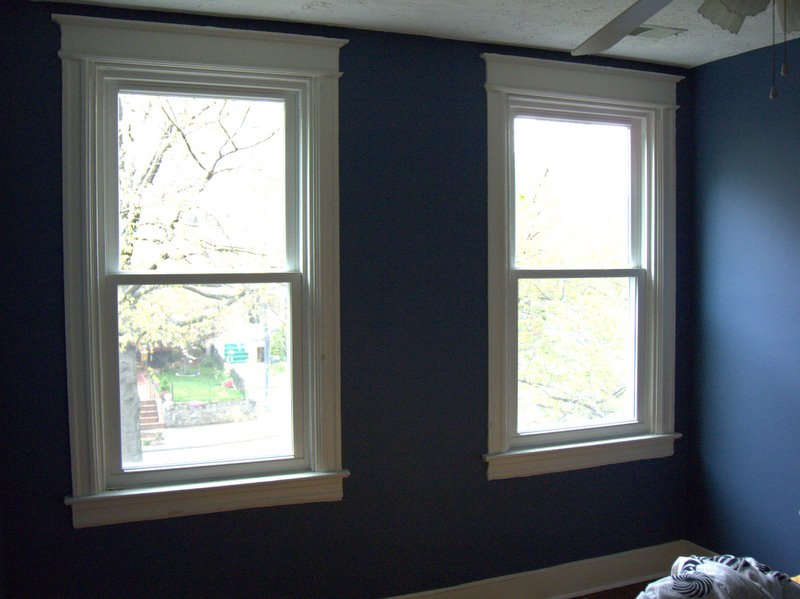
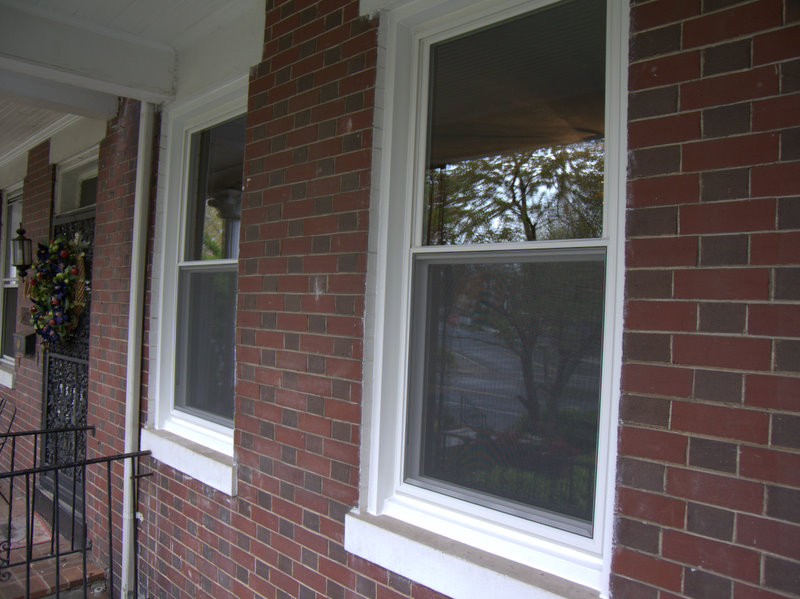
The new windows are in and they look great. So far, I'm quite happy.

DSCN3362.jpg

DSCN3359.jpg

DSCN3360.jpg

There are two big holes in the front of my house ...

Not to worry, they're just where the old aluminum windows used to be. We have new windows being installed today (for Earth Day as it were). Hopefully the new ones will be quieter and more energy efficient (they're vinyl) than before.

DSCN3358.jpg

DSCN3357.jpg

I'll post more pictures as the windows are installed.

Friday, April 17, 2009

My name

It's taken a bit of doing, but I finally own the first page of search results for Michael Oland. Well, almost that is. There's apparently a Michael Oland in Halifax that seems to own the first result (his Facebook page), but other than that, It's almost all me.