Monday, February 12, 2018

Groovy: Basic Concepts: Binding and Scope

Binding and scope define how a language manages defining, storing and accessing variables and the data contained or referenced by that variable.  This section describes how Groovy manages variable/function binding and scope.

Type Binding

Groovy uses a hybrid of static and apparent dynamic typing.  Because Groovy is a superset of Java, it can utilize the compile time binding and type definition of the Java language.  However, to increase the flexibility of the language, Groovy added an additional layer of dynamic-like typing.  It accomplishes this through the def keyword which creates an un-typed variable.  This type allows the Groovy interpreter/cross-compiler to perform a runtime evaluation and value interpretation.  Under the covers, Groovy treats any variable defined by the def keyword as a subclass of Object.
Groovy, when executing in script mode, does not require that variables are explicitly defined offering the option to implicitly define them as in Perl or other languages.  However, if the value is implicitly defined, then it contains a separate scope than an explicitly defined variable.  See Scope below for a further definition of how Groovy works with scope.

Scope

Scoping defines where a variable can be accessed. This section describes how Groovy manages scope.

Scope and Visibility

Groovy is a nested block-based language, like Java.  This means that Groovy follows the block scope concept where a variable’s scope is limited to the inner-most block that it exists in.  For example, a variable defined inside a loop or other block structure only exists within that block.
Groovy also offers a class grouping through the use of packages.  This allows the developer to group a set of related classes together.  In the context of scope, this affects the class and instance level variables and methods, specifically in where they can be invoked.  Packages are defined as follows:
package name.with.dots
When defining a variable at a class or script level, the language offers three levels of visibility protection: public, protected and private.  Public variables and methods are available to any class within any package.  Protected variables and methods are limited to access within other classes in the same package.  Private variables are restricted to instances of that class only.  In Java, the default visibility for a method or variable is protected.
When a Groovy application is written with classes, it follows the standard Java-based scoping as defined above.  One difference with Java is that Groovy marks variables and methods as public by default instead of protected.  The following example shows example Groovy code written in the class style and executed in the runtime interpreter.
class ExampleClass
{
    // Statically defined variable
    private static def STATIC_STRING =
             "A static string"
 
    def createString()
    {
         return STATIC_STRING + "," +
           System.currentTimeMillis()
    }
 
    public static void main(String[] args)
    {
        ExampleClass ec = new ExampleClass();
   
        AnotherExample ae = new AnotherExample()
        // Accesses the automatic getters/setters
        ae.index = 1
        ae.name = ec.createString()
        println ae
    }
}
 
class AnotherExample
{
    private int index;
    private String name;
 
    // Remember, Groovy is public by default
    String toString()
    {
        return name + ":" + index;
    }
}
This code will generate the following output:
A static string,1510640317383:1
However, Groovy can also run in either an interactive or script based mode.  When a Groovy script is executed, scope is modified slightly.  Specifically, variables defined with a type (def, int, etc) are bound to the script itself.  This means any methods, called closures in Groovy, defined in the script will not have access to that variable.  If a variable’s type is not specified, it is given a global scope.  The mechanics of how Groovy deals with script mode will be described in the Object-Oriented Paradigm section.
The following example will demonstrate the scoping of variables in Groovy.
def useGlobal()
{
    // This will work as its a global
    println "In useGlobal: aGlobal = " + aGlobal
    aGlobal = 4
}
 
def useLocal(def variable)
{
    variable = 4
    println "In useLocal variable = " + variable
}
 
def failOnLocal()
{
    // This will throw an exception
    println aLocal
}
 
// Define the variable globally (available to all
// methods)
aGlobal = 1
// Define it local to the script
def aLocal = 1
 
println "In script aGlobal = " + aGlobal
useGlobal()
println "In script aGlobal = " + aGlobal
 
println "In script aLocal = " + aLocal
useLocal(aLocal)
println "In script aLocal = " + aLocal
 
failOnLocal()
Given the above script, the following output is generated:
In script aGlobal = 1
In useGlobal: aGlobal = 1
In script aGlobal = 4
In script aLocal = 1
In useLocal variable = 4
In script aLocal = 1
Exception thrown
In this example, aGlobal is treated as a global variable and is accessible both in the script itself and any of the defined functions.  The variables aLocal and variable are scoped more narrowly.  The variable aLocal is scoped to the script itself and is not directly available to any closures.  The variable v is scoped to the useLocal function only.

Storage Binding and Lifetime

Java, and by extension Groovy, allows for static binding of variables storage.  They accomplish this through the static keyword.  Any variables or functions defined with this modifier will be allocated storage during compile time and be readily accessible.  Other elements in a Groovy application are dynamically allocated storage at runtime.  These elements include non-static, class and method level variables as well as any object instances created during execution.  Groovy also offers a final keyword which marks a variable as readable but not updateable.

Declaration

Variable declaration defines the type, name and other elements.  This section describes these elements.

Type

Groovy does not support the declaration or re-declaration of types.

Constant

Groovy does support a form of constant through the use of the final and static keywords.  Variables marked as final are identified as non-modifiable and static indicates that a variable is available throughout the lifetime of the program execution.

Variable

Groovy allows for creating variables to store values, manage composite values and reference objects.  In defining a variable name, Groovy allows for names using a mixture of characters and numbers.  The following rules apply:
  • Variables must start with a character or a dollar sign ($)
  • Variables must not start with a number
  • They can include characters A-Z, a-z, \u00C0 to \u00D6, \u00D8 to \u00F6, \u00F8 to \u00FF and \u0100 to \uFFFE
  • It must not be a reserved keyword, such as as, for or while
  • Quoted identifiers are allowed after a dot (.) in a dotted expression.

Procedure

Groovy defines procedures in a similar manner to C, C++ and Java.  It takes the form of:
<return type> name(<parameter list>)
If a procedure is declared in a class it can optionally be prefixed with a visibility modifier.  In script mode there are no visibility modifiers.

Sequential and Recursive

Groovy supports sequential and recursive declaration in both class and script modes.

Blocks

Groovy is a block based language, with blocks defined by a pair of curly-braces ‘{}’.  Blocks control the scope of a variable, as discussed in the section Scope.  It also provides a collection of commands that can be assigned to a function.

Groovy: Basic Concepts

In presenting a new programming language, there are a number of basic concepts that are common to all programming languages.  What is different is the way they are expressed.  These basic concepts include:

  • Values and Types - how the programming language defines the data types it uses and how it manages storing values.
  • Expressions - statements and elements that express a concept in the language.  These can include things like literals, iterative expressions and built in function calls
  • Variables, Storage and Commands - This section combines managing simple and composite variables as well as several command types, such as if/then and switch/case
  • Bindings and Scope - in a programming language, when a programmer defines a variable two key bindings occur: the variable name to the value and the variable name to its type.  Once this happens, how long the variable stays bound is governed by scope.
  • Procedural Abstraction - when building an application or program, there will be a need to encapsulate functionality into reusable blocks.  This is called procedural abstraction and can include functions and methods, plus the arguments provided to them.

Before beginning, a few key concepts and items to understand:

At its core, Groovy is a Java-based language. Because it targets the Java Virtual Machine as its runtime environment, it derives much of its syntax and capabilities from the native Java language. However, it provides a set of extensions that allow it to offer additional capabilities not found in the core Java language specification.

These include closures, optional typing, scripting capabilities and functional programming. This section will review the basic elements of the Groovy language, specifically trying to point out where the Groovy language differs from Java.

One key item of note, especially when reading the following examples, Groovy treats the ';' line terminator as optional, so most of the examples omit it for brevity.

Monday, January 22, 2018

Groovy vs Programming Paradigms

As I mentioned in November, one of my classes is a class in programming paradigms.  The goal of the class is to generalize programming languages into a collection of paradigms and concepts.  The result should be a better, cross-language understanding of programming languages and, as a result, the ability to move between programming languages more easily.  Much of the class was based on the book Programming Language Design Concepts by David A. Watt.

Part of the requirements for the class is selecting a language and writing a paper that compares the language itself to the paradigms and identifying how the language meets those paradigms.  I selected Groovy as my language of choice and now that I’ve delivered my paper and the semester is over, I want to publish my results as a series of blog entries.

Saturday, November 18, 2017

Groovy

Groovy logoOne of my classes this semester is a Programming Paradigms class.  In this class, we are looking at programming paradigms (I bet you couldn’t have figured that out based on the title, huh?) that apply across all programming languages and domains.  As part of this, each member of the class has been tasked to write a paper discussing a programming language of their choice and compare it to the paradigms in the class.  To help, the professor gave us a list of 35 or so programming languages to pick from.  It had the usual suspects (C, C++, Java, Fortran, ADA, etc).

When thinking about what language to select, I almost settled on Java as it’s a language I know more intimately than any other at this point.  However, I also realized that a number of other students will likely pick the same language and what fun is that.  So I thought about it some more and ended up picking the Groovy language, which wasn’t on his list (though he’s since added it).

Groovy is a dynamic scripting language that sits on top of Java and the JRE.  It offers optional typing and a much more compact structure than Java, but can still access the entirety of the Java class library and more importantly any other Java libraries.

Much in the same way that C++ started as a language that would cross-compile to C, Groovy started in the same manner.  It has since moved on to a proper language in its own right, but it still targets the JRE.

I’m about half way done with the paper.  Once I’ve turned it in, I may chunk it down into a set posts here.

Tuesday, October 24, 2017

New Movies Anywhere Service

Thought I’d throw this tidbit out to anyone interested.  The big movie studios just created a new (almost) industry wide movie service based on Disney’s successful Disney Movies Anywhere service.  It’s nice because it aggregates all your purchases from Amazon, Google, Apple and Vudu into a single account and ensures you can watch those movies you’ve purchased in any of the above accounts.  I just signed up and now I can watch movies I purchased on Vudu (specifically using its DVD conversion process) on my Amazon Echo Show, on my iPad via the built-in TV app and my Roku using Google Play or the Movies Anywhere app.

This almost makes me willing to purchase more movies in “digital” format.  (The pedantic in me wants to point out that DVD and BluRay are technically digital in that the discs contain a digital version of the movie, but I digress)

Here’s more detailed coverage on Ars Technica and a link to the service itself.

Thursday, October 19, 2017

Rocks Virtual Cluster on VMware Fusion for Mac

As part of my Master’s program, I’m attending a class called Operating Systems for Parallel and Distributed Architectures.  As a requirement of the class, we have been asked to set up a virtual Rocks Cluster on our laptop.  The class is using Virtual Box as the virtualization platform of choice, but since I’ve spent so much time working with VMware in my day job, and because I already had a VMware Fusion license, I chose to use this instead.  The process was fairly straightforward, but did require a bit of work configuring a virtual network adapter for the cluster to use as its private network.

For those of you not aware, a Rocks cluster relies on a private network for its inter-machine communications.  The head node also provides the DHCP and gateway services for the individual compute nodes.  This means the typical VMware “Private to My Mac” (or “Host Only” for VMware Workstation users) network isn’t the right answer.  By default that adapter has a DHCP server that provides addresses to all VMs on the network.

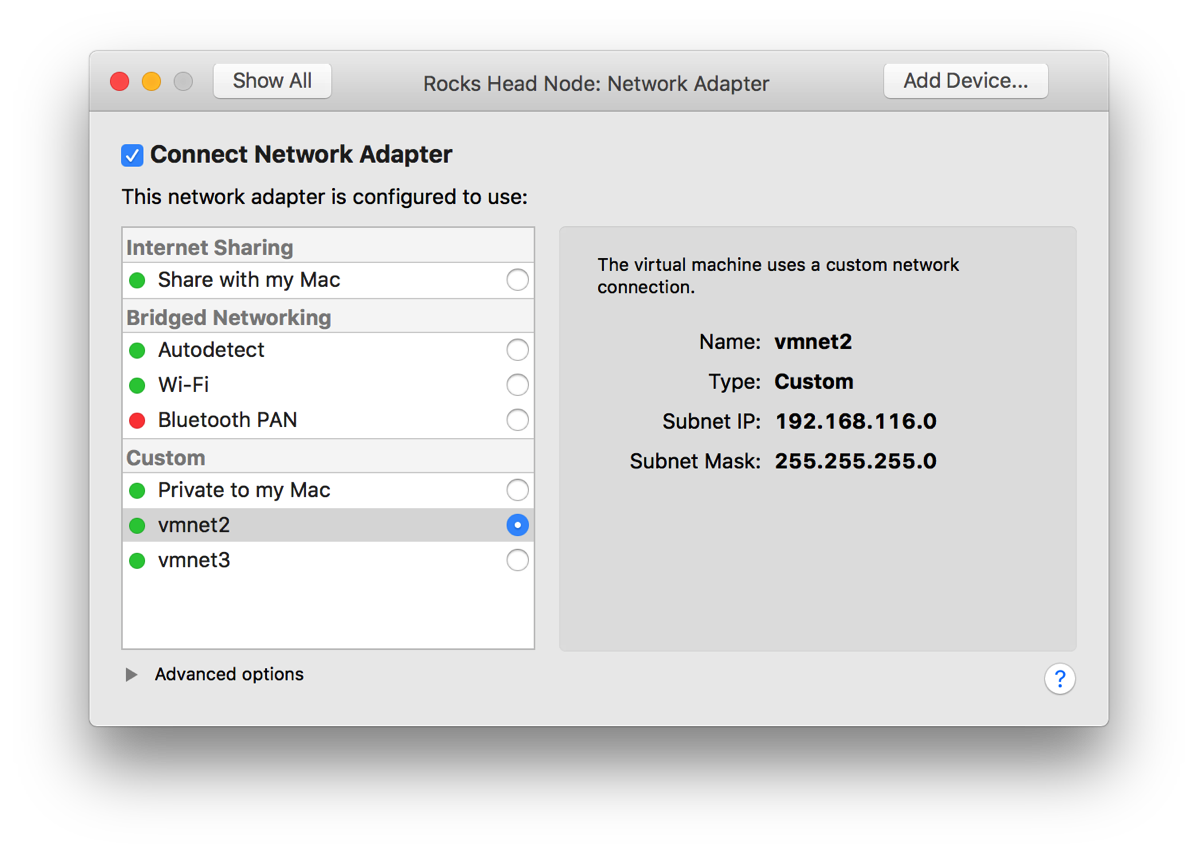
Instead, we need to create a new network that can be used to share connections.  The screenshot below shows the configuration that I ended up using.  (Note: I ended up repurposing a separate NAT network I had previously configured, hence the 192.168.116.x subnet IP listed).  The key items are to disable the DHCP server and uncheck the “Allow virtual machines on this network to connect to external networks (using NAT)”.  Now, to be fair, I did leave the NAT setting enabled and it worked as well, but isolating the network is still likely a good idea.

VMWare Fusion vmnet Configuration

Head Node

Once you have that configured, you can build the VMs.  For the head node, you’ll see two virtual network adapters: “Network Adapter” and “Network Adapter 2”.  These correspond to eth0 and eth1 and for a Rocks cluster, eth0 needs to be the private network.  The other network should be connected to the Internet in some form or fashion.  In the rest of this HOWTO, I will refer to the networks by their Linux name, either eth0 or eth1.  Just know that eth0 refers to “Network Adapter”.

Network Adapters for VM

First, let’s review the configuration for eth0. For it’s connection, I used the custom vmnet2 adapter/network.  (Again, note the subnet in the pictures is set, but since DHCP has been disabled, it’s irrelevant).

Screen Shot 2017 10 19 at 2 48 29 PM

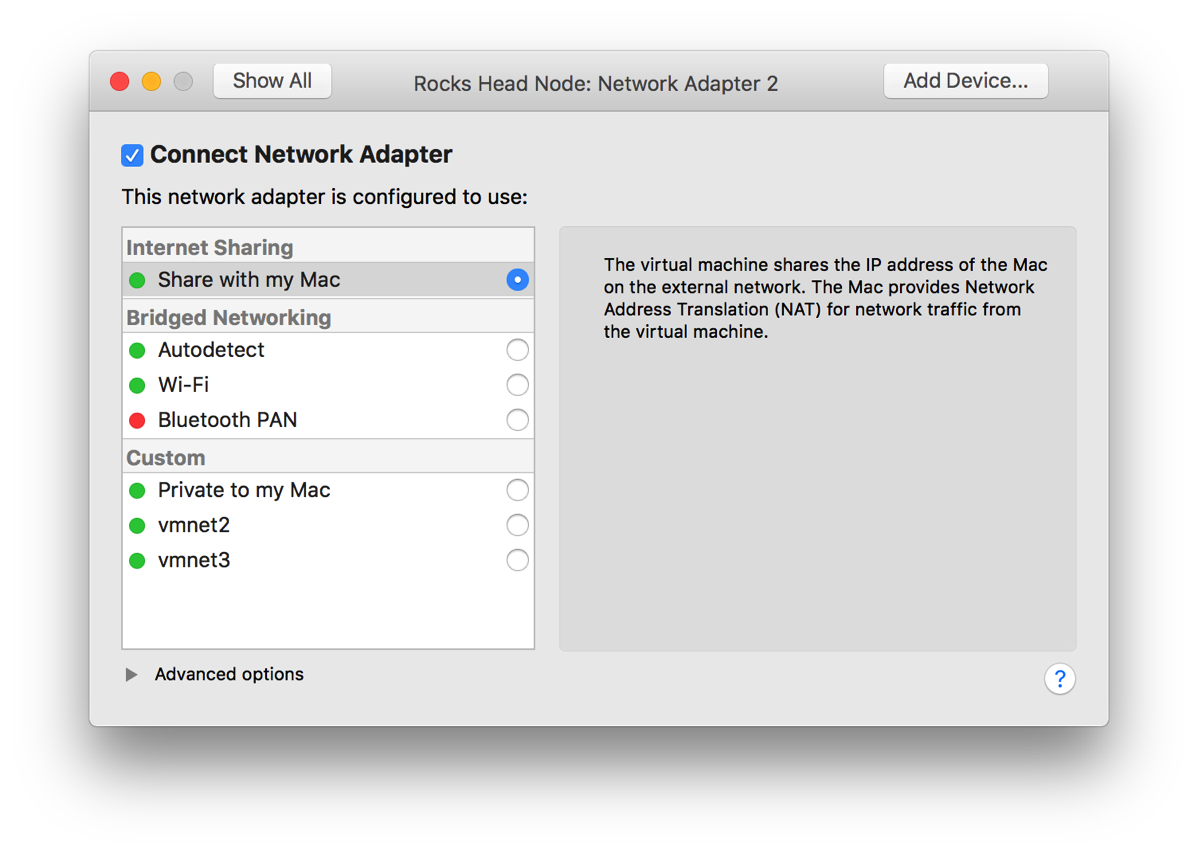
Next, let’s look at the configuration of eth1.  For it’s connection, I used the “Share with my Mac” network.  This is a habit I got into when I worked at IBM and used a VM for development.  Initially I used Bridged Networking, but over time found that if I need to work in a disconnected state (say at a customer site or somewhere I don’t have an active network connection), I would lose the ability to communicate from the host PC/Mac to the VM as the state of connection.  That caused me a bit of frustration over the years, so I ended up relying on the NAT network.  It allowed me to continue to develop and communicate with the VM itself from my host machine and the VM Internet and local network access as needed.  The only real issue with this came when I wanted a separate system to communicate with the VM (remote debugger, mobile device, etc).  In Workstation, I would typically deal with that via port forwarding as long as the protocol supported it, otherwise I’d open up an additional interface set to bridged.  Which you use is up to you and how often you will be without network access.

One other thing I did was provide eth1 with a hard coded IP address that matched the vmnet8 (NAT) network.  This way the head node will always be at the same address (I’ve noted that VMware is aggressive about changing your IP address).

Screen Shot 2017 10 19 at 2 48 35 PM

Compute Node

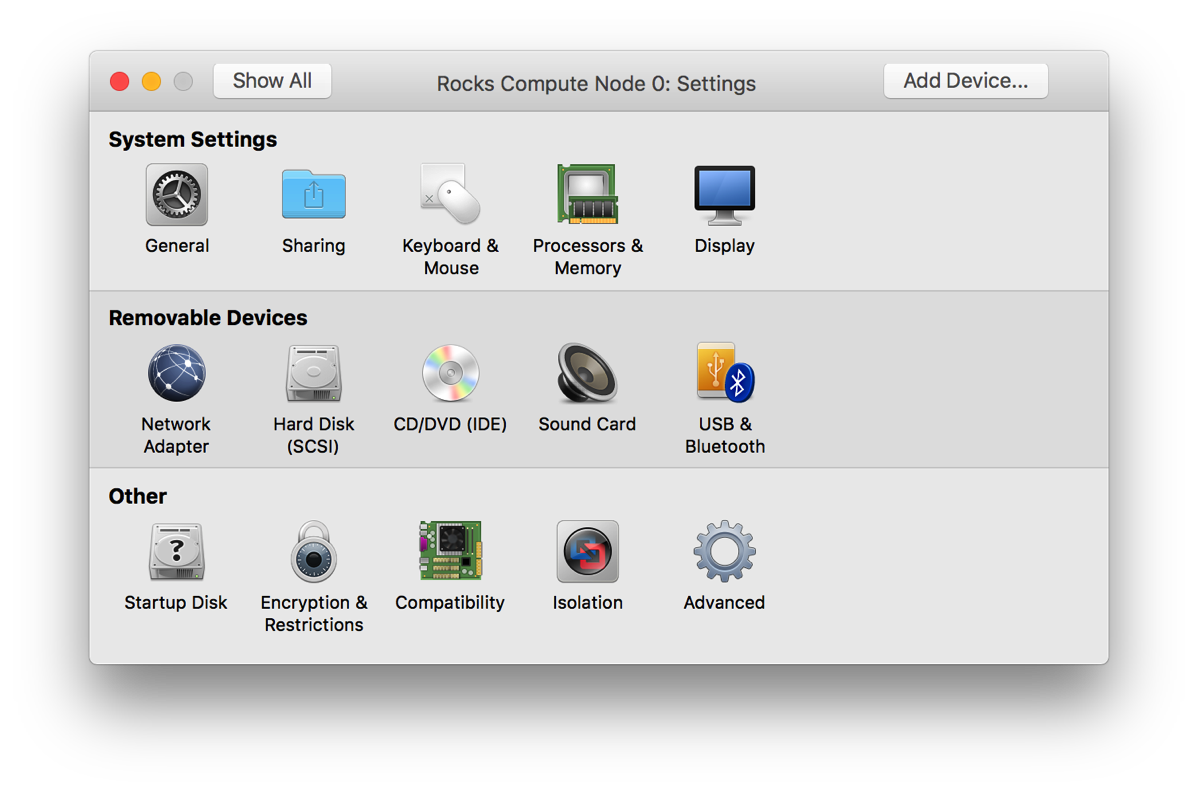
With the head node installed and configured, let’s look at the compute node(s).  They are configured similarly with the exception that there is only one network adapter.  This one is connected to your newly created vmnet (vmnet2 in my case).  That adapter’s configuration should look the same as eth0 on the head node.  (See the picture above).

Screen Shot 2017 10 19 at 3 25 34 PM

Any other requirements should match the prerequisites for Rocks itself, including memory and disk space.

Other Notes

One other thing to note is that your compute nodes need to be able to boot using PXE.  By default, VMware provides a boot off removable media, the internal HDD and then if nothing else, fall back to PXE.  For Rocks, this needs to be reversed.  VMware offers a neat option in newer versions that allows you to boot straight to the firmware as opposed to hitting F8 or whatever the key is.  Under the Virtual Machine menu, you can select the item shown below:

Screen Shot 2017 10 19 at 3 29 31 PM

Once the VM boots, it’ll take you to the firmware screen where you can change the boot order to match below:

Screen Shot 2017 10 19 at 3 39 18 PM

One other thing I saw was that the initial boot for a new node seemed to take two tries.  First I’d boot the VM and let it time out and then just watch.  Eventually the insert-ethers command would show the new machine as available. I’d then reboot the new compute node and it would finish bootstrapping and be fine.  It could have been a WAN issue (at the time my Internet connectivity was hosed), but I can’t say for certain.

Saturday, October 07, 2017

Masters Week 1

This week ends my first week of classes at UBB.  Though, of all my classes, only one ended up being a full class.  The rest were mostly, "hi and here's a 10 minute overview of the class, now leave" type classes.  I guess that's what's to be expected, and I'm not really complaining.

For this semester, I have:
  • Programming Paradigms
  • Advanced Data Modeling
  • Parallel and Distributed Systems Architecture
  • Modeling Concurrent Processing
  • Scientific Methodology of Computer Science
I'm not certain yet whether they'll be difficult or not.  For me, I think the most difficult will be the data and concurrent process modeling classes.  I've done some semblance of each, but not necessarily in a formal manner.

I've seen the course overview for the methodology and programming courses and they should be a matter of just grunting out the work.

The wildcard could be the systems architecture class. They are focusing on distributed processing systems (think Hadoop or some such).  I've dabbled with them in the past, but I can't say that they are my strong suit.  I've already started work on the lab to install a Rocks cluster, so at least I'm not waiting to the last minute.

Looks like there are about 9 members of my group, so I'll have a small set of people to work with and see on a fairly regular basis.  I've only me three of them so far, but they all seemed nice.

As I continue to work through the classes, I'll try and post more here.  I've been waiting to see what I was working with and any insights I gain before really posting. 

Friday, September 22, 2017

I'm in!

I know I just posted on olands.international that I'm waiting to hear back about my Master's program. No more than three hours later I received confirmation that I've been accepted!

Friday, September 15, 2017

Quick Update

For those of you who have been following my application process to school, I wanted to provide a quick update.  Today is the day the results of the application should be posted at the university, so in theory I should know today whether I'm in for my master's or not.  I would say, though, that given that we are moving into our new place today, it may be Monday before we are able to come up for air and get the final result.

Either way, once I know what's going on, I'll update everyone with the details.

Thursday, September 07, 2017

Using Google Wifi

Before I left for Romania, I spent a bit over a week at my mom and dad’s house.  As with any trip back home, it’s always a good time to look at the current state of my parent’s tech and complete any tweaks, maintenance and upgrades.  Of course, much of this my mom can handle as she’s really quite handy with tech herself, but she’s always glad for the help.

During this trip, we replaced much of her existing tech, including a roll-your-own file server we’d created using an HP mini server and Ubuntu server.  It worked well, but at a certain point, using the console for maintenance became a bit too much for my mom to want to manage.  (Fair enough)  We ended up replacing it with the same server I have, the Synology DS416play.

We also took the time to upgrade her wifi and router.  About 4 years ago we moved her to a Cisco small business router and wireless access point.  It’s proved to be rock solid reliable and capable.  But it’s still 802.11g, so it limited her speed and reach a bit.

I’d been looking at the Google Wifi system for a while and thought that now was a good time to get her into a mesh system.  I believe it was even on sale at the time.  Given the size of her house, we thought that she needed more than one, so we picked up a three pack and set two of them up.  I then brought one of them with me here to Romania with the idea of using it as my access point.

Now that I have set up two of the Google Wifi systems, I have some thoughts.  There are a number of comprehensive reviews of the new Google Wifi system out there, so I’m not going to try and write a full on review, but instead I want to call out a few good and a few slightly annoying points that I would have liked to know before going in.

Note: these thoughts are based on v 9460.40.8 firmware on the access point and software version jetstream-BV10119_RC0003 for Android and 2.4.6 for iOS.  I bring this up as things could change over time.

Target Audience

One key thing to note about the system is that it’s definitely aimed at the more non-technical audience.  While it does have some more technical bits, some of the normal configuration options other routers offer are absent.  A few key ones are:

  • Changeable local network settings (you get 192.168.86.* whether you like it or not)
  • No VPN (inbound or outbound)
  • No content filtering options
  • No QOS tweaking (that I’ve seen)

Now, to be fair, much of this really isn’t necessary for your average consumer, but for the more nerdy of us, these could be deal breakers.

The Good

Here is a high level list of the things I liked about the system.

Speed

2017-09-06 02.01.40Like any mesh system, Google Wifi is not just an access point, but it’s also a mesh network system.  For my mom, that meant that her two access points would cover the whole house and key parts of her back yard. Technically, we could extend it further, but those are the places she uses them.  With just one, I don’t know (yet) if it’ll be enough to cover my needs, but it should be a good starting point.  And because it’s a system, I can always buy more later if I want.

After we moved from the Cisco to the Google router, the throughput ramped up from 20mbps to maxing out her 60mbps cable modem.  Here in Romania via a double NAT setup, with who knows what else going on at the time.

The App

The app you use to configure the system is fairly easy to use.  On initial setup, it appears to connect via Bluetooth and complete the initial connection.  From there, it walks you through setting up your Internet connection and wifi password.

It also allows you to share the management of the system with other Google account holders.  Now, you do have to have a Google account to make this work and that could be a deal breaker for some.  In my case, I have the ability to manage my mom’s system remotely.  This can be useful if something pops up that is beyond her ability to fix or even if she just needs a second set of eyes.  It also means that you can extend the access to other family members to they can pause the network for certain devices.

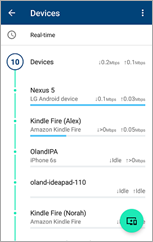
One of my favorite features of the app is the devices list.  From the middle tab you can see a quick overview of the network, your access points and a count of all the devices connected to your network currently.

2017-09-07 13.03.59If you select the devices node, you can see the list of all devices currently connected, including their current bandwidth usage.  It even tried to identify the device and what type of device it is (iPhone, Kindle Fire).

This can be quite useful for sure.  I had an issue a few years ago where my network ended up really slow and I couldn’t figure out why.  I tracked it back to my wifi network, but couldn’t determine what was happening beyond that.  I had two access points and I’d cut one off and the traffic moved to the other one and then back.  Ended up being my Nexus phone uploading pictures (Dropbox, OneDrive and Google Photos) simultaneously.  With this, I could have simply accessed the app and visually viewed what device was hogging my bandwidth.

A few other neat items include:

  • A built in speed test app.  It’s part of the network and system diagnostics and can test from your gateway to the internet directly.  It can also test the throughput from your device to the access point.
  • Simple guest network and device sharing.  You can set up a guest network (nothing special), but you can also expose private devices on the guest side.  This allows access to media streamers and other items that maybe a guest would want to use while keeping your other devices separate.
  • Family wifi configuration allows for you to group devices together and pause them manually or on a schedule.  No more collecting the devices or screaming to turn things off.  Instead, just use the app to pause their network access.
  • Google continually keeps these devices up to date.  I worry about devices you need to manually update, where these can be updated much more easily.  (Just for giggles, I checked and there have already been 5 version updates since it was released late last year).
  • This guy is powered off USB-C.  I think that means that finding replacement power supplies should be fairly straightforward.  I’ve even considered simply plugging it into my Monoprice multi-port USB charger with USB-C.  Of course, if I do that, I’m certain I’d end up accidentally unplugging the whole shebang, but that’s a different story.

The Bad

There are a few things that drive me a bit nuts, though.  Here are the highlights:

  • You cannot configure your local network range.  You are stuck with 192.168.86.*.  One of the first things I tried to do was change it to match the original .1.* we were using.  It was then I ran smack into this issue.  Not really sure why the did this.
  • No non-app access to configuration.  While the app is nice, being able to grab a PC to configure your network is a must for power users.  I think I can live with it, but others may not be.
  • You cannot reserve DHCP addresses for devices that have not yet connected to the network.  Once a device is connected, you can reserve its address (or one of your choosing), but if you have a bunch of devices you want to configure out of the gate, I couldn’t see that it was possible.
  • Very little in the way of tweaking, including static routes and other common router features.  I don’t typically use them, but other tech savvy users may need these settings.

I’m not certain any of these are deal breakers for me.  I may end up changing my mind later, but right now it appears solid.

Bottom Line

At the end of the day, I trend to judge technology based on results.  If it solves a problem and works reliably then it gets my approval.

The Google Wifi system seems to do just that.  It was definitely an upgrade for my mom, allowing her much better access to the Internet and her local file server.  For me, it’s worked great as a secondary router here in Romania. My father-in-law’s router seems decent but there’s a problem with the wifi stack.  Every time we’ve been here, we end up taking it down every 24 hours or so.  I don’t know if it has a memory leak or what, but every day or so the network just drops.

Plugging in the Google system via the wired port and connecting all my devices to it seems to have solved the issue.  Almost a week in and we’ve had no failures since.

Otherwise, it’s a nice looking and reliable router.  I think I could recommend it to most people, but for true techies, I might be inclined to look elsewhere.

Tuesday, September 05, 2017

Early September Update

I know I’ve been chatting with a few of you, but I thought I’d go ahead and update everyone on what’s going on with me.  Last I wrote, I was still waiting to hear back from UBB about my PhD application.  Since then, the response has come back and I was rejected because I don’t yet have a masters.  That’s a bit annoying because I did bring this up early in the process and tried to get an answer, but oh well.  With that specific response in hand, we have now applied for a masters and are waiting to hear back about that.

In the meantime, we are now here in Romania and trying to get settled into our new life.  I think it’ll be a bit before we can completely relax as I still have some paperwork to get through, but at least we are here and can start moving forward again.

Saturday, August 12, 2017

Archiving Photos

In 2005, Hurricane Katrina hit the Gulf Coast and destroyed a large swath of New Orleans and other cities in its path.  I remember listening to people talk about the destruction and what they lost.  One common item people lamented that was lost was often not things, but pictures and memories.  Unfortunately, time (and water) are not kind to pictures.

It was this experience that compelled me to purchase a good quality slide scanner.  After a bit of research, I ended up with a Nikon CoolScan ED.  While it was the cheapest Nikon slide scanner available, it still can make incredible scans of slides and negatives.

Oh, and as a bonus, my mom and dad had kept the negatives from all our pictures from when we were kids.  That ended up being number of rolls of film.  I spent about a year, working a bit at a time, scanning all the negatives.  (Yet another reason to love working from home …)  As a result, I now have almost 250 Gb of pictures in TIFF format.  That ended up being about 60 DVDs of images.

With our impending move (and the reduction in cost of both cloud storage and HDDs), it’s time to move them on to spinning media and into the cloud.  I’ve now spent the past three or four days here in Richmond copying all the files off onto an external HDD, unzipping, sorting and fixing.

I’ve been rather surprised that in all my DVDs, I’ve only hit three that have had issues.  One was my fault as it was sticking up out of the sleeve and ended up bleached in the sun.  Whoops.  The other failures were do to scratches and the like.  None appear to have failed due to a failure of the actual DVD (yet).

As a reminder, in addition to having the files you need to make sure you have good backups.  When in doubt, remember 3-2-1:

  • 3 copies of your pictures (files)
  • 2 different kinds of media
  • 1 offsite

Monday, July 10, 2017

Synology NAS Update

I now have the Synology back up and running, at least up to a point.  It appears I was able to fully back up my data, replace the disks and rebuild the volume.  I’m now in the process of trying to restore the data and reconnect it to OneDrive, Dropbox and other online services.

One nice side effect of this is I’m able to perform the basic reorganization I should have done a while back.  At least now I can move the folders and make really, truly take one copy of everything with me instead of multiples.

That being said, I do have one more rebuild to go.  I had four disks in there and one was new.  I thought I’d left that as disk #1, but apparently I was wrong.  I think it was actually disk #4 which ended up failing and causing the whole meltdown to begin with.  So, I now need to perform the replacement one last time.  I’m just waiting for the full disk scan and parity check to complete, then I shutdown, replace the drive and rebuild.

Saturday, July 08, 2017

Hard Drive Crash

Here’s one for you.  I bought (and still really like) the Synology NAS earlier this year.  It’s proven to be faster and more flexible than the server it replaced.  Granted the Hyper-V server could run any workload I wanted, however I ended up using it only for file and iTunes/music sharing so that was going to waste.

I had four Western Digital Red 3TB drives in it.  The WD Reds are quite likely my current favorite drives for this purpose.  They are 5400 RPM, quiet, cool and fast enough.  I do recommend them.  My only real gripe is they have a three year warranty instead of a five, but that’s what it is.  More expensive WD drives have longer MTBF/warranty times, so you have options.

That being said, three of my drives are at the end of their lifespan.  In fact, one was giving me bad sectors so I decided it was time to replace it, followed by the rest over the next few weeks.  With that in mind, I ordered two new drives, used one to back up the data I cared about and set about replacing the failing drive two.

Within 5 minutes of replacing that drive and starting the rebuild process, I received a number of emails about failures and ultimately a crashed array because drive FOUR had started generating bad sectors.

Ugh.

Next time I have the NAS perform RAID maintenance to catch this. I’m fairly confident that had I done that it would have fixed the issues and moved on, but now I have a permanently degraded array and a fairly big issue.  I’m not in the process of copying EVERYTHING off the NAS and onto a collection of spare drives (three 2tb Reds and a couple other 1tb SSD/HDDs).

At least the array stayed live, albeit read-only, so I could get this done.  It’s more annoying than fatal at this point, but I must admit I’m a bit annoyed the ongoing self-checks didn’t catch the issue.  I also suspect that somewhere there was a note to perform basic maintenance on the array before pulling a drive ….

Ce’st la vie …

Sunday, June 25, 2017

PhD Application Update

For those of you who don’t know, I’m in the process of applying for a PhD.  I narrowed it down (or more specifically, chose to apply for the PhD because of talking with them) to Babeş-Bolyai University in Cluj-Napoca.

I picked the university based on their location and its size.  At 41,000+ students (according to Wikipedia), it’s the biggest university in Romania and has a highly ranked math program, of which their computer science program is a part.  The location is in Cluj-Napoca, which is both a beautiful city and close to where my wife grew up.  We are looking forward to exposing the kids (and myself) to Romanian culture, language and customs.  Oh, and being 75 minutes or so from bunu and buna is a nice thing too.

As for my research topic, I’m hoping to find better and more complete ways to include unstructured data as part of a broader data analytics strategy, leveraging my experience in Enterprise Content Management at IBM and the work I’ve been involved in for the last year or two with Ali Arsanjani, Distinguished Engineer.

My goal is to start using this blog as a place to chronicle my experience, thoughts and insights over the next few years (assuming I’m ultimately accepted).

Tuesday, March 28, 2017

Another Bucket List Item

I’ve put together a list of items I hope to accomplish before we leave for Romania.  As a music guy, of course that includes a list of bands and concerts I’d love to see before I go.  I just received a notification that one of the bands, OK Go, is coming to Baltimore in June!

In case you who don’t know, OK Go is an incredible band that rose to fame through their now infamous dancing treadmill video for Here We Go Again.  I found them through other means when they chose to go their own way and publish music as an independent artist instead of through a major label.  I’ve since grown to love their music and appreciate their artistry.  Below is their most recent video.  It’s worth checking out and I’d also recommend watching the making of videos.

For reference, here’s the list of shows I’m hoping to see before I leave:

For those interested, I have a history with Darlingside and Jamie Kent (albeit a bit loose … cue Weird Al Yankovic’s Lame Claim to Fame) in that they toured together back in 2012.  One stop they made was Ebenezers Coffeehouse here in DC.  I was front of house for that show, so now I can be “that guy” who hollers “I knew them when …”.

On another subject, we do get to go see Empire of the Sun at Echostage as well and that should be a fun show too.  I also got to see Save Ferris a month or so ago at the Black Cat.

Thursday, January 05, 2017

NAS Update

I’m about two weeks into having the NAS and so far so good.  I’ve spent much of the last two weeks sorting out all my pictures (see my other blog posts about that process) in preparation for the big move.  I’d spent so much time at one point or another making duplicates or moving files around that I had at least two copies of almost every picture I’d ever taken.  Needless to say, that wasn’t really sustainable long term.  It also meant that my file server had more than its fair share of extra files on it.  Now I’m at the point where I have, basically, one good copy of all my pictures.  Oh, and I’ve held onto the iPhoto libraries from all the way back too, just in case.

This means that I was able to move some of my three terabyte Western Digital Red drives into the NAS.  Of course, in true moving-a-bit-too-fast-for-my-own-good style, I grabbed the wrong drives out of the server only to have it boot up and tell me that it had no working arrays … whoops.  Fortunately for me, the Synology’s Diskstation Manager (DSM) didn’t immediately grab the drives and try to reformat them.  As such, I just stuck the correct drives back into the old server, grabbed the right drives, booted the system and all was well.

With the additional drives in the new NAS, it was time to add them to the array.  Right now (24 hours later), it’s at 25% expansion of the array.  It’s definitely taking longer than I would have expected to complete the expansion, but I’m hoping that’s a one-time deal.  It is something to be aware of, though, if you plan on expanding an array in a hurry.

A few other notes:

  • I currently use my old server as an iTunes server.  No worries, DSM offers both Plex and a native iTunes server.  The issue I’m seeing right now is the built-in server doesn’t support playlists, other than smart playlists.  Given that I have a playlist I’ve played for the kids almost every night since my son was born, not having access to that capability is a bit of a pain.  To top it off, I can’t seem to get Plex audio playlists to show up on my Roku. Update: Turns out I was wrong, I just needed to install the Synology Audio Station to create static play lists. With that, and the Video Station, I’ve uninstalled Plex for now.
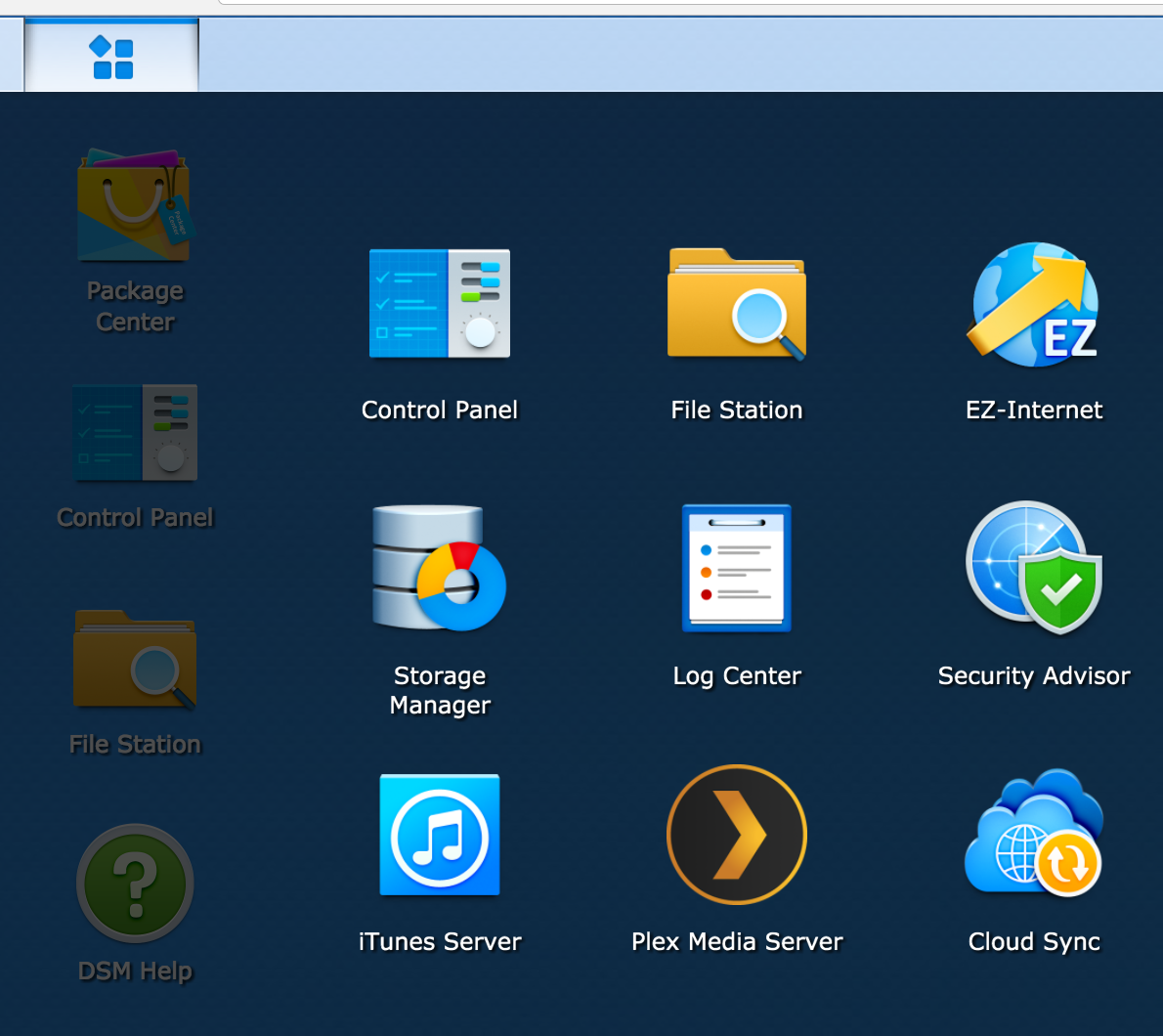
  • The web based UI is decent.  It’s still a web-based UI, but overall it seems competent.  There are places where I can’t always seem to find what I’m looking for, but that’s how it goes.  The biggest issue for me is the split between items you control in the control panel, items you need to go to the package manager to manage and “applications” that appear in the app start menu thingy (see the UI below with the menu expanded).  The big one was the Storage Manager application.  I had to go there to change how the storage was managed.  An OK thing once you know about it, but, to me, that belongs in the control panel.  I guess that’s a minor gripe, because now that I know where it is …
  • Synology also offers Android and iOS applications for certain key features, such as photo, video and music browsing.  I haven’t spent too much time with those yet, but they look interesting and may provide a decent alternative to Plex.  And they have Google Cast capabilities built in!

NewImage

Thursday, December 29, 2016

A new NAS

After 10 years (or so) of using a PC as a file server, I finally decided enough is enough.  The size, noise and upkeep of my old PC was just a bit too much for me to want to deal with any longer.  Not that there’s an issue with using a PC as a file server, but it just seems, now, a bit overkill.

My original goal when I build the PC server was to use virtualization in order to run various servers and experiment with various technologies.  While that worked for a time, the amount of memory I needed ended up growing beyond what I have and the price to upgrade became too much for what is basically an eight-year-old machine.

The size also became a bit too much to handle.  When I built the machine originally, I bought a huge full tower case.  I assumed that I would ultimately need multiple HDDs and a big power supply.  Had I stuck with the virtualization, then this may have made more sense.  Now, it’s just a noisy boat anchor that serves (pun intended) as a file and iTunes server.

One other reason to move away starts with the advent of streaming music services (Google Play, which I use).  I now rely much less on the iTunes sharing than ever before.  My kids have a bedtime play list they use every night to go to sleep, but other than that (and the occasional Sonos use), I don’t rely on it as heavily as before.

With this in mind, I started looking at stand alone Network Attached Storage devices.  I like the idea of a bespoke device to manage this setup.  I also like the size of the device as opposed to beastie I have now.  The new devices also appear to offer more functionality and can, basically, replace a lot of the things I needed a stand alone PC for before.

If you’re curious, I ended up with a Synolog DS416play.  It was slightly more expensive than I was planning on, but it does offer better media capabilities, including hardware-based media transcoding.  This was something I’d tried on the old system and it just couldn’t keep up.  I’m hoping to dump much of my media on there and share them out to my Chromecast and Roku devices.

As I spend more time with it, I’ll post more.

Smart House

Earlier this year, I finally broke down and purchased a Samsung SmartThings home automation hub.  I had wanted to get one for about two years after hearing about them advertised on the TWiT network. I did wait a bit until I had a bit of spare cash and for the SmartThings 2.0 hub to come out.  The big draw for the 2.0 was some limited local network-only remote control.

Anyway, it started with just a Z-wave front door lock and has begun to spread.  I now have several receptacle and smart appliance switches, garage door opener, door sensor and a number of Aeotec water sensors.

In fact, those just saved me today when we had a small water problem in the basement.  Somehow the hot water was left on and that caused a poorly installed trap to slip just enough to let water start leaking onto the floor.

When I bought the sensors originally, that was the very first place I intended to put one because this has happened to me before.  The sink is a pedestal sink which makes it hard to get access to the trap in case of a leak.  Well, when it happened before it took me a while to catch it and I’ve been a bit paranoid about it happening again since.

Well, this time the sensor saved me.  The app first indicated a water problem in the basement at 1:34pm.  By 1:45ish, I’d fixed the problem and cleaned up the mess.

Oh and thanks for the assist goes to Pushbullet.  I’ve been using it for a number of years to handle notification mirroring from my Android phones to Chrome on my PCs.  In this case, the notification popped up on my laptop while I was doing something else, so I was able to immediately react.  For lack of that, I may not have caught it until a bit later.  Come to think of it, I may want to update the action on the water problems to include an email …

Tuesday, December 27, 2016

More Details on Photo Sorting

After about three weeks of work, I believe I’ve identified almost 167,000 unique pictures (give or take a thousand or so) and over 250k duplicates.  Right now, OneDrive is struggling to determine what of the myriad of changes I’ve made are valid and trying to sync that up to the cloud.  I sort of expect that to take quite some time.

I still haven’t resorted them based on the Year/Month/Day/Model mode I mentioned earlier, but I do plan on doing that eventually.  First I need to let this sync happen and then I plan on identifying which cameras belong to us, family and friends so I can separate ours/theirs/etc.  Once that’s done, then I’m going to slowly perform the final reorgs of Mobile/Regular and apply the new sort.

I’m also considering whether I should separate out all the videos or not.  Part of me says yes, part of me says no.  Having the videos separate might make it easier to prepare videos and other multimedia things in the future, but there’s also something nice about having the pictures/videos intermingled and can lead to some neat discoveries.

I’ll post more as I go.