- It’s difficult to do the translation in the same space (or even off in a corner) as the main service. It just creates too much distracting noise. So, you have to figure out how the hearers are going to get the sound. At our church we give the listeners earpieces that fit over one ear and receive a radio signal (I suppose, as i don’t deal with the transmission of the sound). That allows them to follow the original audio as well. If you’re not going to translate everything (for instance, if you translate only the sermon) or if the listeners are also trying to learn Romanian, the live audio comes in handy. Plus, a full headset would make it hard to follow the live music.
- The translator needs to be in a space where he or she can concentrate without distractions. I’m in a studio, where I have a monitor and a headset with a mic. It doesn’t have to be such a dedicated space, but stuff is going on around you that diverts your attention you’ll get behind and then have to start summarizing and paraphrasing to catch up. Or just lose track of what’s being said while you’re talking. You could do it without video, I suppose, but the video makes it a lot easier to follow. If the speaker writes anything or uses graphics, you’d get kind of lost without video. It also allows you to see the song lyrics if they are projected.
- Translation works better if you have multiple services, even if you’re translating only one. That way the translator can attend a service before translating and think through/look up any tricky bits rather than being caught flat-footed. Plus, it allows the translator to have a worship experience, as translating is work. And to have any Scripture passages bookmarked before translating, so that those can just be read rather than having to translate them. If you have just one service there are things you can do to help the translator. All of these will also enhance the translation, even if the translator has a chance to experience the service beforehand. Having sermon notes ahead will allow them to make sure they have the best possible terminology for key words and main points. Plus, it will give them the Scripture passage ahead of time. If you want to translate the music, having the lyrics ahead of time is very helpful. If you’re translating into English, in many cases the translator could find the English lyrics. If not, it’s still helpful to see the Romanian lyrics, as poetic language can be trickier than normal speech, and it can throw translators for a loop. If you do dramas, it’s also really helpful to have that script ahead of time.
- You have to determine which portions of the service you will translate. At the U.N. they switch out translators every 20 min. or so (I’ve been told). I do an hour and a half (minus some announcements and instrumental music), and it’s a lot. We don’t get the lyrics ahead of time, so not all of our translators even attempt to do music. Even though it would be handy to be able to switch out translators and keep them fresh, if you’re working with volunteers on a rotational basis it can get logistically hairy to find enough people if you have to use more than one per week, especially if that requires them to attend two services.
- I would suggest that you have at least a couple or three people that you can count on. One person might start with great enthusiasm but could easily get burnt out. Plus, if that person is away or ill, the people who have come to depend on translation are left high and dry.
- If you are streaming the services you’ll have to decide whether or not translation will be part of that package and how to pull it off technically. You might want to work out the kinks and make sure that you’re really going to continue with translation long-term before you cross this bridge..
- I think it’s important to have somebody who understands both languages monitor the translation, at least initially and from time to time, to make sure that you don’t have wildly divergent quality levels and that it’s actually working. Not everybody who is an expert in both languages can do simultaneous translation, so having some quality control can help determine if the translator(s) is capable. Feedback can also help improve performance over time. We don’t do this at our church, but I think we should. I know that some people, like me, are really translating, whereas I have the sense that some are just giving periodic summaries or very loose paraphrases. Your pastor(s) might not be happy to have people “flavoring” their messages too much.
Friday, March 08, 2019
Thoughts on Interpretation
Tuesday, March 05, 2019
Configuring Icecast and BUTT
For starters, you'll need a Windows machine (probably Windows 7 based on my recent experience, though YMMV). After that you will:
- Configure your Windows machine with either a static IP address or a DHCP reservation with your firewall. (I'm a big fan of the DHCP reservation so you can take your machine elsewhere and it'll still work fine).
- Download the two packages mentioned above: Icecast and BUTT.
Install the Tools
- Install Icecast using the downloaded installer. You can accept the defaults, but you might want to install it somewhere other than Program Files as you'll need to edit the configuration file and, given that it's a server, you might want to run as a non-system/non-privileged user.
- Install BUTT using the downloaded installer.
Configure Icecast
- Change the value of the <location>Earth</location> tag. The value doesn't matter much, but Icecast will gripe at you if you don't.
- Change the <admin>icemaster@localhost</admin> tag to your contact address
- Change the <hostname>localhost</hostname> tag to your system's hostname
- In the <limits> section:
- set <queue-size>16384</queue-size>
- set <burst-size>16384</burst-size>
- In <authentication>, set the source, relay and admin passwords.
Configure BUTT
Configure the server
- Click the settings button to the right of the VU meter
- Click the ADD button under the server drop down to configure your server. Enter the following:
- Name: I used localhost just because, but you can call it what you want
- Type: Icecast
- Address: localhost
- Port: 8000
- Password: <source password from icecast config file>
- IceCast mountpoint: live.mp3 (or whatever you want it to be. This is will be part of the URL for the Icecast server)
Configure Audio Settings
- Select your audio input device
- Set channel to Mono
- Set Samplerate to 22050Hz
- Set the streaming bitrate to 64k
Test
Documentation
Live Interpretation (Updated)
Let's start with our current technology stack. It's fairly similar to what we were using before, but we have managed to simplify it a bit. Here's a list of tech:
- Hardware
- HP laptop (I don't have the specs currently)
- TP-Link TL-WDR4300
- Gatt MX-6 mixer
- Behringer UFO202 USB audio interface
- Sennheiser EM100 wireless microphone
- Software
- Windows 7
- Icecast
- Broadcast Using This Tool
- VLC for iOS and Android
- Connect mic to mixer
- Connect mixer to interface
- Connect the interface to the laptop
- Connect the laptop to router
- Connect router to internet
- Power everything on
- Start Icecast
- Start BUTT
- Start streaming
- Internet connectivity is very important. Our initial tests were on a local network with no internet connectivity and, while it worked, it did cause some issues. Specifically, we started using TuneIn the streaming radio player and its initial setup required internet connectivity to move forward. VLC doesn't, but you cannot assume the users will have enough data on their plan to download the software. We now have a dedicated wireless network that does have internet connectivity
- Wireless channel selection. Right now we are having some issues with cross-talk between the various routers in the house. (sound tech, ours and others). I'm hoping we can get around to assigning dedicated channels for these, but we're not there yet
- User friendliness: VLC, while a great app, isn't always the friendliest. The iOS app will keep track of URLs you've listened to and that helps, but Android does not. I'm hoping to eventually replace this with a dedicate app for CT, but that's a future enhancement.
- Audio Processing: Our current mixer has limited audio processing, specifically no compression. BUTT doesn't offer any dynamics either, so we are looking at other options to allow us to compress and boost the audio a bit. Also, don't skimp on the choice of microphone. You could use an inexpensive computer mic, but I would think it would result in poor sounding audio and not be pleasant to the listener. We're using a Sennheiser mic (which is probably overkill), but at least a Shure SM58. Ideally you'd have a good plosive filter too.
- Dedicated space: one of the issues we have now is our interpreters are set up in the back of the theater. This is for expediency sake at this point as they can see what's going on and hear the message. There are two key downsides to this:
- The interpreters can occasionally be heard by the congregation. To avoid this, they often have to speak more quietly than they would and that causes the volume to fluctuate for the listener.
- The listeners tend to hear the sound from the service flow into the feed we are sending. This can be a bit distracting, especially given the lag.
- Latency: while the technology appears to work well, it does suffer from a bit of latency. Each step of the chain adds a small time buffer to smooth out any network loss. The configurations I use tend to reduce this, but it still adds up. At best, we tend to see 3 second latency between when words are spoken to when they are delivered. At worst, I've seen 10 seconds or more. With VLC, you can simply stop and restart the stream to reduce that back down, but it's still something to keep in mind.
- Avoid Windows 10 (for now): I personally use Windows 10 and have since about the time it came out. (In fact, I'm writing this post on a Windows 10 Pro machine). However, when I tried to use Icecast on Windows 10, something went wrong. It worked in testing, but in production use, somehow the networking stack in Windows (be it the firewall or something) ended up killing all active connections. It was so bad that I had to quickly restart into Linux just to continue the service. We're currently using Windows 7 and it works just fine, so until I can figure out what happened, I'd avoid 10.
- GDPR: One thing Icecast will do is create log files. Under GDPR you will need to make sure you handle those with care and follow your organization's privacy guidelines. And if you don't have guidelines for compliance ... bring it up as it does matter.
Saturday, October 27, 2018
CT Interpretation Live Links
This post provides links to the live stream only. For more details on the whole process, see the previous post.
To listen to the live stream, tap on one of the following links:
Live Interpretation 2.1
- Connect to the CT-Live24 or CT-Live50 access point (password: CTInterpretation)
- Connect to the following streaming URL using a media player (like VLC or TuneIn): http://bit.ly/CTEnglish (or if that fails, you can try http://192.168.0.4:8000/live.mp3)
- Connect to the CT-Live24 or CT-Live50 WiFi access point. The password is CTInterpretation. Note: you will need to do this in the cinema itself as the WiFi does not extend out into the lobby.
- Download VLC (or any audio streaming application you want to use). We're recommending VLC as it is free and has proven to work well.
,

- Start VLC. On first run, there will be some introductory steps you will need to skip through.

For iOS, you can take the tour or just tap on "Done"

For Android, note that on the second step you can disable the "Let VLC scan my device for media content" option. - Open the live stream for the first time:

For iOS, tap on the traffic cone / VLC icon in the top left and then select "Network Stream". In the URL box at the top, enter: http://bit.ly/CTEnglish (or if that fails, you can try http://192.168.0.4:8000/live.mp3)

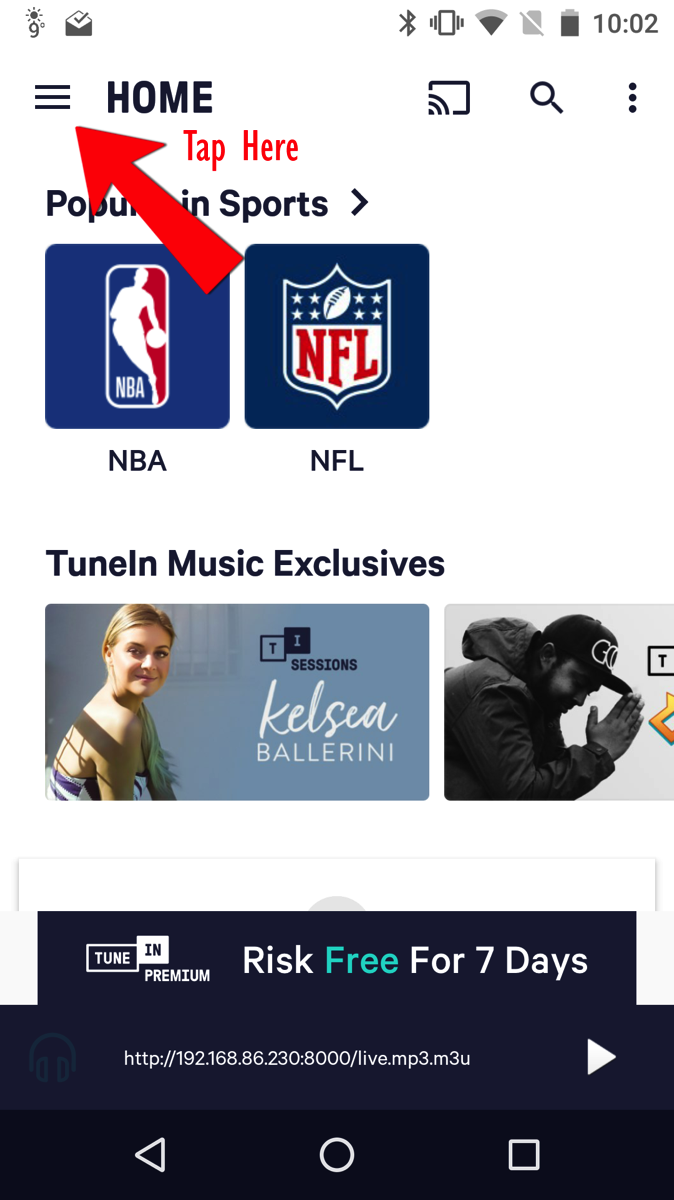
For Android, tap on the hamburger menu (three lines) in the upper left, tap on "Stream" and enter http://bit.ly/CTEnglish and tap on the arrow to the right. (If that fails, you can try http://192.168.0.4:8000/live.mp3)
Note: if the stream ends up lagging behind the service by more than about 5 seconds, you can stop and restart the stream. - For subsequent, future visits, you may be able to select the stream from a list of recent streams:

For iOS, on the Network Stream page, you can simply select the CTEnglish stream from the list.
For Android, you may be able to select it from the History page.
Google Play and the Google Play logo are trademarks of Google LLC.
Sunday, May 13, 2018
Smooth Move of the Week
A bit more details are in order, for sure. While I can't be 100% certain, I think what happened was this: while riding, I saw my neighbor's kid and wanted to say hi. That meant I slammed on my brakes to slow down and I think I just shifted my weight forward causing the bike to stop and me to keep going.
Next thing I know I'm heading over the handlebars and thinking "this is going to be painful". I then crashed into the ground (shoulder first), hit my head (in my helmet) on the ground and then crashed into my side. The result was bruised ribs, road rash on my shoulder/arms/knee/foot and a serious bruise to my ego.
Fortunately I was wearing a helmet so I'm only living with painful ribs and not a concussion. I will heal and live to bike again. The bike also survived the encounter more or less unscathed. The handlebars do have a bit of road rash too and I need to adjust a few things.
My only real hope now is that I heal sooner than later .. and that someone happened to get that on video. I'd love to watch me bounce off the air like a moron. Bonus points if they have it in slow motion.
Wednesday, March 14, 2018
Listening to the Live Stream
In my last post, I described how I’m trying to use streaming audio to deliver simultaneous translation of the messages at my church. This post is meant to be a HOWTO for anyone attending and tho want to listen to the stream.
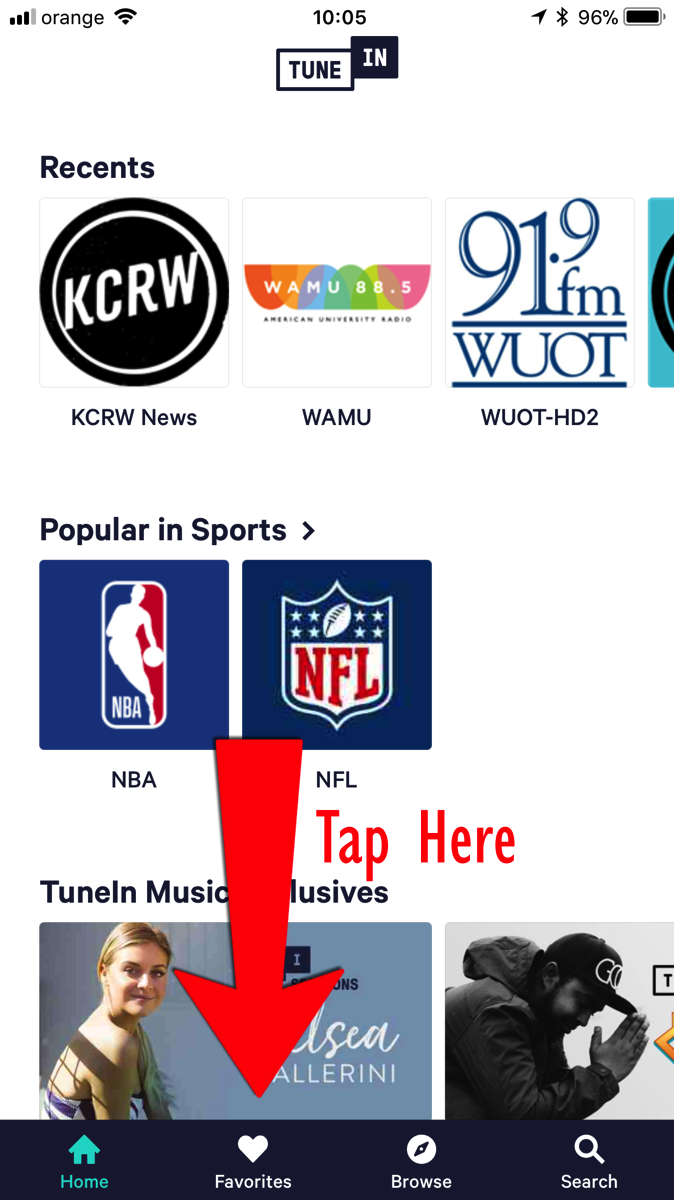
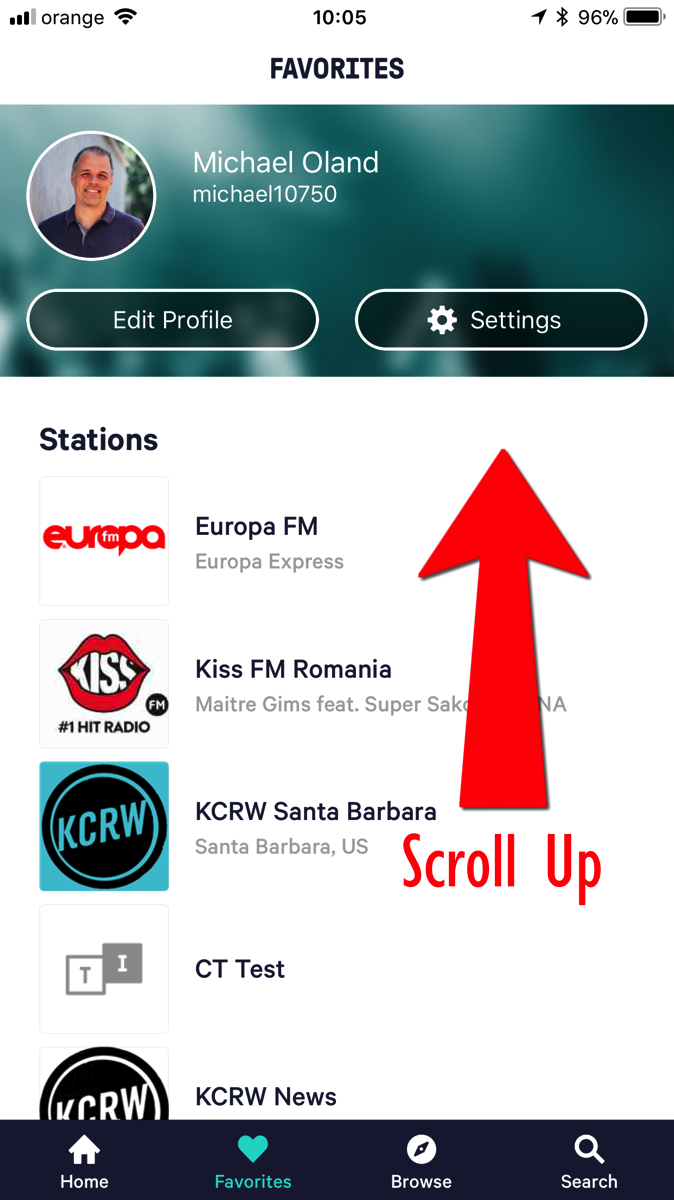
Note for this to work, you will need to be connected to the appropriate wireless network. This will be given out on Sunday morning
Once you have created and saved the custom URL, each time you want to listen you can just select that Custom URL from the favorites list and it will begin streaming the audio.
Simultaneous Translation Tech Pilot
When we moved to Cluj, we started attending a local church, Casa Tamplarului. As a church, it reminds us a lot of National Community Church in DC, which we attended before we moved here. Of course, being the audio nerd that I am, I’ve joined the production team and now run front of house regularly.
As much as I like the church and the people there, I have one issue: the message is delivered in Romanian. Actually, it’s not a problem with the church, but it’s really my problem as my Romanian isn’t quite as far along as I would like. I’m learning, but I’m not there yet.
In talking with some of our friends there, the team has wanted to offer simultaneous translation of the service into English for a while. They even started collecting some consumer-grade wireless headphones to try and use. While we were able to make them function, they offer some limitations, so we started looking at alternatives.
What we’ve settled on as an initial trial is to use mobile phones and streaming audio as a delivery platform. It offers a few key advantages:
- Everyone has a mobile phone, so we are not limited to hardware that the church has to provide.
- Phones are already set up to receive streaming audio, the listener just needs to download an application.
- As we move forward, it offers the option of broadcasting the audio not only locally but to the Internet at large as well.
- If we decide to add more languages, it should be just a matter of adding additional streaming endpoints to the existing tech.
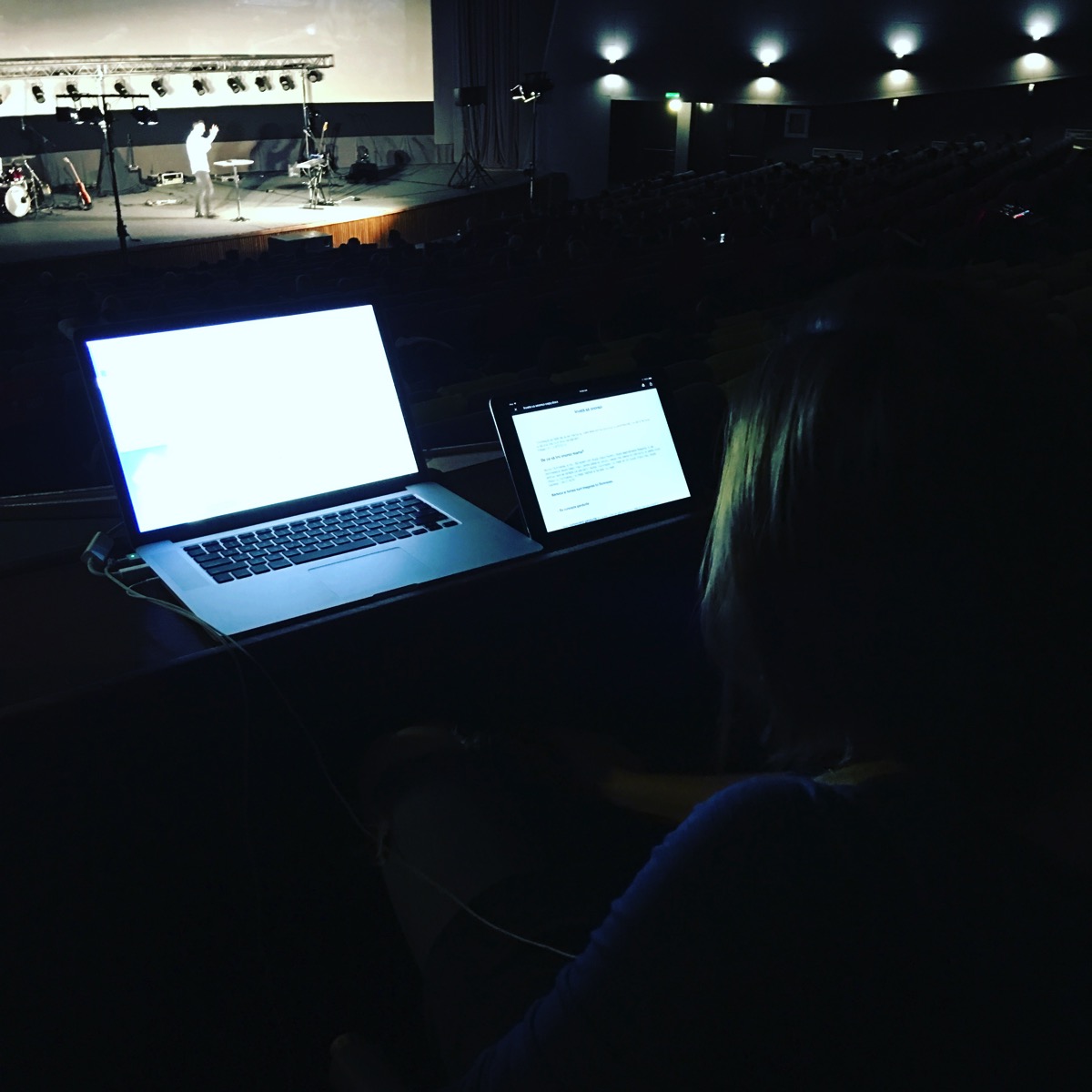
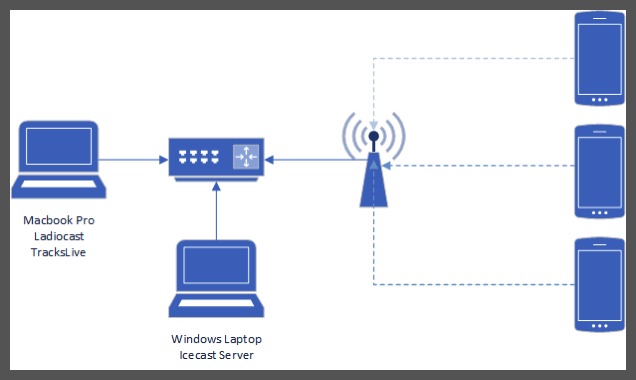
For the initial pilot, we started with a completely local setup with the following components:
- One Windows laptop
- One Mac
- Google WiFi access point(s)
- An Icecast server on the Windows laptop that would offer up audio streams to as many endpoints as possible.
- Ladiocast on the Mac which would forward the audio to the Icecast server.
- TuneIn (Android, iOS) as the streaming client on each of the mobile devices.
One key thing I did was to wire up everything that was static. Both laptops were wired into a gigabit desktop switch in order to limit the amount of traffic on the wireless network. We also did not connect the access point to the Internet, mostly because it was an initial test, however, as I’m thinking about it now, we may not want to connect it to the internet at all, again in order to limit saturating the wireless network.
In the end, with just me connecting, the technology did work. There is a fairly long delay of about 10-15 seconds in the audio stream. I think this is due to the client buffering the audio. I will continue to look into how to reduce that latency, but for now it’s workable.
We plan on trying it again this weekend with a larger audience of clients and see how it goes. We also need to gather together some additional upstream tech (microphones, mixers, etc) in order to complete the rig.
I also plan on updating things here as we get closer to a finished solution and start learning lessons of what to do and what not to do.
Monday, February 12, 2018
Groovy: Related Languages
Groovy as a language does pull from other languages, however. These language elements include:
- Ruby
- Meta programming construct where a meta object is created for key objects providing runtime extension and introspection capabilities beyond what Java offers natively
- Range type as demonstrated in the select/case statement
- Python
- list/map literal notation
- syntax for default parameters
- Smalltalk
- collection processing methods
- collect and inject naming scheme
- Functional programming
- Closures came from the world of functional programming (function pointers)
Groovy: Conclusions
These abstractions offer a level of power to the language that may not exist in Java itself. These abstractions and extension include the ability to create domain specific languages and writing more compact and concise code. It also makes learning the language easier for native Java developers than moving to Ruby or Python.
However, since these elements are grafted onto an underlying language, that can cause problems. Following the Law of Leaky Abstractions, as coined by Joel Spolsky, there are places where a Groovy developer can encounter errors that may not make sense as they are covered by these abstractions.
class LeakyAbstraction
{
int makeMeFail()
{
Random r = new Random()
if(r.nextBoolean())
return -1
// Here’s a “hidden” type conversion error
}
}
With that exception, the Groovy language does provide a welcome addition to the Java eco-system by providing an alternative to the strict, structured world of Java but still offering access to the full breadth of the Java ecosystem.
Groovy: Comparison to Programming Paradigms
Imperative Programming
Unlike Java where everything is an object (with the exception of primitives), Groovy offers a scripting framework that allows for a more imperative method of programming. A Groovy script operates as a set of variables containing data that can be acted upon via functions. These functions perform operations and can return a result. This result is stored can be stored in a variable in the code.Unlike a true imperative language, like C, Groovy still maintains two key elements of object-oriented programming:
- Unlike C, a variable in Groovy can store not only a value but also a reference to an object.
- Under the covers, Groovy converts all scripts to a Java object in order to be executed by the JVM. This conversion is transparent to the developer, but it is an abstraction that is described in greater detail in the next section.
Object-Oriented Paradigm
Groovy is an object-oriented language and follows all key OO paradigms including:- Everything is an object
- Classes and subclasses for polymorphism
- Inheritance
- Inclusion polymorphism
// A sample Groovy script
a = 1
def b = 2
def doSomething()
{
def c = "Foo"
def d = a
}
// A cross compiled Groovy script
public class Sample extends Script {
// Groovy-specific constructors omitted
public static void main(String[] args) {
new Sample(new Binding(args)).run();
}
public Object run() {
setProperty("a", 1);
Integer b = 1;
return null;
}
public void doSomething() {
String c = "Foo";
Object d = this.getBinding().getProperty("a");
}
}
Concurrent Paradigm
Groovy implements elements of current programming. The underlying processing model allows for:- Creating and managing multiple threads to process in a parallel or interleaved fashion
- Event management
- Mutual exclusion via synchronization and atomic object classes
- Admission control via Semaphore
Functional Programming
Groovy implements elements of the functional programming paradigm through the implementation of closures. Closures allow for defining a function as a variable and then using that function in various ways, including list processing.Scripting
Groovy implements key elements of the scripting paradigm. In fact, one of the primary goals when Groovy was created was to offer a scripting language like Python that targeted the Java Virtual Machine. A developer can create a compact script of commands and variables that can be executed in an interactive fashion either via the groovy command line tool or in the Groovy shell.It implements script-like variable binding and scope by offering script-level globals and variable definition within the script itself. Variables are optionally typed, adding a def keyword that defines a variable as untyped. Groovy offers the ability to scope variables and functions within packages and offers access to the underlying Java packaging system.
Data abstraction is accomplished using packages as well as through Java classes and objects.
Groovy: Language Evolution and Usage
Groovy 1.5
- Added support for key conventions added in Java 1.5, including
- Annotations - syntactic metadata added to classes and methods for use by the compiler and at runtime.
- Enumerations (enum) - named lists of pre-defined constants
- Static Imports - importing static methods from other classes into a class o Generics
- Classical for loop
- Domain Specific Language - the ability to extend the language with domain specific naming, allowing programmers to work with language and structures that are specific to their domain and have them mapped to the appropriate Groovy code
- Elvis Operator - a simple conditional of <test> ? <ifTrue> : <ifFalse>
Groovy 2.0
- Static type checking - while Groovy is an optionally typed language, version 2.0 added the ability to indicate that static type checking is required for a class
- Static compilation - added the ability to compile objects as native Java classes rather than using the meta object protocol
- Implemented additional Java 1.7 features
- Binary literals
- Underscore literals
- Multi-catch blocks
- Extension Modules
- Contributing instance and static methods (similar to adding to a JS prototype)
Groovy 2.1
- Compile time meta-annotations
- The GPars 1.0 concurrency and threading library was included
- Definable custom base classes, allowing a programmer to select which base class to extend for a Groovy object rather than the language defined one
Groovy 2.2
- Better interaction with Java 8 lambdas
Groovy 2.3
- Official JDK 8 support
- Traits
- Template markup engine - a mechanism for formatting text output
Groovy 2.4 (current)
- Support for writing Android apps in Groovy
- Other enhancements
Usage
While the Groovy language was not targeted at a specific industry or vertical sector of the programming language market, like ADA for example, it has been embraced in web development circles, including the Grails web application development framework. It also provides the core language for Samsung’s SmartThings home automation platform.Groovy: Advanced Concepts: Concurrency
In order to implement concurrency, Groovy operates on a single-process, multi-threading model. Each process contains at least one thread and it has the ability to create multiple additional threads, each capable of performing separate work. These threads share access to the same data, so the language implements a set of critical region and semaphore capabilities to allow for protecting access and updates to shared memory.
Control and Creation
The core language object in Java, and by extension Groovy, for managing multi-threading are java.lang.Thread and java.lang.Runnable. The Thread object represents a single thread of execution within a Java process. The language allows a developer to create, monitor and affect the processing of a given thread.In order to create a thread, a class must be created that implements the Runnable interface. This interface offers a single run method that is the developer will implement and provide the main entry point for the thread to start execution. The developer will first create an instance of the class, then create the Thread object using the new class and finally calling the Thread.start() method to being processing.
Threads in Groovy are interruptible and include a set of exceptions that can be thrown if a sleeping or blocked thread is interrupted. They also offer a wait for operation called join that allows a parent thread to wait for the completion of the thread processing before continuing.
class Worker implements Runnable
{
public void run()
{
// Work goes here
}
}
class Parent
{
static void main(String[] args)
{
// Create the worker object
Worker w = new Worker();
// Create the new thread
Thread t = new Thread(w);
// Start the thread
t.start();
// Wait for the thread to complete processing
t.join();
}
}
Critical Regions and Semaphores
When it is necessary to make execution a section of code mutually exclusive, Groovy offers the ability to surround that code in a lock block. Locks apply to a specific object and when a second thread attempts to access the same block as another thread, it will wait until the lock has been released.One of the simplest methods for managing access is by marking a method as synchronized or by the synchronized(this) {} semantic. This locks access to the entire object, giving mutually exclusive access to the object and its memory structures to the requesting thread. All other threads are placed in wait until that section has completed processing.
public class Example
{
synchronized void mutexMethod()
{
// Only one thread can execute this code
// at a time
}
void method()
{
synchronized(this)
{
// This code block is mutex
}
}
}
In addition to the synchronized mutex described above, Groovy also offers a Semaphore class which allows for limiting access to a set of code and resources not to a single thread alone, but to a pre-defined number of threads. It follows the baseline pattern of initialize/wait/signal. Creating a Semaphore object defines the number of permits, the acquire methods implements wait and signal and the release methods implement the relinquish.
Groovy also implements a number of atomic objects that manage mutex access to primitive values, such as integer or floating point, and offer synchronized methods to get and increment the value of that object.
Events
Groovy implements events via the base Object’s wait and notify methods. A given thread can call the wait method which will place that thread in a wait state until the corresponding signal is received. This signal is set by the Object’s notify method.// Wait code in one thread
synchronized(obj)
{
obj.wait()
}
// Send signal code in separate object
synchronized(obj)
{
obj.notify()
}
Groovy: Advanced Concepts: Sequencers
Jumps
Java implements limited jump capabilities, limited to the break and continue escapes, as described in the next section.Escapes
The Groovy language supports the following escape and branching statements: break, continue and return. Each of these allow for escaping or modifying the next step in a loop or function.break
Within a loop or switch, a break instructs the runtime to exit that composite statement. This is useful when a loop needs to be terminated without meeting its completion criteria or when a particular case statement is complete.while(true)
{
// Break when the first true is returned
if(new Random().nextBoolean())
break;
}
switch(1)
{
case 1:
// Do something and then exit
break;
case 2:
case 3:
// Case 2 falls through to case 3
default:
// Case 2 and 3 will fall through
}
outermost:
for(int i = 0; i < 10; i++)
{
for(int j = 0; j < 10; j++)
{
if(i < 5 && i + j == 17)
break;
if(i + j == 17)
break outermost
println "${i},${j} = ${i+j}"
}
}
continue
Within a loop, a continue statement will cause the processing of loop commands to stop and control be returned to the top of the loop. The following example will only print the odd numbers as even numbers will satisfy the if statement, triggering the continue.for(int i = 0; i < 10; i++)
{
if(i % 2 == 0)
continue;
println i
}
return
The final flow control statement supported by Groovy is the return statement. Within a function or method, a return statement will immediately exit the function and, if provided, return the value defined in the return statement. The value returned must be of a compatible type to the defined return value for the function.Groovy adds an additional consideration in that, unlike Java, Groovy will assume the output of the last operation will be returned at the end of a function. If the final statement does not return a value, Groovy will attempt to return a value of null. This can result in class cast exceptions if care is not taken to ensure all function exit points return the appropriate data type because the compiler may not catch these edge cases.
Exceptions
Groovy offers exception handling like that of Java. In the instance of a programming error, unintended condition or other unrecoverable error, a method or operation can throw an exception. This exception is an object that is ultimately a subclass of java.lang.Exception. This object includes the ability to include a descriptive message and the initial cause of the exception.Groovy exceptions are implemented by wrapping a function call, or set of function calls, in a try block. The try block is followed by one or more catch blocks. Each catch block defines one or more exception classes and a collection of statements to be executed in the event of an exception of that type. A try/catch block is optionally followed by a finally block. The code in the finally block is executed regardless of whether an exception is thrown or not and is often used to clean up resources.
try
{
}
catch(ExceptionTypeOne e1)
{
// code do deal with ExceptionTypeOne and any subclasses
}
catch(ExceptionTypeTwo e2)
{
// code do deal with ExceptionTypeTwo and any subclasses
}
finally
{
// code to be executed at the end of the block regardless
// of outcome (successful or exceptional completion)
}
// The following method throws a FileNotFoundException
void method() throws FileNotFoundException
{
// The following call throws a FileNotFoundException
// and must be declared or caught
FileInputStream fis = new FileInputStream(“foo”)
// Attempt to read data from fis
try
{
// throws an IO exception, caught below
int byte = fis.read()
}
catch(IOException e)
{
// Rethrow the exception as a runtime exception
// which does not need to be declared
throw new RuntimeException(“Failed reading”)
}
finally
{
try
{
fis.close()
}
catch(IOException ex)
{
throw new RuntimeException(ex)
}
}
}
Groovy: Advanced Concepts: Type Systems
Inclusion Polymorphism
Groovy implements inclusion polymorphism through classes and subclasses instead of types and subtypes. When defining a class, as in Java, the developer defines the variables in the class and the methods available in the class. A developer can then create a second class that extends that class, creating a subclass.The subclass inherits access to all the protected and public methods and variables provided by the parent class. It can also be used anywhere the parent class can be used.
abstract class Shape
{
private int x, y
public int getX() { return x }
public int getY() { return y }
public void setX(int x) { this.x = x }
public void setY(int y) { this.y = y }
abstract void draw()
}
class Circle extends Shape
{
private long radius
void draw()
{
println "I drew a circle @ ${x},${y} "+
"with radius ${radius}"
}
}
class Test
{
static void main(String[] args)
{
// Create instance of Circle
Circle c = new Circle()
c.radius = 1.4
// Access the methods from Shape
c.x = 1
c.y = 5
// Assign c to a variable of type
// Shape which works because Circle
// is a sub class of Shape
Shape s = c
s.draw()
}
}
In addition to the Java class and interface mechanism, Groovy adds an additional set of capabilities through its traits mechanism. This mechanism allows a class to extend one or more traits, which adds methods and fields. This is similar to how JavaScript allows for extending a prototype or existing object with additional fields and methods. In actuality, traits are defined in code somewhere between an interface and a class.
trait FlyingAbility
{
String fly() { "I'm flying!" }
}
class Bird implements FlyingAbility {}
def b = new Bird()
assert b.fly() == "I'm flying!"
trait A
{
String exec() { 'A' }
}
trait B
{
String exec() { 'B' }
}
// When called, the exec command will return the value of
// B.exec() because it is listed last
class C implements A, B {}
Parameterized Types
Groovy supports Java’s generics structure which can be likened to a parameterized type. For a further description of Java generics, see Generic Abstraction.Overloading
Groovy supports method overloading, allowing multiple definitions for a method of a given name. Overloaded methods are differentiated by the parameters passed into the method. The following example shows the draw method is overloaded with two implementations: one that takes no parameters and one that takes a single int parameter. Depending on which method is invoked, the class will present two different outcomes.class Circle
{
private int x, y
private float radius
void draw()
{
println "I drew a circle @ ${x},${y} "+
"with radius ${radius}"
}
void draw(int scale)
{
int x = this.x * scale
int y = this.y * scale
float radius = this.radius * scale
println "I drew a circle @ ${x},${y} "+
"with radius ${radius}"
}
}
Type Conversions
Groovy supports converting one type into another. The underlying Java language is strongly typed, meaning that it can define a variable as a specific primitive or class. Once a variable has been defined, Java allows for converting that variable from one type to another, where applicable, via both casting and coercion.Casting
Casting instructs the JRE to treat or convert a given variable as a different type of object. This is accomplished by prefixing a variable or method with the class type to cast to. At compile time, the compiler will attempt to determine if the cast is valid for the combination of variable/return and target variable. For example, if the target variable is a parent class for the source variable or method, then the compiler will allow it because any subclass of the target variable will be compatible. If the target variable is a subclass of the return, then the compiler will allow it and defer to runtime checks. If the cast is not possible (such as Integer to String), the Java compiler will return an error.class CastExample
{
static void main(String[] args)
{
// Compile time-check
Parent p = getChild();
// Runtime check
Child c = (Child)getParent();
// Invalid cast
Child c = new Object()
}
static Parent getParent()
{
// Child is cast to Parent on return
return new Child();
}
static Child getChild()
{
return new Child();
}
}
class Parent
{
// No implementation for this example
}
class Child extends Parent
{
// No implementation for this example
}
String s = “42”
int i = s as Integer
Coercion
In addition to explicit conversions via casts, Groovy also supports implicit casts via coercion. Within primitive types, Java allows coercing values of storage to be converted into variables of higher storage. For example, Java can automatically convert a short to an int to a long. In each case, the second type stores more bits than the source type, allowing the JRE to represent the same value.short s = 10
int i = s
long i = s
Groovy: Advanced Concepts: Generic Abstraction
Generics were added in 2004 with the release of Java 1.5. Prior to this, Java collections targeted Object only. This meant that the developer would need to perform a series of casts to coerce the value provided from the collection to the appropriate type. Not only was this messy, it also offered a higher likelihood of runtime errors due to improperly trying to cast an object from one type to another.
ArrayList old = new ArrayList();
old.add(“A string”);
// The required cast to use the stored object as a String
String aString = (String)old.get(0);
ArrayList<String> generic = new ArrayList<String>();
generic.add(“a string”);
// Accessing an element from a generic does not require
// the cast operation
aString = generic.get(0);
Groovy inherits this Java generics behavior directly, allowing the developer to use the Java generics.
def list = new ArrayList<String>() as ArrayList<String>
list.add(/a string/)
String value = list.get(0)
class GroovyGenericClass<T>
{
private ArrayList<T> items = new ArrayList<T>()
void add(T t)
{
items.add(t)
}
}
// Require any class used in the generic to extend
// Comparable (in this case Comparable is an interface
// so the class must implement it)
class GroovyGenericClass<T extends Comparable>
{
private ArrayList<T> items = new ArrayList<T>()
void add(T t)
{
items.add(t)
}
boolean equals(int index, T t)
{
// The compareTo method is defined in the
// interface Comparable
return items.get(index).compareTo(t) == 0
}
}
Groovy: Advanced Concepts: Data Abstraction
Packages and Encapsulation
Groovy allows for organizing classes into packages. Packages are defined using the package keyword and must be defined at the top of the compilation unit. Groovy offers additional visibility modifiers that apply to members of a package. Classes can be marked as protected, which results in them being either available only to other classes in the same package.Objects and Classes
Java is a class-based language. This means that Java provides a class-based data abstraction and encapsulation strategy. In fact, apart from primitives, everything in Java is an object. There are no standalone data structures or functions. This means that if a class has a variable that is marked as private, no other class can access that variable. To access the variable, Java recommends methods to be created in the form of getters and setters, keeping the underlying variables private.In Java classes can extend an existing class through the sub-classing mechanism. Classes in Java can only extend a single class.
Groovy offers the same method of data abstraction. One key addition from Groovy is the automatic creation of getter and setter methods for all variables in a class. This includes non-Groovy-based classes.
public class JavaClass
{
// This is a private variable only accessible
// by instances of this class
private int privateInt;
private int anotherPrivateInt = 42;
// The following are getters and setters to provide
// access to the private variable
public int getPrivateInt()
{
return privateInt;
}
public void setPrivateInt(int value)
{
this.privateInt = value;
}
}
class GroovyClass
{
private int privateInt
}
class GroovyExecutableClass
{
static void main(String[] args)
{
JavaClass jc = new JavaClass()
jc.setPrivateInt(3)
println(jc.getPrivateInt())
// Accessing the private variable by the
// automatic getter/setter
GroovyClass gc = new GroovyClass()
gc.privateInt = 4
println(gc.privateInt)
// Note: Groovy automatically provides the
// same functionality for existing Java classes
println(jc.anotherPrivateInt)
}
}
One addition item of note is how Groovy handles data abstraction in the presence of a trait. Traits are described in Inclusion Polymorphism.
Groovy: Advanced Concepts
- Data Abstraction - sometimes known as encapsulation, this is the process of hiding data from the user of a given framework or API.
- Generic Abstraction - providing common classes that can accept generic data types as arguments
- Type Systems - the mechanism the programming language uses to defined types and change variables and values between types
- Sequencers - these are more advanced flow control and exception handling concepts.
- Concurrency - the support of performing multiple actions in a simultaneous or simulated simultaneous fashion
Groovy: Basic Concepts: Procedural Abstraction
Functions and Methods
Any Java class, and by extension any Groovy class, offers the ability to have methods exposed. These methods can encapsulate a set of operations, making them reusable. Also, since they are attached to a class, they can act upon encapsulated data as described in Data Abstraction and Type Systems.class AnotherExample
{
private int index;
private String name;
// Remember, Groovy is public by default
String toString()
{
return name + ":" + index;
}
}
In addition to class-based methods, Groovy also offers a type of standalone function. This function can also encapsulate a set of operations and be reused. The function is not bound to a class, but instead is bound to the script itself, creating a form of JavaScript-like closure. The function can be bound to a variable and passed into a function for the purposes of callbacks or other instances where a dynamic function needs to be provided to a method.def callback(def value)
{
println(value)
}
def needsCallback(Closure c)
{
c(“do something”)
}
// Note the use of this to reference the callback
// in the script context
needsCallback(this.&callback)
Note: in Groovy a stand-alone function is called a closure.For both methods and functions, Groovy supports both function procedure and proper procedure definitions. Proper procedures are defined by defining a return type of void and function procedures are defined with a return type of an object or primitive.
class Example
{
void properProcedure(int param1, String param2)
{
// do something
}
int functionalProcedure(int param1, String param2)
{
// do something and return a value
return 0;
}
}
Parameters and Arguments
When passing parameters into a Groovy method or function, all values are in only and passed by copy. This means that primitive values are copied into the function for use.Object values are passed by reference, meaning the reference value, like a pointer in C, is passed in by copy. The result is an object accessed in a method is the same object from the calling method.
Java does not support passing functions as variables, so Groovy added an operator, the & operator, to represent the equivalent to a function pointer.
Groovy: Basic Concepts: Variables, Storage and Commands
Simple Variables
Groovy supports simple variables. These variables can contain either a primitive value or a reference to an object.int i = 0
short s = 4
Composite Variables
Groovy also supports composite variables that can store or reference arrays and maps. When updating composites, Groovy supports both selective and total updates.// Define a composite as an array
def comp = [1,2,3]
// Selective update
comp[2] = 4
// Total update
comp = [5,6,7]
Copy and Reference
Groovy supports the reference semantic. When assigning one variable’s value to another, it will either copy the primitive value or the reference. Groovy objects to support a clone method that has a similar effect to the copy semantic, however, the implementer will need to determine exactly how the copy occurs.Lifetime
Variables created in Groovy are created on the heap and are generally defined as local variables. Each variable is limited to the class that it was defined in, further defined by the block structure. As each block is closed, the variables defined within that block fall out of scope and are marked for removal. See the section Scope and Visibility for more information on scope in Groovy.Because Groovy is a garbage collected language, the lifetime of a variable is impossible to precisely define as the garbage collector runs at arbitrary times and will clean up variables that have been marked for collection.
Groovy does support a form of global variable, but only in the script mode. In this mode, a global exists for the lifetime of the script execution. In a traditional class-based mode, variables are restricted to the class they are defined in. Modifiers to class variables do allow for marking a variable as static, which has the effect of making that variable global to all instances of the class, and if marked as public, available to all instances as well. This can have an effect of making a static variable as globally available though they are still a member of a class and not a true global.
Pointers
Groovy does not support pointers. It only supports references as partial replacement for pointers.Groovy supports several types of commands including skips, assignment, sequential, conditional and iterative commands.
Skips
Groovy supports a form of skip or command. Groovy supports the Java ‘;’ line terminator as an optional element. A single ‘;’ is interpreted as a skip.Assignments
Groovy supports both single and multiple variable assignment.int a = 1 def b = c = 2
Sequential Commands
Groovy supports sequential commands using the ‘;’ as a separator.Conditional Commands
Groovy supports two key conditional commands: if-else and switch-case. Both allow for conditional code execution based on provided values.if-else
Groovy supports the Java standard if-else conditional structure. This allows for executing two different blocks of code depending on whether the statement in the if statement evaluates to true or false.boolean comparison = new Random().nextBoolean()
if(comparison)
{
println "Value was true"
}
else
{
println "Value was false"
}
Groovy also supports the nested if-else if-else structure.boolean comparison = new Random().nextBoolean() boolean comparison2 = new Random().nextBoolean() if(comparison && comparison2) println "Both are true" else if (comparison && !comparison2) println "Only comparison is true" else if (!comparison && comparison2) println "Only comparison2 is true" else println "Both were false"
switch-case
Groovy supports the switch-case structure. The switch statement can accept a single variable and jump to a specific code block indexed with a specific value. Unlike Java, Groovy can perform a broader set of matching in the case statement, including strings, types and lists of values. The following example was taken directly from the Groovy language reference.def x = 1.23
def result = ""
switch ( x ) {
case "foo":
result = "found foo"
// let’s fall through
case "bar":
result += "bar"
case [4, 5, 6, 'inList']:
result = "list"
break
case 12..30:
result = "range"
break
case Integer:
result = "integer"
break
case Number:
result = "number"
break
case ~/fo*/:
result = "foo regex"
break
case { it < 0 }: // or { x < 0 }
result = "negative"
break
default:
result = "default"
}
assert result == "number"
Iterative Commands
Groovy offers the following types of loops: while, for, for in, each and do-while. The following section covers each of the type of loops available in Groovy and the samples show how to print the numbers 0-9 within the loop.While
A while starts with a test and as long as the test results in true it will continue the loop. This behavior is shared with the underlying Java language.// Definition
// while(<termination>)
// {
// statement(s)
// }
// Example
def i = 0
while(i < 10)
{
println i++
}
For
A for loop works similar to a while loop, except that its definition contains the conditional, the definition of the variable(s) and the code that affects the variable. In operation, the for loop works the same as the while loop in that it will continue looping while the termination comparison evaluates to true. The initialization and increment elements are optional.// Prototype
// for(<initialization>;<termination>;<increment>)
// {
// <statements>
// }
// Example
for(int i = 0; i < 10; i++)
{
println i
}
def j = 0;
// Example
for(; j < 10;)
{
println j++
}
One item to note is that as of 2.4, Groovy for loops only support a single initialization parameter in a for loop, while Java can support multiple. Groovy version 2.6 will offer this functionality.For In
Groovy offers an alternate form of a for loop that instead of checking for a conditional, the for in loop will loop through each item in a collection (typically a static array or a List). Other languages implement this function with a separate foreach keyword.// Definition
// for( <type> <variable> in/: <array/list>)
// {
// statement(s)
// }
// Example using the word in
for(int j in [0,1,2,3,4,5,6,7,8,9])
{
println j
}
// Example using the : instead of in
for(int j : [0,1,2,3,4,5,6,7,8,9])
{
println j
}
Do-While
The current released version of Groovy (2.4) does not support the do-while loop construct. This is scheduled to be released in version 2.6.Each and EachWithIndex
Because Groovy offers closures, it offers an additional form of loop that can be applied to an array, list or map. It offers similar functionality to the for-in loop, but in a more compact syntax. Unlike the for-in loop, as Groovy iterates through each member of the collection, it calls the provided function/closure, providing the current item as a calling parameter.// Definition
// <array/list/map>.each(Closure c)
// Print 0-9
[0,1,2,3,4,5,6,7,8,9].each {
println it
}
// Get the index and letter from the list
["Alpha","Bravo","Charlie","Delta","Echo"].eachWithIndex { letter, index ->
println "${index} -> ${letter}"
}
// Iterate through a map, using the variable letter for key
// and name for word
[
"A":"Alpha",
"B":"Bravo",
"C":"Charlie",
"D":"Delta",
"E":"Echo"].each{ letter, name ->
println "${letter} <-> ${name}"
}
Because closures can be bound to variables, this can allow for more compact coding through the reuse of closures on multiple each or eachWithIndex calls.// Define the closure
def doSomething(letter,index)
{
println "${index} -> ${letter}"
}
["Alpha","Bravo","Charlie","Delta","Echo"]
.eachWithIndex this.&doSomething
["Foxtrot","Golf","Helo","India","Juliet"]
.eachWithIndex this.&doSomething
Expressions with Side Effects
Groovy supports expressions with side effects, meaning that an expression, such as a function call or operation, can be used inline with another function call or operation. The example below shows an example of embedding a function call in an if statement.if(getCurrentState())
{
}