Saturday, September 14, 2019

PhD v2.0

It was about two and a half years ago that I started publishing information about my presumed pending doctoral program.  Well, that ended up being sidelined because of the Romanian Ministry of Education.  In reviewing my application, they determined I was not eligible because I had not attended or completed a master's degree.

Whoops!

Nothing like selling everything you have and preparing to move to a new country only to discover that the primary reason (or excuse) you planned the move was not going to happen.  At least the educational system in Romania tends towards a "things get done at the last minute" method, so I was able to apply for a Master's Program at UBB instead.  And, while the process was annoying, it did end up with me having a better understanding of the process and a stronger line on what I will be attempting to research.

My original plan was to continue my loose work around text analytics, but the more time I spent learning the math involved, the more I started to understand that my passions lie elsewhere.  Now, that's not to say I won't end up picking this back up, but for now I plan on working towards a different topic.

Which brings us to the main thrust of this post: I have now been accepted into the PhD program at Universitatea Babes-Bolyai.  This time, I'm going to start looking into the intersection of workflow management and parallel programming.  Associate Professor Virginia Niculescu posed the following question during my last semester: what overlap is there between the workflow patterns (as documented by van der Aalst and Russell) and the defined parallel programming patterns.

With that thought in my head, I started my Master's thesis based on that, with a healthy dose of advanced case management thrown in.  Apparently, it was enough to complete my degree.  Now, I plan on working to complete the thought, as I believe there is plenty of room left to research the topic.  In fact, my thesis was about 80 pages (including project documentation) and I firmly believe that I could have easily added another 20-40 pages.

Follow this space (and my ResearchGate profile) as I move forward.  I'm already starting to write what I hope to be my first academic article and as it progresses I will try and update here.

Friday, July 05, 2019

Masters is (Basically) Complete

This may be slightly premature as I'm still waiting on the final grades from the University, but Wednesday 3 July, I delivered my thesis/dissertation defense and final presentation.  I believe it went well and hope to publish my final paper on ResearchGate as soon as the final grades are out.  In the meantime, here's the abstract:
Computers and information technology are commonly used to perform complex tasks more efficiently. Within information technology, two disciplines that are often used to assist businesses and other domains complete processes in a more efficient manner are workflow management and advanced case management. Workflow management is a discipline that is used to document, enforce, and streamline repetitive processes. Advanced Case Management is an emerging field that is an alternative to traditional workflow management and that offers more flexibility in completing processes. Both disciplines can provide additional efficiency gains through enabling business to distribute tasks to multiple users simultaneously.
Another discipline in computer science is parallel and high-performance computing. It offers users a similar ability to increase performance and throughput of complex processes through parallel task execution and work distribution across multiple systems. 
To explore the commonality between the three disciplines, this paper will review both the disciplines of workflow management and advanced case management from a parallel programming perspective. In addition, this paper will present a prototype of a new framework based on the guard-stage- milestone methodology of advanced case management, that has been built on the Akka actor model framework, uses a common big data NoSQL database for data storage, and can be used to demonstrate how an advanced case management system can be used to as a parallel task execution environment.

Saturday, March 09, 2019

URL Shorteners + Icecast/VLC

One additional thing I've been trying that seems to work well is using something like bit.ly.  We've been using it for linking to our online instructions, but last weekend I started using it as the URL for listening to the stream.  Now, instead of having to type in http://192.168.0.4:8000/live.mp3, the listeners can simply use bit.ly/CTEnglish.

So far, it seems to be working, though I haven't tried it on both iOS and Android.

Friday, March 08, 2019

Thoughts on Interpretation

I have a friend, Scott Garber, in the US who has been an interpreter for his church for a number of years.  When we started planning the new ministry, I reached out to him for some pointers.  With his permission, below are his thoughts:

  1. It’s difficult to do the translation in the same space (or even off in a corner) as the main service. It just creates too much distracting noise. So, you have to figure out how the hearers are going to get the sound. At our church we give the listeners earpieces that fit over one ear and receive a radio signal (I suppose, as i don’t deal with the transmission of the sound). That allows them to follow the original audio as well. If you’re not going to translate everything (for instance, if you translate only the sermon) or if the listeners are also trying to learn Romanian, the live audio comes in handy. Plus, a full headset would make it hard to follow the live music.
  2. The translator needs to be in a space where he or she can concentrate without distractions. I’m in a studio, where I have a monitor and a headset with a mic. It doesn’t have to be such a dedicated space, but stuff is going on around you that diverts your attention you’ll get behind and then have to start summarizing and paraphrasing to catch up. Or just lose track of what’s being said while you’re talking. You could do it without video, I suppose, but the video makes it a lot easier to follow. If the speaker writes anything or uses graphics, you’d get kind of lost without video. It also allows you to see the song lyrics if they are projected.
  3. Translation works better if you have multiple services, even if you’re translating only one. That way the translator can attend a service before translating and think through/look up any tricky bits rather than being caught flat-footed. Plus, it allows the translator to have a worship experience, as translating is work. And to have any Scripture passages bookmarked before translating, so that those can just be read rather than having to translate them. If you have just one service there are things you can do to help the translator. All of these will also enhance the translation, even if the translator has a chance to experience the service beforehand. Having sermon notes ahead will allow them to make sure they have the best possible terminology for key words and main points. Plus, it will give them the Scripture passage ahead of time. If you want to translate the music, having the lyrics ahead of time is very helpful. If you’re translating into English, in many cases the translator could find the English lyrics. If not, it’s still helpful to see the Romanian lyrics, as poetic language can be trickier than normal speech, and it can throw translators for a loop. If you do dramas, it’s also really helpful to have that script ahead of time.
  4. You have to determine which portions of the service you will translate. At the U.N. they switch out translators every 20 min. or so (I’ve been told). I do an hour and a half (minus some announcements and instrumental music), and it’s a lot. We don’t get the lyrics ahead of time, so not all of our translators even attempt to do music. Even though it would be handy to be able to switch out translators and keep them fresh, if you’re working with volunteers on a rotational basis it can get logistically hairy to find enough people if you have to use more than one per week, especially if that requires them to attend two services. 
  5. I would suggest that you have at least a couple or three people that you can count on. One person might start with great enthusiasm but could easily get burnt out. Plus, if that person is away or ill, the people who have come to depend on translation are left high and dry.
  6. If you are streaming the services you’ll have to decide whether or not translation will be part of that package and how to pull it off technically. You might want to work out the kinks and make sure that you’re really going to continue with translation long-term before you cross this bridge..
  7. I think it’s important to have somebody who understands both languages monitor the translation, at least initially and from time to time, to make sure that you don’t have wildly divergent quality levels and that it’s actually working. Not everybody who is an expert in both languages can do simultaneous translation, so having some quality control can help determine if the translator(s) is capable. Feedback can also help improve performance over time. We don’t do this at our church, but I think we should. I know that some people, like me, are really translating, whereas I have the sense that some are just giving periodic summaries or very loose paraphrases. Your pastor(s) might not be happy to have people “flavoring” their messages too much.

Tuesday, March 05, 2019

Configuring Icecast and BUTT

In my last post, I described some of the recent changes we've made to our live interpretation tech and described some lessons learned.  Now I want to try and walk someone through the process of setting up a similar system to ours.  I'm going to focus on Windows, Icecast and Broadcast Using This Tool (BUTT).  I may add a second post to show how this can be configured using Linux as well, but for now Windows will do.

For starters, you'll need a Windows machine (probably Windows 7 based on my recent experience, though YMMV).  After that you will:

  • Configure your Windows machine with either a static IP address or a DHCP reservation with your firewall.  (I'm a big fan of the DHCP reservation so you can take your machine elsewhere and it'll still work fine).
  • Download the two packages mentioned above: Icecast and BUTT.

Install the Tools

  • Install Icecast using the downloaded installer.  You can accept the defaults, but you might want to install it somewhere other than Program Files as you'll need to edit the configuration file and, given that it's a server, you might want to run as a non-system/non-privileged user.
  • Install BUTT using the downloaded installer.

Configure Icecast

Icecast uses an XML configuration file.  Edit that file in your favorite text editor.  You will need to make the following changes (at minimum ... there may be more things you can do to harden the server).
  1. Change the value of the <location>Earth</location> tag.  The value doesn't matter much, but Icecast will gripe at you if you don't.
  2. Change the <admin>icemaster@localhost</admin> tag to your contact address
  3. Change the <hostname>localhost</hostname> tag to your system's hostname
  4. In the <limits> section:
    1. set <queue-size>16384</queue-size>
    2. set <burst-size>16384</burst-size>
  5. In <authentication>, set the source, relay and admin passwords. 
Save the configuration and start the server with the icecast.bat file.  If you've done everything right, you should see a console window like this:

Configure BUTT

BUTT offers a nice UI for configuring the tool.  So, once you've started it, you can configure it using the UI.

Configure the server

  1. Click the settings button to the right of the VU meter
  2. Click the ADD button under the server drop down to configure your server.  Enter the following:
    1. Name: I used localhost just because, but you can call it what you want
    2. Type: Icecast
    3. Address: localhost
    4. Port: 8000
    5. Password: <source password from icecast config file>
    6. IceCast mountpoint: live.mp3 (or whatever you want it to be.  This is will be part of the URL for the Icecast server)

Configure Audio Settings

On the Audio tab you will configure the audio encoding settings.  The default assumes full CD quality 44100/stereo.  As this is voice only, you can greatly reduce your overhead and network usage by reducing this.  To do this, you will: 
  1. Select your audio input device
  2. Set channel to Mono
  3. Set Samplerate to 22050Hz
  4. Set the streaming bitrate to 64k

Save the settings and start streaming.


After you start, you might want to update the title of the stream using the Stream tab and update song name manually option.


Note: there is also an option on this tab to start streaming automatically.  Once you know you have the settings correct, enabling this option might be a good idea.  It simplifies the process.

Test

Now that you have your system up and running, you can test the sound by starting VLC (or any streaming client) and opening the stream.  You should adjust your audio to suit.

Documentation

I'm a big fan of creating documentation for volunteers to use.  As such, I created a HOWTO document for our team.  I've uploaded a sanitized version of this document here for you to use as a starting point.

Live Interpretation (Updated)

I had someone come to me today asking about the solution we are using for live interpretation.  Apparently news of this is starting to get around and this made me realize it's time to update the technical details and start posting some of my lessons learned.

Let's start with our current technology stack.  It's fairly similar to what we were using before, but we have managed to simplify it a bit.  Here's a list of tech:
The configuration is fairly straightforward:
  • Connect mic to mixer
  • Connect mixer to interface
  • Connect the interface to the laptop
  • Connect the laptop to router
  • Connect router to internet
  • Power everything on
  • Start Icecast
  • Start BUTT
  • Start streaming


I will create blog posts to describe how to configure the software and a description of Windows vs Linux as a server OS for this purpose.  However, this is meant to be an overview of what we're using and how.

I also wanted to provide a list of issues we've run into so far and things to keep in mind:
  • Internet connectivity is very important.  Our initial tests were on a local network with no internet connectivity and, while it worked, it did cause some issues.  Specifically, we started using TuneIn the streaming radio player and its initial setup required internet connectivity to move forward.  VLC doesn't, but you cannot assume the users will have enough data on their plan to download the software.  We now have a dedicated wireless network that does have internet connectivity
  • Wireless channel selection.  Right now we are having some issues with cross-talk between the various routers in the house.  (sound tech, ours and others).  I'm hoping we can get around to assigning dedicated channels for these, but we're not there yet
  • User friendliness: VLC, while a great app, isn't always the friendliest.  The iOS app will keep track of URLs you've listened to and that helps, but Android does not.  I'm hoping to eventually replace this with a dedicate app for CT, but that's a future enhancement.
  • Audio Processing: Our current mixer has limited audio processing, specifically no compression.  BUTT doesn't offer any dynamics either, so we are looking at other options to allow us to compress and boost the audio a bit.  Also, don't skimp on the choice of microphone.  You could use an inexpensive computer mic, but I would think it would result in poor sounding audio and not be pleasant to the listener.  We're using a Sennheiser mic (which is probably overkill), but at least a Shure SM58.  Ideally you'd have a good plosive filter too.
  • Dedicated space: one of the issues we have now is our interpreters are set up in the back of the theater.  This is for expediency sake at this point as they can see what's going on and hear the message.  There are two key downsides to this:
    • The interpreters can occasionally be heard by the congregation.  To avoid this, they often have to speak more quietly than they would and that causes the volume to fluctuate for the listener.
    • The listeners tend to hear the sound from the service flow into the feed we are sending.  This can be a bit distracting, especially given the lag.
  • Latency: while the technology appears to work well, it does suffer from a bit of latency.  Each step of the chain adds a small time buffer to smooth out any network loss.  The configurations I use tend to reduce this, but it still adds up.  At best, we tend to see 3 second latency between when words are spoken to when they are delivered.  At worst, I've seen 10 seconds or more.  With VLC, you can simply stop and restart the stream to reduce that back down, but it's still something to keep in mind.
  • Avoid Windows 10 (for now): I personally use Windows 10 and have since about the time it came out. (In fact, I'm writing this post on a Windows 10 Pro machine).  However, when I tried to use Icecast on Windows 10, something went wrong.  It worked in testing, but in production use, somehow the networking stack in Windows (be it the firewall or something) ended up killing all active connections.  It was so bad that I had to quickly restart into Linux just to continue the service.  We're currently using Windows 7 and it works just fine, so until I can figure out what happened, I'd avoid 10.
  • GDPR: One thing Icecast will do is create log files.  Under GDPR you will need to make sure you handle those with care and follow your organization's privacy guidelines.  And if you don't have guidelines for compliance ... bring it up as it does matter.
At the end of the day, it's not the most perfect setup, but the price of starting up is fairly inexpensive.  Assuming you have a PC or laptop available, simply add the dedicated wireless router, mixer and microphone and you're up and running.

As we continue on, I will publish more thoughts and details.

Saturday, October 27, 2018

CT Interpretation Live Links

This post provides links to the live stream only.  For more details on the whole process, see the previous post.

To listen to the live stream, tap on one of the following links:

Apple iOS or Android Link

Live Interpretation 2.1

Welcome to the Casa Taplarului live service interpretation service.  Getting connected and listening is fairly straightforward, though it does include a few steps.  This guide will try and cover both Android and iOS.  For those technically inclined, here's the brief overview:

  1. Connect to the CT-Live24 or CT-Live50 access point (password: CTInterpretation)
  2. Connect to the following streaming URL using a media player (like VLC or TuneIn): http://bit.ly/CTEnglish (or if that fails, you can try http://192.168.0.4:8000/live.mp3)
For those who need more step-by-step instructions, here are the steps for Android and iOS:
  1. Connect to the CT-Live24 or CT-Live50 WiFi access point.  The password is CTInterpretation.  Note: you will need to do this in the cinema itself as the WiFi does not extend out into the lobby. 
  2. Download VLC (or any audio streaming application you want to use).  We're recommending VLC as it is free and has proven to work well.

    , Get it on Google Play


  3. Start VLC.  On first run, there will be some introductory steps you will need to skip through.


    For iOS, you can take the tour or just tap on "Done"

      
    For Android, note that on the second step you can disable the "Let VLC scan my device for media content" option.
  4. Open the live stream for the first time:

     
    For iOS, tap on the traffic cone / VLC icon in the top left and then select "Network Stream".  In the URL box at the top, enter: http://bit.ly/CTEnglish  (or if that fails, you can try http://192.168.0.4:8000/live.mp3)

      
    For Android, tap on the hamburger menu (three lines) in the upper left, tap on "Stream" and enter http://bit.ly/CTEnglish and tap on the arrow to the right.   (If that fails, you can try http://192.168.0.4:8000/live.mp3)

    Note: if the stream ends up lagging behind the service by more than about 5 seconds, you can stop and restart the stream.
  5. For subsequent, future visits, you may be able to select the stream from a list of recent streams:


    For iOS, on the Network Stream page, you can simply select the CTEnglish stream from the list.

    For Android, you may be able to select it from the History page.
If you have any issues, you can reach out to one of the volunteers and they can direct you to someone who can help.

Google Play and the Google Play logo are trademarks of Google LLC.

Sunday, May 13, 2018

Smooth Move of the Week

On Wednesday, I pulled a good one.  Alex and I were biking across town for his guitar lesson when I managed to crash my bike.  I'm sure you've heard other people's stories where they hit a car, crashed into a curb or got their tire stuck in a streetcar track.  My story's even better.  I managed to crash over the air.  I literally hit nothing.

A bit more details are in order, for sure.  While I can't be 100% certain, I think what happened was this:  while riding, I saw my neighbor's kid and wanted to say hi.  That meant I slammed on my brakes to slow down and I think I just shifted my weight forward causing the bike to stop and me to keep going.

Next thing I know I'm heading over the handlebars and thinking "this is going to be painful".  I then crashed into the ground (shoulder first), hit my head (in my helmet) on the ground and then crashed into my side.  The result was bruised ribs, road rash on my shoulder/arms/knee/foot and a serious bruise to my ego.

Fortunately I was wearing a helmet so I'm only living with painful ribs and not a concussion.  I will heal and live to bike again.  The bike also survived the encounter more or less unscathed.  The handlebars do have a bit of road rash too and I need to adjust a few things.

My only real hope now is that I heal sooner than later .. and that someone happened to get that on video.  I'd love to watch me bounce off the air like a moron.  Bonus points if they have it in slow motion.

Wednesday, March 14, 2018

Listening to the Live Stream

In my last post, I described how I’m trying to use streaming audio to deliver simultaneous translation of the messages at my church.  This post is meant to be a HOWTO for anyone attending and tho want to listen to the stream.

Note for this to work, you will need to be connected to the appropriate wireless network. This will be given out on Sunday morning

AndroidiOS

Download TuneIn

 TuneIn Android TuneIn iOS 

Copy URL (or use QR code)

Stream URL
http://192.168.86.230:8000/live.mp3.m3u

Create Custom URL in TuneIn

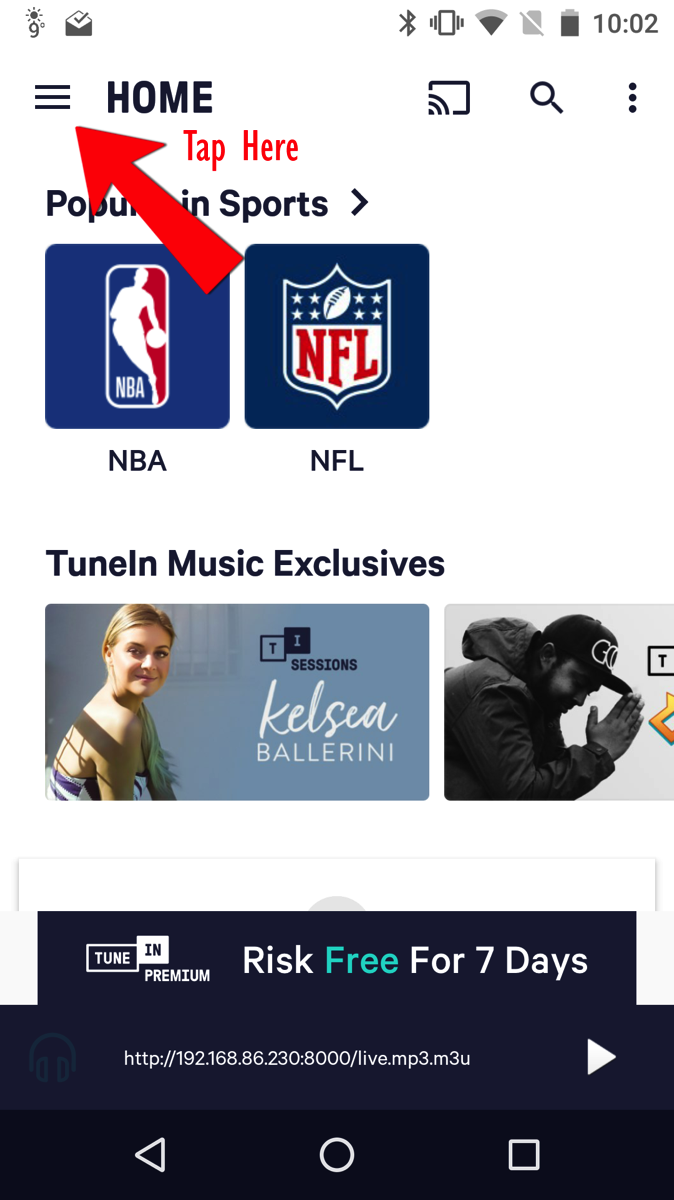
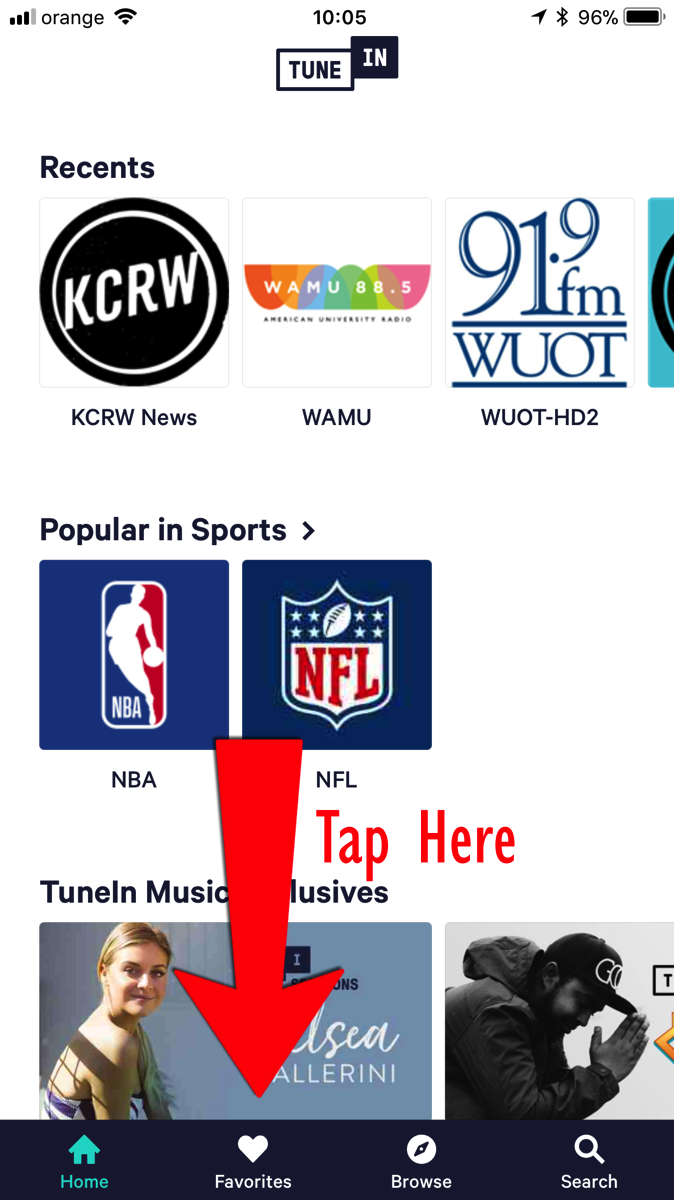
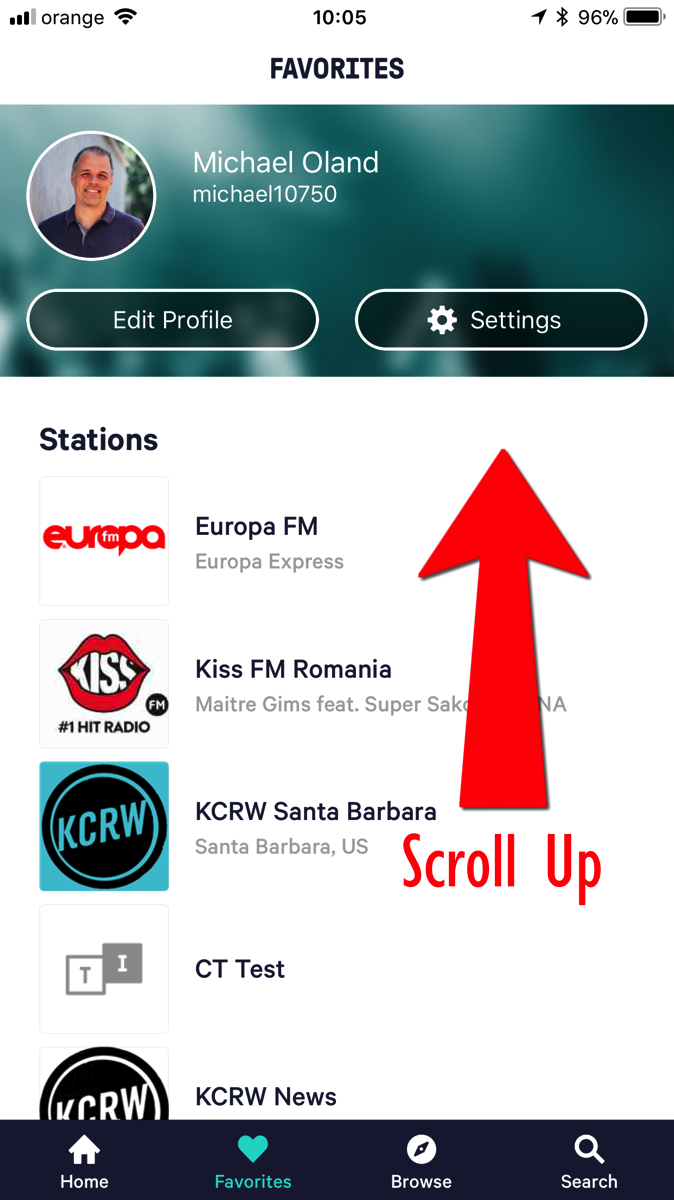
Step 1: Select favorites from the hamburger menu (Android) or from the bottom set of links (iOS)
Screenshot 20180314 100225 2018 03 14 10 05 47
Screenshot 20180314 100229
Step 2: Click "Add Custom URL"
Screenshot 20180314 100239 2018 03 14 10 05 59
Screenshot 20180314 100242 2018 03 14 10 06 02
Step 3: Enter the Custom URL into the box and touch Save on Android or touch the URL below the search box on iOS
Screenshot 20180314 100247 2018 03 14 10 06 06
Screenshot 20180314 100312 2018 03 14 10 06 34

Once you have created and saved the custom URL, each time you want to listen you can just select that Custom URL from the favorites list and it will begin streaming the audio.

Simultaneous Translation Tech Pilot

When we moved to Cluj, we started attending a local church, Casa Tamplarului.  As a church, it reminds us a lot of National Community Church in DC, which we attended before we moved here.  Of course, being the audio nerd that I am, I’ve joined the production team and now run front of house regularly.

As much as I like the church and the people there, I have one issue: the message is delivered in Romanian.  Actually, it’s not a problem with the church, but it’s really my problem as my Romanian isn’t quite as far along as I would like.  I’m learning, but I’m not there yet.

In talking with some of our friends there, the team has wanted to offer simultaneous translation of the service into English for a while.  They even started collecting some consumer-grade wireless headphones to try and use.  While we were able to make them function, they offer some limitations, so we started looking at alternatives.

What we’ve settled on as an initial trial is to use mobile phones and streaming audio as a delivery platform.  It offers a few key advantages:

  • Everyone has a mobile phone, so we are not limited to hardware that the church has to provide.
  • Phones are already set up to receive streaming audio, the listener just needs to download an application.
  • As we move forward, it offers the option of broadcasting the audio not only locally but to the Internet at large as well.
  • If we decide to add more languages, it should be just a matter of adding additional streaming endpoints to the existing tech.

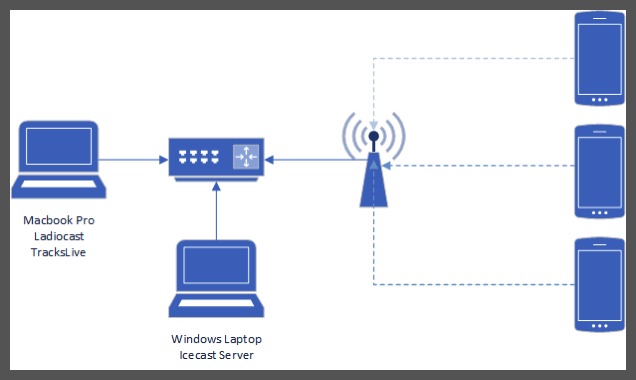
For the initial pilot, we started with a completely local setup with the following components:

  • One Windows laptop
  • One Mac
  • Google WiFi access point(s)
  • An Icecast server on the Windows laptop that would offer up audio streams to as many endpoints as possible.
  • Ladiocast on the Mac which would forward the audio to the Icecast server.
  • TuneIn (Android, iOS) as the streaming client on each of the mobile devices.

Network topology

One key thing I did was to wire up everything that was static.  Both laptops were wired into a gigabit desktop switch in order to limit the amount of traffic on the wireless network.  We also did not connect the access point to the Internet, mostly because it was an initial test, however, as I’m thinking about it now, we may not want to connect it to the internet at all, again in order to limit saturating the wireless network.

In the end, with just me connecting, the technology did work.  There is a fairly long delay of about 10-15 seconds in the audio stream.  I think this is due to the client buffering the audio.  I will continue to look into how to reduce that latency, but for now it’s workable.

2018 03 11 11 51 00 1

We plan on trying it again this weekend with a larger audience of clients and see how it goes.  We also need to gather together some additional upstream tech (microphones, mixers, etc) in order to complete the rig.

I also plan on updating things here as we get closer to a finished solution and start learning lessons of what to do and what not to do.

Monday, February 12, 2018

Groovy: Related Languages

The Groovy language is most directly related to Java. One key design consideration for Groovy was building it to integrate directly with the Java Runtime. In fact, any valid Java code is valid Groovy code. A Groovy application can also access the Java class library and third-party libraries. Even where the languages differ, the language implements these differences in a compatible way. An example is the cross compiling of a Groovy script into a Java class.
Groovy as a language does pull from other languages, however. These language elements include:
  • Ruby
    • Meta programming construct where a meta object is created for key objects providing runtime extension and introspection capabilities beyond what Java offers natively
    • Range type as demonstrated in the select/case statement
  • Python
    • list/map literal notation
    • syntax for default parameters
  • Smalltalk
    • collection processing methods
    • collect and inject naming scheme
  • Functional programming
    • Closures came from the world of functional programming (function pointers)

Groovy: Conclusions

Groovy is an interesting hybrid language that bridges the words of strictly-typed, object-oriented languages and dynamically-typed scripting languages.  Because it is built directly onto the JVM, it must adhere to the constructs of an object-oriented language.  However, despite this requirement, the language itself has built into it a number of abstractions that allow for the developer to utilize it as if it were a dynamically typed language.
These abstractions offer a level of power to the language that may not exist in Java itself.  These abstractions and extension include the ability to create domain specific languages and writing more compact and concise code.  It also makes learning the language easier for native Java developers than moving to Ruby or Python.
However, since these elements are grafted onto an underlying language, that can cause problems.   Following the Law of Leaky Abstractions, as coined by Joel Spolsky, there are places where a Groovy developer can encounter errors that may not make sense as they are covered by these abstractions.
class LeakyAbstraction
{
    int makeMeFail()
    {
         Random r = new Random()
         if(r.nextBoolean())
              return -1
 
         // Here’s a “hidden” type conversion error
        
    }
}
In the above example, the method makeMeFail is typed to return a primitive int.  In the case where nextBoolean returns true, this function will complete successfully as the return is a primitive integer.  However, if nextBoolean returns false, the return attempted is a NULL as Groovy will attempt to return the value of the last executed operation.  Because NULL cannot be converted to a primitive this causes a conversion exception.  This error may not make immediate sense to the developer as other scripting languages handle this more gracefully.
With that exception, the Groovy language does provide a welcome addition to the Java eco-system by providing an alternative to the strict, structured world of Java but still offering access to the full breadth of the Java ecosystem.

Groovy: Comparison to Programming Paradigms

Groovy is derived from Java and as such follows many of the object-oriented design paradigms, however its scripting nature and other elements allows it to implement elements of other programming paradigms.  This section compares Groovy to each of the key paradigms.

Imperative Programming

Unlike Java where everything is an object (with the exception of primitives), Groovy offers a scripting framework that allows for a more imperative method of programming.  A Groovy script operates as a set of variables containing data that can be acted upon via functions.  These functions perform operations and can return a result.  This result is stored can be stored in a variable in the code.
Unlike a true imperative language, like C, Groovy still maintains two key elements of object-oriented programming:
  • Unlike C, a variable in Groovy can store not only a value but also a reference to an object.
  • Under the covers, Groovy converts all scripts to a Java object in order to be executed by the JVM.  This conversion is transparent to the developer, but it is an abstraction that is described in greater detail in the next section.

Object-Oriented Paradigm

Groovy is an object-oriented language and follows all key OO paradigms including:
  • Everything is an object
  • Classes and subclasses for polymorphism
  • Inheritance
  • Inclusion polymorphism
As noted in the imperative paradigm section, Groovy does offer a scripting semantic that appears to implement the imperative paradigm.  However, at compilation time, the script itself is converted into a proper Java object with the globals, functions and other elements handled within the class.  Below is a sample Groovy script:
// A sample Groovy script
a = 1
def b = 2
 
def doSomething()
{
    def c = "Foo"
    def d = a
}
The following code example is the same script cross-compiled into Java by the Intelli-J integrated development environment.
// A cross compiled Groovy script
public class Sample extends Script {
    // Groovy-specific constructors omitted
    public static void main(String[] args) {
        new Sample(new Binding(args)).run();
    }
    public Object run() {
        setProperty("a", 1);
        Integer b = 1;
        return null;
    }
    public void doSomething() {
        String c = "Foo";
        Object d = this.getBinding().getProperty("a");
    }
}
Global variables are managed through a Bindings object which manages the scope and access within created methods.  Any functions created in the script are promoted to class-level methods.  All other elements are managed using normal object-oriented paradigms.

Concurrent Paradigm

Groovy implements elements of current programming.  The underlying processing model allows for:
  • Creating and managing multiple threads to process in a parallel or interleaved fashion
  • Event management
  • Mutual exclusion via synchronization and atomic object classes
  • Admission control via Semaphore

Functional Programming

Groovy implements elements of the functional programming paradigm through the implementation of closures.  Closures allow for defining a function as a variable and then using that function in various ways, including list processing.

Scripting

Groovy implements key elements of the scripting paradigm.  In fact, one of the primary goals when Groovy was created was to offer a scripting language like Python that targeted the Java Virtual Machine.  A developer can create a compact script of commands and variables that can be executed in an interactive fashion either via the groovy command line tool or in the Groovy shell.
It implements script-like variable binding and scope by offering script-level globals and variable definition within the script itself.  Variables are optionally typed, adding a def keyword that defines a variable as untyped.  Groovy offers the ability to scope variables and functions within packages and offers access to the underlying Java packaging system.
Data abstraction is accomplished using packages as well as through Java classes and objects.

Groovy: Language Evolution and Usage

After the initial release, the Groovy language continued to evolve and progress. Below are key features with each major release, not including pending releases.

Groovy 1.5

  • Added support for key conventions added in Java 1.5, including
    • Annotations - syntactic metadata added to classes and methods for use by the compiler and at runtime.
    • Enumerations (enum) - named lists of pre-defined constants
    • Static Imports - importing static methods from other classes into a class o Generics
    • Classical for loop
  • Domain Specific Language - the ability to extend the language with domain specific naming, allowing programmers to work with language and structures that are specific to their domain and have them mapped to the appropriate Groovy code
  • Elvis Operator - a simple conditional of <test> ? <ifTrue> : <ifFalse>

Groovy 2.0

  • Static type checking - while Groovy is an optionally typed language, version 2.0 added the ability to indicate that static type checking is required for a class
  • Static compilation - added the ability to compile objects as native Java classes rather than using the meta object protocol
  • Implemented additional Java 1.7 features
    • Binary literals
    • Underscore literals
    • Multi-catch blocks
  • Extension Modules
  • Contributing instance and static methods (similar to adding to a JS prototype) 

Groovy 2.1

  • Compile time meta-annotations
  • The GPars 1.0 concurrency and threading library was included
  • Definable custom base classes, allowing a programmer to select which base class to extend for a Groovy object rather than the language defined one

Groovy 2.2

  • Better interaction with Java 8 lambdas

Groovy 2.3

  • Official JDK 8 support
  • Traits
  • Template markup engine - a mechanism for formatting text output

Groovy 2.4 (current)

  • Support for writing Android apps in Groovy
  • Other enhancements

Usage

While the Groovy language was not targeted at a specific industry or vertical sector of the programming language market, like ADA for example, it has been embraced in web development circles, including the Grails web application development framework.  It also provides the core language for Samsung’s SmartThings home automation platform.

Groovy: Advanced Concepts: Concurrency

Groovy supports multithreaded operation, deriving its capabilities from the Java language itself.  This includes thread-based processing and concurrent processing capabilities.
In order to implement concurrency, Groovy operates on a single-process, multi-threading model.  Each process contains at least one thread and it has the ability to create multiple additional threads, each capable of performing separate work.  These threads share access to the same data, so the language implements a set of critical region and semaphore capabilities to allow for protecting access and updates to shared memory.

Control and Creation

The core language object in Java, and by extension Groovy, for managing multi-threading are java.lang.Thread and java.lang.Runnable.  The Thread object represents a single thread of execution within a Java process.  The language allows a developer to create, monitor and affect the processing of a given thread.
In order to create a thread, a class must be created that implements the Runnable interface.  This interface offers a single run method that is the developer will implement and provide the main entry point for the thread to start execution.  The developer will first create an instance of the class, then create the Thread object using the new class and finally calling the Thread.start() method to being processing.
Threads in Groovy are interruptible and include a set of exceptions that can be thrown if a sleeping or blocked thread is interrupted.  They also offer a wait for operation called join that allows a parent thread to wait for the completion of the thread processing before continuing.
class Worker implements Runnable
{
    public void run()
    {
         // Work goes here
    }
}
 
class Parent
{
    static void main(String[] args)
    {
         // Create the worker object
         Worker w = new Worker();
         // Create the new thread
         Thread t = new Thread(w);
         // Start the thread
         t.start();
         // Wait for the thread to complete processing
         t.join();
    }
}

Critical Regions and Semaphores

When it is necessary to make execution a section of code mutually exclusive, Groovy offers the ability to surround that code in a lock block.  Locks apply to a specific object and when a second thread attempts to access the same block as another thread, it will wait until the lock has been released.
One of the simplest methods for managing access is by marking a method as synchronized or by the synchronized(this) {} semantic.  This locks access to the entire object, giving mutually exclusive access to the object and its memory structures to the requesting thread.  All other threads are placed in wait until that section has completed processing.
public class Example
{
    synchronized void mutexMethod()
    {
         // Only one thread can execute this code
         // at a time
    }
 
    void method()
    {
         synchronized(this)
         {
              // This code block is mutex
         }
    }
}
The synchronized block semantic described above does not apply only to the object it is defined in, it can also apply to any other objects available within the execution scope.
In addition to the synchronized mutex described above, Groovy also offers a Semaphore class which allows for limiting access to a set of code and resources not to a single thread alone, but to a pre-defined number of threads.  It follows the baseline pattern of initialize/wait/signal.  Creating a Semaphore object defines the number of permits, the acquire methods implements wait and signal and the release methods implement the relinquish.
Groovy also implements a number of atomic objects that manage mutex access to primitive values, such as integer or floating point, and offer synchronized methods to get and increment the value of that object.

Events

Groovy implements events via the base Object’s wait and notify methods.  A given thread can call the wait method which will place that thread in a wait state until the corresponding signal is received.  This signal is set by the Object’s notify method.
// Wait code in one thread
synchronized(obj)
{
    obj.wait()
}
 
// Send signal code in separate object
synchronized(obj)
{
     obj.notify()
}

Groovy: Advanced Concepts: Sequencers

In addition to the sequencers and control flow elements described in Control Flow, Groovy also implements the following additional sequencers: jumps, escapes and exceptions.

Jumps

Java implements limited jump capabilities, limited to the break and continue escapes, as described in the next section.

Escapes

The Groovy language supports the following escape and branching statements: break, continue and return.  Each of these allow for escaping or modifying the next step in a loop or function.

break

Within a loop or switch, a break instructs the runtime to exit that composite statement.  This is useful when a loop needs to be terminated without meeting its completion criteria or when a particular case statement is complete.
while(true)
{
    // Break when the first true is returned
    if(new Random().nextBoolean())
        break;
}
 
switch(1)
{
    case 1:
        // Do something and then exit
        break;
    case 2:
    case 3:
        // Case 2 falls through to case 3
    default:
        // Case 2 and 3 will fall through
}
Breaks can be both labeled and unlabeled, implementing a limited form of jump.  Unlabeled break statements will terminate the innermost statement, while a labeled break statement will break labeled statement. [10]  The following example will break the outermost for loop when i is greater than 5 and when i + j equals 17.
outermost:
for(int i = 0; i < 10; i++)
{
    for(int j = 0; j < 10; j++)
    {
        if(i < 5 && i + j == 17)
            break;
   
        if(i + j == 17)
            break outermost
           
        println "${i},${j} = ${i+j}"
    }
}

continue

Within a loop, a continue statement will cause the processing of loop commands to stop and control be returned to the top of the loop.  The following example will only print the odd numbers as even numbers will satisfy the if statement, triggering the continue.
for(int i = 0; i < 10; i++)
{
    if(i % 2 == 0)
        continue;
       
    println i
}
In the same way as break statements, continue statements can be labeled or unlabeled.  Continues will follow the same rules for which loop to target if labeled or unlabeled.

return

The final flow control statement supported by Groovy is the return statement.  Within a function or method, a return statement will immediately exit the function and, if provided, return the value defined in the return statement.  The value returned must be of a compatible type to the defined return value for the function.
Groovy adds an additional consideration in that, unlike Java, Groovy will assume the output of the last operation will be returned at the end of a function.  If the final statement does not return a value, Groovy will attempt to return a value of null.  This can result in class cast exceptions if care is not taken to ensure all function exit points return the appropriate data type because the compiler may not catch these edge cases.

Exceptions

Groovy offers exception handling like that of Java.  In the instance of a programming error, unintended condition or other unrecoverable error, a method or operation can throw an exception.  This exception is an object that is ultimately a subclass of java.lang.Exception.  This object includes the ability to include a descriptive message and the initial cause of the exception.
Groovy exceptions are implemented by wrapping a function call, or set of function calls, in a try block.  The try block is followed by one or more catch blocks.  Each catch block defines one or more exception classes and a collection of statements to be executed in the event of an exception of that type.  A try/catch block is optionally followed by a finally block.  The code in the finally block is executed regardless of whether an exception is thrown or not and is often used to clean up resources.
try
{
}
catch(ExceptionTypeOne e1)
{
    // code do deal with ExceptionTypeOne and any subclasses
}
catch(ExceptionTypeTwo e2)
{
    // code do deal with ExceptionTypeTwo and any subclasses
}
finally
{
    // code to be executed at the end of the block regardless
    // of outcome (successful or exceptional completion)
}
There are two types of exceptions: a base Exception (a checked exception) and a RuntimeException (an unchecked exception).  While both can be used to indicate that an error has occurred and that the developer should take corrective action, RuntimeExceptions do not need to be dealt with in code.  The Groovy language requires that exceptions that are not declared as RuntimeException must either be caught or declared in the method definition.
// The following method throws a FileNotFoundException
void method() throws FileNotFoundException
{
    // The following call throws a FileNotFoundException
    // and must be declared or caught
    FileInputStream fis = new FileInputStream(“foo”)
 
    // Attempt to read data from fis
    try
    {
         // throws an IO exception, caught below
         int byte = fis.read()
    }
    catch(IOException e)
    {
         // Rethrow the exception as a runtime exception
         // which does not need to be declared
         throw new RuntimeException(“Failed reading”)
    }
    finally
    {
         try
         {
          fis.close()
     }
     catch(IOException ex)
     {
          throw new RuntimeException(ex)
     }
    }
}

Groovy: Advanced Concepts: Type Systems

Groovy implements a comprehensive type system that allows developers to define items as specific types and convert these items into other types as necessary.  The Groovy type system implements inclusion polymorphism, overloading and type conversions.  Groovy also supports an equivalent to parameterized types via its generics structure.
Inclusion Polymorphism

Groovy implements inclusion polymorphism through classes and subclasses instead of types and subtypes.  When defining a class, as in Java, the developer defines the variables in the class and the methods available in the class.  A developer can then create a second class that extends that class, creating a subclass.
The subclass inherits access to all the protected and public methods and variables provided by the parent class.  It can also be used anywhere the parent class can be used.
abstract class Shape
{
    private int x, y
   
    public int getX() { return x }
    public int getY() { return y }
 
    public void setX(int x) { this.x = x }
    public void setY(int y) { this.y = y }
   
    abstract void draw()
}
 
class Circle extends Shape
{
    private long radius
    
    void draw()
    {
        println "I drew a circle @ ${x},${y} "+
           "with radius ${radius}"
    }
}
 
class Test
{
    static void main(String[] args)
    {
        // Create instance of Circle
        Circle c = new Circle()
        c.radius = 1.4
        // Access the methods from Shape
        c.x = 1
        c.y = 5
 
        // Assign c to a variable of type
        // Shape which works because Circle
        // is a sub class of Shape
        Shape s = c
        s.draw()
    }
}
The above example defines two classes: Shape and Circle.  Shape is an abstract class, meaning it forms a prototype or base class for any subclasses, but cannot be directly instantiated.  This can be considered a partially implemented class.  Like an interface, it defines methods that need to be implemented by any class extending this abstract class.  Unlike an interface, an abstract class may include methods and variables.
In addition to the Java class and interface mechanism, Groovy adds an additional set of capabilities through its traits mechanism.  This mechanism allows a class to extend one or more traits, which adds methods and fields.  This is similar to how JavaScript allows for extending a prototype or existing object with additional fields and methods.  In actuality, traits are defined in code somewhere between an interface and a class.
trait FlyingAbility
{
    String fly() { "I'm flying!" }
}
 
class Bird implements FlyingAbility {}
def b = new Bird()         
assert b.fly() == "I'm flying!"
Groovy allows for implementing multiple traits in a given class, resulting in an equivalent of multiple inheritance in C++.  In an instance where a class implements multiple traits with the same method, the last declared trait will be executed.
trait A
{
    String exec() { 'A' }
}
 
trait B
{
    String exec() { 'B' }
}
 
// When called, the exec command will return the value of
// B.exec() because it is listed last
class C implements A, B {}

Parameterized Types

Groovy supports Java’s generics structure which can be likened to a parameterized type.  For a further description of Java generics, see Generic Abstraction.

Overloading

Groovy supports method overloading, allowing multiple definitions for a method of a given name.  Overloaded methods are differentiated by the parameters passed into the method.  The following example shows the draw method is overloaded with two implementations: one that takes no parameters and one that takes a single int parameter.  Depending on which method is invoked, the class will present two different outcomes.
class Circle
{
    private int x, y
    private float radius
   
    void draw()
    {
        println "I drew a circle @ ${x},${y} "+
           "with radius ${radius}"
    }
   
    void draw(int scale)
    {
        int x = this.x * scale
        int y = this.y * scale
        float radius = this.radius * scale
   
        println "I drew a circle @ ${x},${y} "+
           "with radius ${radius}"
    }
}
Unlike Java, Groovy also offers the ability to overload operators as well as providing method level overloading.

Type Conversions

Groovy supports converting one type into another.  The underlying Java language is strongly typed, meaning that it can define a variable as a specific primitive or class.  Once a variable has been defined, Java allows for converting that variable from one type to another, where applicable, via both casting and coercion.

Casting

Casting instructs the JRE to treat or convert a given variable as a different type of object.  This is accomplished by prefixing a variable or method with the class type to cast to.  At compile time, the compiler will attempt to determine if the cast is valid for the combination of variable/return and target variable.  For example, if the target variable is a parent class for the source variable or method, then the compiler will allow it because any subclass of the target variable will be compatible.  If the target variable is a subclass of the return, then the compiler will allow it and defer to runtime checks.  If the cast is not possible (such as Integer to String), the Java compiler will return an error.
class CastExample
{
    static void main(String[] args)
    {
        // Compile time-check
        Parent p = getChild();
        // Runtime check
        Child c = (Child)getParent();
        // Invalid cast
        Child c = new Object()
    }
 
    static Parent getParent()
    {
        // Child is cast to Parent on return
        return new Child();
    }
 
    static Child getChild()
    {
        return new Child();
    }
}
 
class Parent
{
    // No implementation for this example  
}
 
class Child extends Parent
{
    // No implementation for this example
}
Groovy adds an additional set of explicit conversions though the as <type> instruction.
String s = “42”
int i = s as Integer
This instruction tells the interpreter how to perform the conversion, eliminating any ambiguity that can arise from the Groovy automatic conversion system.

Coercion

In addition to explicit conversions via casts, Groovy also supports implicit casts via coercion.  Within primitive types, Java allows coercing values of storage to be converted into variables of higher storage.  For example, Java can automatically convert a short to an int to a long.  In each case, the second type stores more bits than the source type, allowing the JRE to represent the same value.
short s = 10
int i = s
long i = s
Groovy can also inherits Java’s implicit object to string conversion.  When any Object is assigned to a String variable, Java automatically calls the toString() method that is defined in the base Object class that all Java classes subclass.  This allows Java to get a string representation of any object, even if it’s just the class name and hashcode.

Groovy: Advanced Concepts: Generic Abstraction

In addition to process and data abstraction, Groovy offers a form of generic abstraction.  It accomplishes this by using the underlying Java generics mechanism.  This allows typed collections and other classes that specify at compile time a specific class or interface that can be used with a specific generic.
Generics were added in 2004 with the release of Java 1.5.  Prior to this, Java collections targeted Object only.  This meant that the developer would need to perform a series of casts to coerce the value provided from the collection to the appropriate type.  Not only was this messy, it also offered a higher likelihood of runtime errors due to improperly trying to cast an object from one type to another.
ArrayList old = new ArrayList();
old.add(“A string”);
 
// The required cast to use the stored object as a String
String aString = (String)old.get(0);
 
ArrayList<String> generic = new ArrayList<String>();
generic.add(“a string”);
 
// Accessing an element from a generic does not require
// the cast operation
aString = generic.get(0);
Groovy inherits this Java generics behavior directly, allowing the developer to use the Java generics.
def list = new ArrayList<String>() as ArrayList<String>
list.add(/a string/)
String value = list.get(0)
Not only does this genericity apply to provided classes, the developer can create classes that utilize the same mechanism.  The following example creates a new collection-like object that takes a generic type T.  At compile time, the compiler will check to see that any objects added are of the type or subclass of T as defined in the code.
class GroovyGenericClass<T>
{
    private ArrayList<T> items = new ArrayList<T>()
   
    void add(T t)
    {
        items.add(t)
    }
}
Java generics also offer the ability to specify a base class or interface that a class must extend or implement to be compatible with the generic class.  An interface is a definition of expected behavior of a class, through the definition of methods and constants, that any implementing class must conform to.  In the context of generics, this allows the developer of the generic to define a specific behavior or method that can be expected of any class that is used in the generic.
// Require any class used in the generic to extend
// Comparable (in this case Comparable is an interface
// so the class must implement it)
class GroovyGenericClass<T extends Comparable>
{
    private ArrayList<T> items = new ArrayList<T>()
 
    void add(T t)
    {
        items.add(t)
    }
   
    boolean equals(int index, T t)
    {
        // The compareTo method is defined in the
        // interface Comparable
        return items.get(index).compareTo(t) == 0
    }
}

Groovy: Advanced Concepts: Data Abstraction

Groovy is an object-oriented language that offers an additional layer of scripting capabilities.  Its data abstraction capabilities are derived from this basic architecture.

Packages and Encapsulation

Groovy allows for organizing classes into packages.  Packages are defined using the package keyword and must be defined at the top of the compilation unit.  Groovy offers additional visibility modifiers that apply to members of a package.  Classes can be marked as protected, which results in them being either available only to other classes in the same package.

Objects and Classes

Java is a class-based language.  This means that Java provides a class-based data abstraction and encapsulation strategy.  In fact, apart from primitives, everything in Java is an object.  There are no standalone data structures or functions.  This means that if a class has a variable that is marked as private, no other class can access that variable.  To access the variable, Java recommends methods to be created in the form of getters and setters, keeping the underlying variables private.
In Java classes can extend an existing class through the sub-classing mechanism.  Classes in Java can only extend a single class.
Groovy offers the same method of data abstraction.  One key addition from Groovy is the automatic creation of getter and setter methods for all variables in a class.  This includes non-Groovy-based classes.
public class JavaClass
{
    // This is a private variable only accessible
    // by instances of this class
    private int privateInt;
    private int anotherPrivateInt = 42;
 
    // The following are getters and setters to provide
    // access to the private variable
    public int getPrivateInt()
    {
        return privateInt;
    }
 
    public void setPrivateInt(int value)
    {
        this.privateInt = value;
    }
}
 
class GroovyClass
{
    private int privateInt
}
 
class GroovyExecutableClass
{
    static void main(String[] args)
    {
        JavaClass jc = new JavaClass()
        jc.setPrivateInt(3)
        println(jc.getPrivateInt())
 
        // Accessing the private variable by the
        // automatic getter/setter
        GroovyClass gc = new GroovyClass()
        gc.privateInt = 4
        println(gc.privateInt)
 
        // Note: Groovy automatically provides the
        // same functionality for existing Java classes
        println(jc.anotherPrivateInt)
    }
}
Groovy’s ability to add automatic getters and setters can be useful, but it can be used to break encapsulation in ways that class writers may not expect.  Any public API that contains private variables are now readable and writable by a Groovy script.  This has caused a fair amount of discussion as to whether this is a true feature, bug or issue.
One addition item of note is how Groovy handles data abstraction in the presence of a trait.  Traits are described in Inclusion Polymorphism.